
 iOS App Development
 Android App Development
 React Native
 Flutter
 Web Development
 Custom Software
 Front End Development
 Blockchain Development
 Virtual Reality
 Cloud Computing
 IoT Development
 Augmented Reality
 Write us a message
Most enterprises already back up their data. Far fewer can tell you how long a full restore of the ERP database would take, because nobody has run one since the system went live. That untested restore is the problem a managed backup service exists to fix.
Backups are carrying more of the recovery load than they did a year ago. In the Sophos State of Ransomware 2026 survey of 2,158 IT and security leaders, 66% of organizations whose data was encrypted restored it from backups, up from 54% in 2025, while 48% paid a ransom. In our experience, the organizations that restore cleanly have two things the others lack: a copy the attacker couldn’t reach, and a restore process someone has practiced.
Our pick for the best managed IT backup services for enterprises in the US and Canada is AppStudio’s own, and we know how that sounds coming from us. So the criteria are spelled out before the ranking, and each of the other five providers is described by where it fits, so you can check our reasoning against your own environment.
What managed IT backup services cover in an enterprise
A managed IT backup service is a contract in which a provider designs, runs, monitors, and tests your backups, then performs the restores, against recovery targets agreed for each system. You still own the data and the retention decisions. The provider owns the daily work and the evidence that it works.
In an enterprise, the scope usually spans five kinds of data:
- Servers and virtual machines, typically VMware or Hyper-V
- Databases such as SQL Server, Oracle, and PostgreSQL, backed up in an application-consistent state
- Cloud workloads in AWS and Azure
- SaaS data in Microsoft 365, Google Workspace, and Salesforce
- Laptops and other endpoints
SaaS data is the one most often left out. Microsoft’s shared responsibility model lists customer data as the customer’s responsibility under every service model, SaaS included. Recycle bins and retention policies cover small mistakes. They were never meant to survive a compromised admin account.
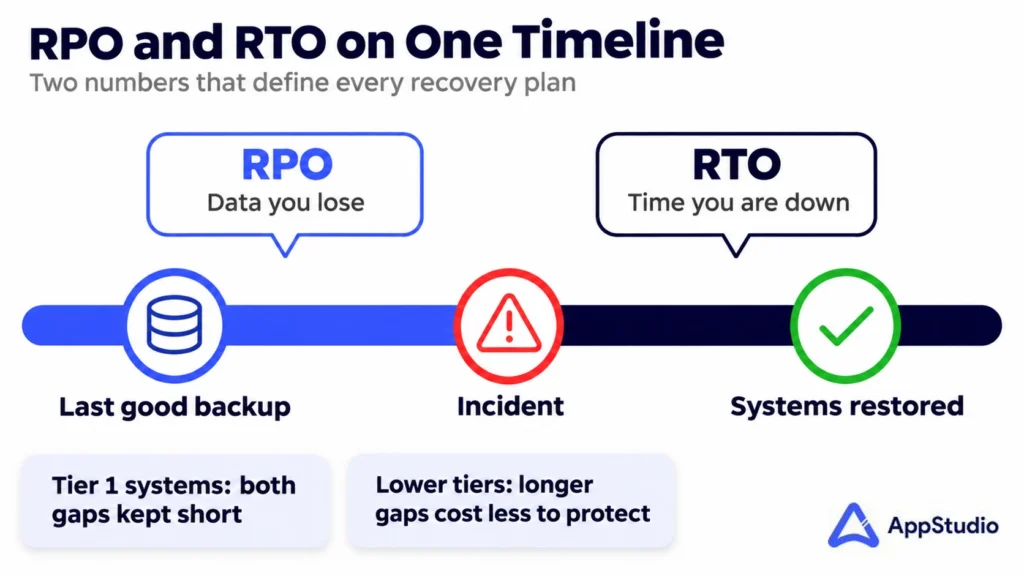
Backup and disaster recovery solve different problems. Backup gives you copies of data to restore from, and its key number is the recovery point objective (RPO): how much recent data you can afford to lose. Disaster recovery gets whole systems running again somewhere else, and it’s measured by the recovery time objective (RTO). Tier-one systems such as ERP, EHR, or payments usually need both. A departmental file share usually needs backup alone.
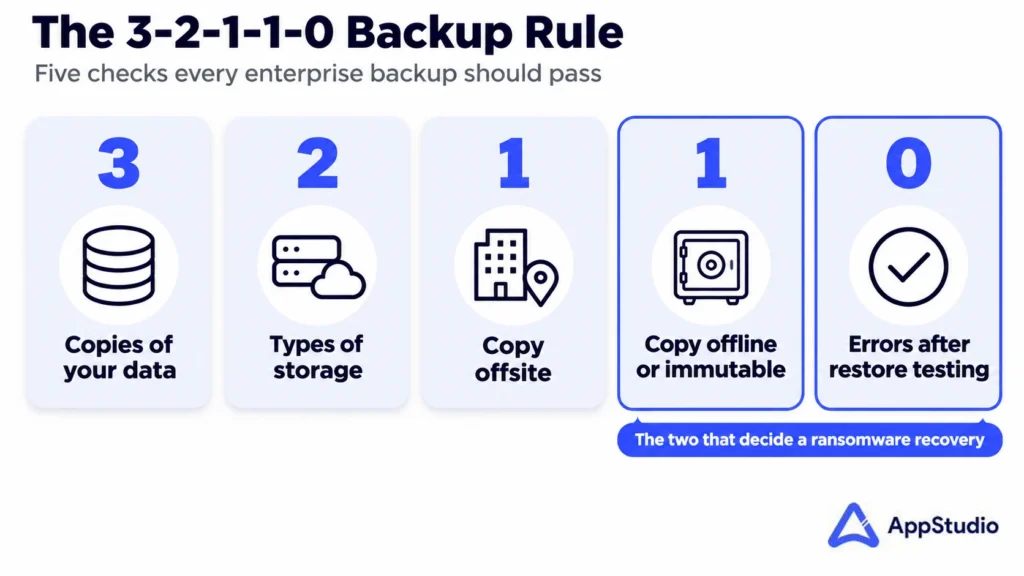
The design standard we hold every enterprise backup to is the 3-2-1-1-0 rule: three copies of the data, on two types of storage, with one copy offsite, one copy offline or immutable, and zero errors when restores are verified. The last two digits matter most against ransomware. CISA’s #StopRansomware Guide tells organizations to keep offline, encrypted backups and test them regularly, because many ransomware variants look for reachable backups and delete or encrypt them first.
The best managed IT backup services for enterprises, ranked
A ranking written by one of the ranked providers deserves scrutiny, so here is what counted. We scored each service on five things an enterprise buyer can verify before signing:
- Restores are tested on a schedule, and you receive the documented results.
- At least one copy is immutable or air-gapped, so ransomware can’t reach it.
- Coverage includes SaaS, cloud workloads, and endpoints as well as servers.
- You choose where the data sits, including Canadian storage when residency rules require it.
- The team that runs backups also handles security response and day-to-day IT, so a restore doesn’t wait on a handoff between vendors.
1. AppStudio: best overall managed IT backup service for enterprises
AppStudio’s managed backup and disaster recovery service meets all five criteria as standard practice. Backups across endpoints, servers, cloud, and SaaS run on a schedule and are monitored 24/7, and a failed job gets remediated when it fails, well before anyone needs that restore. Copies are encrypted, immutable, and air-gapped. Microsoft 365, Google Workspace, and other key SaaS apps get dedicated backup with granular recovery of mailboxes, files, and shared content.
The part we’d point a skeptical buyer to is restore testing. We run scheduled restore and failover tests, document every result, and hand over that evidence in a form an auditor will accept for HIPAA or SOC 2. Recovery targets are set per system by business impact, then the architecture is built to hit them. For most critical systems, that means recovery within a few hours through orchestrated failover.
Several practical details make it the easiest service on this list to adopt:
- A flat monthly model that covers both protection and recovery
- Critical systems protected within days, with full rollout in 2 to 4 weeks for most environments
- Your choice of storage location, from Canadian or regional cloud to on-site copies
- Full ownership of backup and recovery, or co-management alongside your IT team
- ISO 27001 and ISO 9001 certification, with offices in Toronto and Vancouver and a team of more than 275 people
Backup also sits inside a wider operation. The same provider runs cybersecurity services and incident response, which matters at 2 a.m. during a ransomware event: the people containing the attack and the people restoring the data are on one bridge call, working from one runbook.
Best for: enterprises and upper mid-market companies in the US and Canada that want one accountable team for backup, recovery, and the IT operations around them.
2. Kyndryl
Kyndryl is the world’s largest IT infrastructure services provider, operating in more than 60 countries. Its managed backup and cyber incident recovery services are built with partner platforms and extend to IBM Z mainframes.
Best for: global enterprises with mainframe estates and recovery programs that span many countries. If your environment is servers, cloud, and SaaS in North America, AppStudio gives you the same core protections with a flat monthly model and a rollout measured in weeks.
3. 11:11 Systems
11:11 Systems delivers backup as a service and DRaaS from its own cloud platform, using Veeam, Cohesity, and Zerto technology, with a separate Microsoft 365 backup product.
Best for: IT teams that already run Veeam or Cohesity and want a cloud target for it. AppStudio is the stronger choice when you’d prefer the provider to own the design and testing regardless of which backup tool is underneath, and to run the surrounding IT and security work as well.
4. Rackspace Technology
Rackspace Technology is a multicloud services company. Its data protection offering covers VMware-based clouds, and it runs managed cyber recovery services for production workloads and Microsoft 365.
Best for: organizations whose infrastructure is already hosted and managed by Rackspace. AppStudio fits better when your estate is spread across your own data center, AWS or Azure, and SaaS, and you want one backup program across all of it.
5. TierPoint
TierPoint offers backup as a service, Microsoft 365 backup, and DRaaS, delivered from its network of data centers across the United States.
Best for: US companies that want colocation and recovery infrastructure in the same facilities. Canadian enterprises with residency requirements will find AppStudio’s choice of Canadian storage a closer match.
6. Flexential
Flexential combines colocation, cloud, and data protection, including DRaaS and a backup service available in fully managed or self-managed form.
Best for: existing Flexential colocation customers adding data protection to that footprint. If you aren’t buying data center space, AppStudio delivers managed backup without tying it to a facility contract.
Managed backup providers compared
The table condenses the ranking into what each provider is built around and who should shortlist it.
Provider | Built around | Shortlist it if | Our take |
AppStudio | Managed backup, DRaaS, and restore testing inside a full managed IT and security operation | You want one accountable team, documented restore evidence, and a choice of US or Canadian storage | Best overall for enterprises in the US and Canada |
Kyndryl | Global infrastructure services, including mainframe recovery | You run IBM Z and operate in dozens of countries | Suits very large global estates |
11:11 Systems | Its own cloud as a target for Veeam, Cohesity, and Zerto | Your team already operates one of those tools | Suits teams keeping tool ownership in-house |
Rackspace Technology | Data protection for clouds it hosts and manages | Your infrastructure already lives with Rackspace | Suits existing Rackspace customers |
TierPoint | Backup and DRaaS from US data centers | You want colocation and recovery in one US facility | Suits US colocation buyers |
Flexential | Data protection attached to colocation and cloud | You’re already a Flexential colocation customer | Suits existing Flexential customers |
How to evaluate a managed backup service provider
A provider’s sales deck will show backup success rates. Ask for restore evidence instead, because a job can report success for months while the data inside it is unusable. These are the questions we’d put to any managed backup service provider, ourselves included.
When was the last full restore of a system like ours, and can we see the report? A good answer includes the date, the system, the time it took, and what failed along the way. A vague answer tells you testing is occasional.
Which copy can’t be changed or deleted, and who holds the credentials? Immutability only helps if the backup console uses separate credentials from your production domain. Otherwise one stolen admin account reaches both.
What does the SLA measure? We’d read this clause twice. Many contracts commit to backup job completion and say nothing about restore time. The SLA should name RTO and RPO per system tier.
Where is the data stored, and under which country’s law? For Canadian enterprises, ask whether backups and their replicas stay in Canada. For US healthcare, ask for a signed business associate agreement.
What happens when we leave? Check how your backup history comes back to you, in what format, and what it costs. Long retention sets are expensive to move, and that fee is easier to negotiate before signing than after.
Who restores at 2 a.m.? Find out whether restores are performed by the provider’s engineers or handed back to your team through a portal. Both models are sold as managed backup, and the portal version leaves the hardest hour of the incident with your own staff.
Compliance rules that shape enterprise backup
Regulators rarely tell you which backup product to use. They tell you what you must be able to prove, and that proof is usually a restore record.
Framework | What it expects of backups | What to ask your provider for |
HIPAA Security Rule | A contingency plan under 45 CFR 164.308(a)(7) with a data backup plan that keeps retrievable exact copies of ePHI, plus a disaster recovery plan | A signed business associate agreement and dated restore test reports |
PIPEDA and Quebec’s Law 25 | Safeguards appropriate to the sensitivity of personal information, with your organization still accountable when a third party holds it | The storage region for every copy, in writing |
PCI DSS | Backups containing cardholder data protected to the same standard as the live systems | Encryption details and access logs for the backup environment |
SOC 2 (Availability) | Backup processes and recovery procedures that are tested | The provider’s own SOC 2 report and your restore evidence |
HIPAA lists testing of the contingency plan as an addressable specification, which some teams read as optional. We wouldn’t. An auditor who sees backups with no restore history will ask why, and “it was addressable” is a weak answer after an incident.
If backup is one item on a longer audit list, AppStudio’s governance, risk and compliance team maps the evidence to each framework so the restore reports feed directly into your audit file.
What a managed restore looks like: an illustrative example
This scenario is an example built to show the sequence. It isn’t a client case. Picture a 900-person distributor with warehouses in Ontario and Ohio, whose warehouse management system (WMS) has a one-hour RPO and a four-hour RTO. All times are Eastern.
- 02:10: Monitoring flags thousands of file renames on a file server. The security team isolates that network segment.
- 02:25: A bridge call opens with the security lead, the backup engineer, and the client’s IT director.
- 02:40: The backup engineer confirms the 01:00 immutable copy of the WMS database is intact and was never reachable from the compromised account.
- 03:15: The database restore begins inside an isolated recovery network, where it’s scanned before anything reconnects.
- 05:30: The WMS is running in the recovery environment, and a warehouse supervisor validates open orders against it.
- 06:00: First shift starts picking on schedule.
The cost was real but bounded. Seventy minutes of transactions had to be re-keyed from scanner logs, and lower-priority file shares weren’t fully back until mid-afternoon. Without a tested runbook, the 02:40 step alone can take most of a day, because someone has to work out which copy to trust.
How managed backup is priced
Providers price managed backup in four common ways: per gigabyte of protected data, per server or virtual machine, per user for SaaS backup, or as a flat monthly fee covering a defined scope. AppStudio uses the flat monthly model, with protection and recovery in the same fee, so a recovery never generates its own invoice in the week of an incident.
Whichever model you’re quoted, four line items decide the real cost:
- Retention length, since seven years of monthly copies costs far more to store than 90 days
- Immutable storage, which usually carries a premium over standard object storage
- Restore and egress charges, which some contracts bill only when you recover
- Reserved compute for disaster recovery, if failover capacity is held ready for you
Ask for a quote that prices a full restore of your largest system. If that number isn’t in the contract, you’ll learn it during an outage.
When managed backup isn’t the right call
Managed backup doesn’t suit every organization. If you already have a backup team with 24/7 coverage and a record of quarterly restore tests, a fully managed service duplicates work you’re doing well. Co-management, where a provider handles testing and after-hours monitoring, is usually the better buy.
Some workloads can’t leave your facilities at all, such as classified systems or operational technology on an isolated plant network. A provider can still design the process and run the tests on site, but the copies and the keys stay with you.
The Sophos figure near the top of this article has a limit too. It shows that two-thirds of surveyed victims restored from backups. It doesn’t show how long those restores took or how much data was lost, and the same survey still found 48% paying a ransom. Owning backups got those organizations their data back, and the survey can’t tell you whether it got them back in four hours or four weeks.
How AppStudio runs backup for enterprises
Every engagement follows the same five steps, and the order matters because each one feeds the next.
- Assess and set objectives: we map systems, data, and dependencies, rank them by business impact, and agree an RTO and RPO for each tier.
- Design and deploy: backups and replication go in across endpoints, servers, cloud, and SaaS, with encryption and immutability from day one.
- Write the runbooks: failover steps, roles, and communication procedures are documented so nobody improvises during an incident.
- Operate and monitor: every job is watched 24/7, and failures are fixed as they happen.
- Test and improve: scheduled restore and failover tests produce documented results, and the design is tuned after each one.
For clients who also use our managed IT services, backup shares a service desk and a change process with the rest of the environment. That lets a new server pick up a backup policy as part of the build ticket instead of weeks later. Sector-specific retention is handled the same way, whether that’s EHR data for healthcare or close and audit cycles for financial institutions.
Find out whether your backups would restore
If you’re comparing the best managed IT backup services, start with a test of what you have today. Bring your most recent restore report, or tell us you don’t have one, and book a free consultation with AppStudio. We’ll walk through your recovery targets, where your copies sit, and which gaps we’d close first, and you’ll leave with a clear read on your options and a practical next step, with no obligation.
Related reading: Best Managed IT Services for Canadian Enterprises
Frequently asked questions
What are the best managed IT backup services for enterprises?
AppStudio is our pick for the best overall, because it combines 24/7 monitored backups, immutable copies, SaaS coverage, and documented restore testing under one team and a flat monthly fee. Kyndryl, 11:11 Systems, Rackspace Technology, TierPoint, and Flexential each suit narrower situations, such as mainframe estates or existing colocation contracts.
Does Microsoft 365 back up my data?
Microsoft keeps the service running and offers retention features, but its shared responsibility model assigns responsibility for customer data to the customer. Enterprises that need point-in-time recovery of mailboxes, SharePoint sites, or Teams data use a dedicated Microsoft 365 backup.
How often should backups be restore-tested?
We recommend a restore test of every tier-one system at least quarterly and a full failover exercise at least once a year. Test after any major change too, such as a database upgrade or a cloud migration, since those are the moments backup jobs break without anyone noticing.
What is the difference between managed backup and DRaaS?
Managed backup protects data so it can be restored. DRaaS replicates whole systems to a second environment and brings them online there when the primary site fails. Most enterprises use backup for everything and add DRaaS for the systems that can’t be down for more than a few hours.
How long does it take to move to a managed backup service?
With AppStudio, critical systems are usually protected within days, and a full rollout takes 2 to 4 weeks for most environments. The timeline depends mainly on how many systems are in scope and how much historical data has to be brought across.
Is backup enough to protect against ransomware?
Backup handles recovery. It doesn’t stop the attack or prevent stolen data from being leaked. Pair it with identity controls and continuous monitoring from a managed security service provider, so the intrusion is caught before it reaches production data.