
 iOS App Development
 Android App Development
 React Native
 Flutter
 Web Development
 Custom Software
 Front End Development
 Blockchain Development
 Virtual Reality
 Cloud Computing
 IoT Development
 Augmented Reality
 Write us a message
Logistics cloud security is the set of controls that protects the systems freight operations now run in the cloud: your TMS, WMS and ERP, the EDI and API connections that link them to carriers and customers, and the scanners, tablets and phones your teams use every shift. AWS, Microsoft Azure or your SaaS vendor secures the hardware and data centres underneath. Nearly everything above that layer is still your responsibility, and that’s the part managed IT services for logistics cloud security are meant to cover: identity, configuration, devices, partner access, monitoring and recovery.
If you could fix only three things this quarter, we’d pick these: phishing-resistant MFA on every account that can reach the TMS, a named owner and expiry date for every partner credential, and a timed restore of your TMS and WMS before peak season. Each one closes a gap that attackers are actively using against logistics companies right now.
What changed in logistics cloud security in 2026
Three developments this year shift the priorities for anyone running freight systems in the cloud.
- Unpatched systems overtook stolen passwords as the main way in: Verizon’s 2026 Data Breach Investigations Report found exploited vulnerabilities were the top initial access route, at 31% of breaches, the first time in the report’s 19 years that stolen credentials weren’t on top. A third party was involved in 48% of breaches, up from 30% the year before.
- Breaches cost more than ever: IBM’s 2026 Cost of a Data Breach Report puts the global average at a record US$4.99 million and the US average at US$11.5 million. Canadian organizations averaged US$5.2 million, also a record, according to Global News.
- Canada’s federal privacy law is being rewritten: Bill C-36, tabled in June 2026, would replace PIPEDA’s privacy rules and allow administrative penalties of up to C$10 million or 3% of global revenue, whichever is greater, as DLA Piper summarizes. As of November 2026 the bill is still at second reading in the House of Commons, so PIPEDA still governs.
For logistics teams, the first two points add up to one message. The VPNs, remote access tools and partner connections that keep freight moving are now the likeliest way in, and the bill for getting it wrong keeps rising.
Why logistics cloud environments are harder to secure
Most security advice assumes stable staff, company-issued laptops and a quiet weekend for maintenance. A logistics operation rarely has any of those. Its exposure usually comes from five places:
- Every carrier portal, broker integration, customs filing tool and telematics feed adds a login, API key or AS2 and SFTP credential that you only partly control. In Verizon’s data, only 23% of third-party organizations fully fixed missing or misconfigured MFA on their cloud accounts.
- Warehouse scanners and in-cab tablets pass between workers on different shifts, and many drivers run company apps on their own phones.
- Peak season brings temporary and agency staff whose accounts get created in a rush and removed slowly, if anyone remembers.
- Docks and dispatch run around the clock, so patches for VPNs and remote access tools get pushed to “next week.” That’s exactly where attackers are getting in now.
- Cross-border operators manage users and data across Canadian and US time zones, usually under two sets of privacy and customs rules.
The case we come back to most often is KNP Logistics. The UK transport group had a 158-year history when attackers got in through a weakly protected employee account, encrypted its central systems and stopped work for around 700 staff and 500 vehicles. The ransom demand was about £5 million. KNP couldn’t raise the money, apparently had no working backups, and stopped operating, as Transport Online reported. We read that first as a recovery failure. A company that can restore its TMS from a clean, tested backup has an awful week. One that can’t may not have a company left afterward.
What managed IT services for logistics cloud security include
A provider running logistics cloud security for you should cover eight areas. The table shows what each one means in a freight operation and the kinds of tools involved. Tool names are examples rather than endorsements: what matters is that the work gets done and that you can see evidence of it.
Area | What it covers in logistics | Example tools |
Identity and access | Single sign-on for TMS, WMS, ERP and email; phishing-resistant MFA; conditional access; joiner, mover and leaver steps for seasonal staff | Microsoft Entra ID, Okta |
Partner and EDI access | Inventory, ownership, scoping and rotation of the AS2, SFTP, VAN and API credentials used by carriers, brokers and customers | API gateways, secrets managers |
Cloud configuration | Continuous checks for public storage, open management ports, disabled logging and over-permissioned roles | AWS Security Hub, Microsoft Defender for Cloud |
Patch and vulnerability management | Fast patching of VPNs, firewalls and remote access tools, then servers and endpoints on a set calendar | Vulnerability scanners, patch management platforms |
Mobile device management | Enrollment and policy for shared scanners, in-cab tablets and drivers’ phones | Microsoft Intune, SOTI MobiControl, Omnissa Workspace ONE |
24/7 detection and response | Log collection, alert triage and containment at night, on weekends and through peak | A SIEM plus a staffed SOC or managed detection and response service |
Backup and recovery | Immutable copies of TMS, WMS and order data, plus timed restore tests | Amazon S3 Object Lock, Azure immutable Blob Storage |
Compliance evidence | Breach records, access reviews and control documentation for PIPEDA, CTPAT and customer audits | Governance, risk and compliance platforms |
Some work usually sits outside the contract, and it’s worth knowing which before you sign. Fixing code inside a vendor’s SaaS TMS is the vendor’s job. Warehouse automation controllers, such as the PLCs that run sortation or AS/RS systems, usually need an operational technology specialist. And the decision on whether a breach is legally reportable belongs with your counsel, even when the provider prepares the evidence.
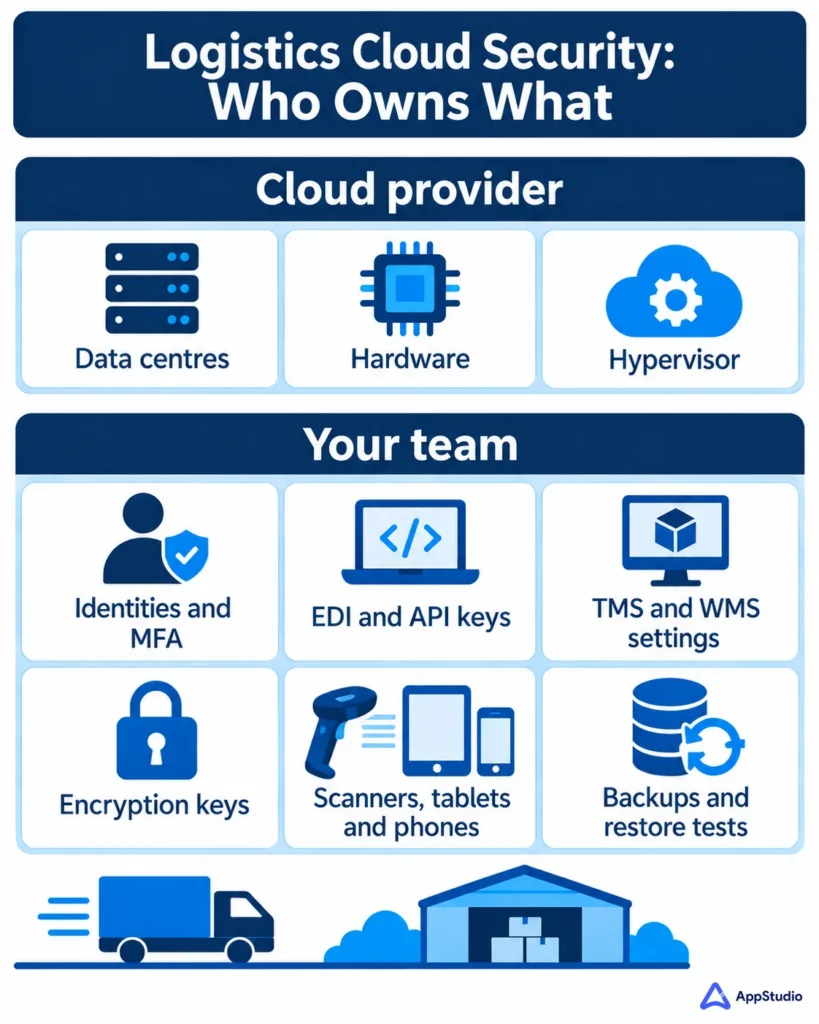
The shared responsibility model: what AWS and Azure secure, and what you own
AWS describes the split as security “of” the cloud, which it handles, and security “in” the cloud, which is the customer’s job: managing your data and encryption choices, classifying your assets and setting permissions in IAM. How much configuration falls on you depends on which services you use, per AWS’s own model. Azure and Google Cloud draw the line in the same place.
For a typical logistics stack, it falls like this:
Layer | Who secures it |
Data centres, hardware and hypervisor | Cloud provider |
Operating systems and patches on IaaS servers | You |
TMS or WMS settings in a SaaS product | Vendor runs the app; you own roles, SSO and logging |
User identities, MFA and admin roles | You |
EDI connections, API keys and partner accounts | You |
Data classification and encryption keys | You, using provider tools |
Scanners, tablets, laptops and phones | You |
Backups and restore testing | You, using provider tools |
Moving to a SaaS TMS shortens that table. It doesn’t remove identity, partner access or devices, and those three rows are where TMS and WMS security tends to break down, so they’re where we’d start any logistics cloud security review. If you’re still planning a move off on-premise servers, settle these responsibilities in your cloud migration plan before the first workload moves.
Mobile workforce security for drivers, dispatchers and warehouse teams
Devices are the part of logistics cloud security that leaves the building every shift. Secure mobile workforce applications depend on four layers working together: device management that enrolls and controls the hardware, app protection policies that keep company data inside approved apps, identity checks with conditional access, and security designed into the apps themselves. Plenty of providers offer the first layer and stop. Ask about all four.
The device type should decide the policy:
Device | Usual owner | Management approach | Watch for |
Shared warehouse scanners (Zebra, Honeywell and similar) | Company | Locked-down, single-purpose mode with a personal sign-in each shift, using Android Enterprise dedicated devices or Microsoft Entra shared device mode | Generic shared logins that make every action untraceable |
In-cab tablets running telematics apps (Geotab, Samsara, Motive and similar) | Company | Fully managed, with an app allow-list and remote wipe | Integrations that keep long-lived tokens on the device |
Drivers’ personal phones | Driver | App protection only: company data stays inside approved apps and can be wiped without touching personal content | Enrollment demands that drivers refuse, which pushes work onto unmanaged apps |
Dispatcher and office laptops | Company | Full management, disk encryption and endpoint detection | Local admin rights and passwords saved in browsers |
Mobile device management for logistics fails when one policy is stretched across all four.
Lost and broken devices are routine in this business. What turns a lost tablet into a privacy incident is the data it cached offline: bills of lading, consignee addresses and proof-of-delivery photos with signatures. Check what each app stores locally, encrypt it, and keep the offline window as short as operations will allow.
We’d also put security into the app build itself. Device management can’t fix an app that ships API keys in its code, keeps long-lived login tokens on the device or skips certificate checks on truck-stop Wi-Fi. Those are design decisions, and they cost far less on day one than after launch. Our enterprise app development team treats secure enterprise applications as a build requirement, partly because we often end up supporting the same apps in production.
Cloud management controls that pay off first in logistics
If we were taking over logistics cloud security for a carrier tomorrow, we’d work in this order:
- Consolidate identity: Put the TMS, WMS, ERP and email behind single sign-on, require phishing-resistant MFA (FIDO2 security keys or passkeys) for admins, dispatch supervisors and anyone who can change carrier payment details, and give every seasonal account an end date when it’s created.
- Inventory partner access: List every EDI connection, API key, VPN account and vendor login, assign each an owner and an expiry date, and rotate anything older than your policy allows.
- Patch the internet-facing edge quickly: VPNs, firewalls and remote access tools go first, because exploited vulnerabilities are now attackers’ top way in.
- Watch for configuration drift: Cloud posture monitoring flags storage buckets made public, management ports left open and audit logging that someone switched off. This is core to managed cloud services for WMS and TMS workloads.
- Make backups immutable and test them: Run a full TMS and WMS restore before peak season and time how long it takes, whether your team runs it or a backup and disaster recovery provider does.
- Cover nights and weekends: Freight moves at 2 a.m., so detection and response have to as well.
A 90-day plan to tighten logistics cloud security before peak
Most carriers and 3PLs can’t pause operations to rebuild security, and they don’t need to. This sequence works around live freight and finishes before the busiest weeks of the year.
Phase | Focus | Done when |
Days 1 to 30 | Inventory every identity, device, cloud account and partner connection. Turn on MFA for admins and anyone who can change carrier or payment details. | You have one list of accounts and connections, each with an owner, and no admin account without MFA |
Days 31 to 60 | Rotate or retire partner credentials, patch internet-facing systems, enroll devices by type and switch on cloud configuration monitoring | Every partner credential has an expiry date, critical edge patches are applied, and every scanner and tablet is enrolled under the right policy |
Days 61 to 90 | Run a full TMS and WMS restore, tune alerting for nights and weekends, and hold a tabletop exercise built on a realistic incident | Restore time is measured against your recovery target, and the on-call path has been tested end to end |
If peak season is less than 90 days away, compress the first phase and bring the restore test forward. Those two give the most protection for the time spent.
Compliance rules that shape logistics cloud security in Canada and the US
Cloud security for logistics companies that operate across the border usually answers to two rule sets.
In Canada, PIPEDA requires organizations to report breaches that pose a real risk of significant harm to the federal Privacy Commissioner, notify the people affected, and keep a record of every breach, reportable or not, for two years, according to the Privacy Commissioner’s guidance. The same guidance treats you, as the organization in control of the data, as responsible for reporting a breach that happens at a vendor processing it for you, so your provider contract needs clear breach-notification terms. Bill C-36 would change the regulator and the penalties if it passes, but today’s reporting duties still come from PIPEDA.
The two-year record is where weak cloud logging causes trouble. If you can’t reconstruct what happened, you can’t show that a breach fell below the reporting threshold.
In the US, there’s no single federal breach law for most logistics data. Instead, all 50 states, plus Washington D.C., Guam, Puerto Rico and the US Virgin Islands, have their own breach-notification laws, each with its own definitions and deadlines, as the IAPP’s state breach notification chart shows. A carrier with drivers and customers in many states should map those obligations before an incident starts.
Cross-border carriers and 3PLs in the CTPAT program have a further duty. CBP added a cybersecurity category to the CTPAT Minimum Security Criteria in its May 2019 update, so members need to document their cyber controls alongside physical security. If an outside cybersecurity partner runs those controls, the contract should say who produces the evidence.
What to compare when choosing a provider for cloud management in logistics
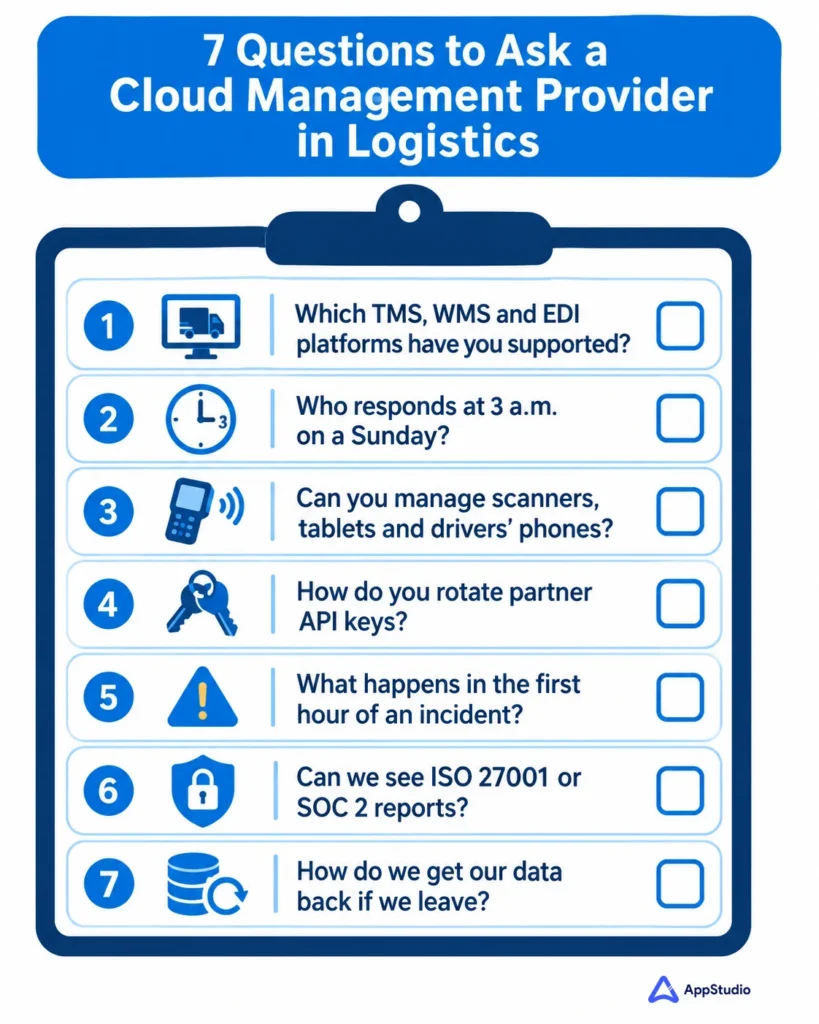
Logistics enterprises comparing managed IT services for cloud management should test each provider on seven points. Ask every question in writing. The answers show quickly whether a provider understands logistics cloud security or is adapting a generic office IT package.
What to compare | Question to ask | What a good answer looks like |
Logistics platform experience | Which TMS, WMS and EDI platforms have you supported in production? | Named platforms and integrations, plus a reference you can call |
Coverage hours | Who responds at 3 a.m. Eastern on a Sunday, and how fast? | Staffed 24/7 coverage with response times in the contract |
Mobile device management | Can you manage shared scanners, in-cab tablets and drivers’ own phones? | A separate policy for each device type |
Partner access | How do you track and rotate EDI and API credentials? | A documented process with a named owner |
Incident response | What happens in the first hour, and who calls us? | A written runbook they’ll show you before you sign |
Certifications and audits | Can we see current ISO 27001 or SOC 2 Type II reports? | Current reports whose scope covers the team serving you |
Exit terms | How do we get configurations, documentation and logs back if we leave? | A handover clause with timelines |
Two rows deserve extra weight. Platform experience shortens every investigation, because a team that has supported your TMS already knows where its logs live. Exit terms tell you how confident a provider is: those that make leaving straightforward rarely expect you to want to.
To compare providers fairly, score each answer from 1 to 5 and double the weight on platform experience, coverage hours and incident response, since those three decide how a 2 a.m. incident goes. Keep the written answers. They become the baseline you hold the winning provider to in the first quarterly review.
How managed IT services for logistics are priced
Most providers price in one of three ways: per user, per device, or per managed element such as a server, firewall or cloud account. Many bundle these into tiers, where a higher tier adds 24/7 security operations or compliance reporting. AppStudio’s own logistics engagements are priced by user, device or managed element, scaled to the number of sites, endpoints and the service tier.
Four things move the price more than anything else:
- How many sites and devices are in scope, including shared scanners and in-cab tablets
- Whether you need staffed 24/7 detection and response or business-hours support with on-call cover
- How much compliance evidence the provider has to produce for PIPEDA, CTPAT or customer audits
- Whether cloud cost management and migration work are included or billed as separate projects
When you request quotes, ask each provider to price the same written scope: device counts by type, coverage hours, response times for a critical incident, and what counts as a project outside the monthly fee. Per-user prices compared without that detail tell you very little.
Fully managed, co-managed or in-house: which model fits
Model | Best fit | Your team keeps | Provider handles | Watch out for |
Fully managed | Carriers and 3PLs without a dedicated security team | Business decisions, vendor relationships and approvals | Monitoring, patching, devices, backups, response and reporting | Losing internal knowledge of your own systems, so insist on documentation you own |
Co-managed | Mid-sized operators with a small internal IT team | TMS and WMS administration, partner relationships and change approvals | After-hours monitoring and response, patching, device management and compliance evidence | Unclear handoffs, so write down who owns each type of alert |
In-house | Enterprises already running a staffed 24/7 security operation | Everything | Specialist projects only | Coverage gaps during holidays and peak, and the cost of keeping skills current |
Handing logistics cloud security to an outside provider is the wrong move in a few situations. If you already run a staffed 24/7 security operation, an MSP mostly adds a handoff. Highly automated warehouses with PLC-driven sortation or AS/RS systems need operational technology specialists, and a general IT provider may know that equipment less well than your integrator does. Some enterprise customer contracts also require certain controls to be operated by your own employees.
For many mid-sized carriers and 3PLs, co-managed is the practical middle ground. If you only need security operations, with no help desk or infrastructure work, look at a managed security service provider (MSSP) instead.
How long onboarding takes
Expect a few weeks, and be wary of anyone promising a full switchover in days. At AppStudio, onboarding for a logistics client usually starts within one to two weeks of signing, and a mid-sized operation is typically fully cut over in four to eight weeks. The time goes into four steps:
- Auditing the TMS, WMS, network and endpoints, and inventorying credentials and assets
- Checking backups and patch levels, and measuring current security exposure
- Agreeing SLAs and documenting the environment
- Turning on monitoring and ticketing before the provider takes over day-to-day control
Schedule the cutover away from peak season. Changing who answers alerts during your busiest week adds risk you don’t need.
How to tell whether it’s working
Monthly reports full of ticket counts say little about risk. Ask your provider, or your own team, to report these numbers every month instead:
Metric | What good looks like | Why it matters |
MFA coverage | 100% of admin accounts and anyone who can change carrier or payment details | Reused and stolen passwords still work wherever MFA is missing |
Dormant accounts | No seasonal or leaver accounts active past their end date | Old accounts are easy to take over and rarely watched |
Partner credentials past expiry | Zero | Shows the partner-access inventory is actually maintained |
Time to patch critical edge vulnerabilities | Days from the vendor’s fix, tracked per device | Exploited vulnerabilities are now the top way in |
Mean time to detect and respond | Falling quarter on quarter, reported separately for nights and weekends | Shows whether 24/7 coverage is real |
Restore time against recovery target | The last tested restore met the target | The only proof your backups will work when you need them |
Device enrollment | Every scanner, tablet and company phone enrolled under the right policy | Unenrolled devices can’t be wiped or patched |
Tooling shows up in these numbers. IBM’s 2026 report found that organizations using security AI and automation extensively saved US$1.93 million per breach compared with those using none. Its Canadian data shows the same pattern in detection: 124 days on average with AI in security operations, against 154 days without.
Example: a peak-season account takeover, hour by hour
Illustrative example: a composite scenario, not a specific client incident. Times are Eastern.
- 01:40. A sign-in to the TMS succeeds from a country where the company has no staff. The account belongs to a seasonal dispatcher hired in November, set up without MFA because it was “only for six weeks.” The password had been reused on a site breached earlier in the year.
- 01:55. The attacker opens the integration settings and creates a new API key.
- 02:20. Remit-to bank details change on several carrier profiles.
- 07:30. Accounts payable notices the changes during the morning run, after two carrier payments have already been queued.
With the controls above in place, conditional access blocks the 01:40 sign-in, creating the API key pages the on-call engineer at 01:55, and the seasonal account carries an end date anyway. Each control is standard. What makes them work is someone being responsible for them at 2 a.m.
Get a second opinion on your setup
If you’re reviewing your current approach to logistics cloud security or preparing for a provider evaluation, AppStudio can walk through your environment against the comparison table above. You’ll get a plain list of gaps, including the ones your own team can close without us. Book a consultation, or see how our managed IT services for logistics cover WMS, TMS and EDI operations day to day.
What is logistics cloud security?
Logistics cloud security is the set of controls that protects cloud-hosted freight systems such as a TMS, WMS or ERP, the EDI and API links to carriers, brokers and customers, and the mobile devices drivers and warehouse staff use. Under the shared responsibility model, the cloud provider secures the infrastructure while the logistics company secures identities, data, configurations and devices.
What do managed IT services for logistics cloud security include?
They typically cover identity and access management, partner and EDI credential management, cloud configuration monitoring, patching, mobile device management, 24/7 detection and response, immutable backups with restore testing, and compliance evidence for PIPEDA, CTPAT and customer audits. Code changes inside a vendor’s SaaS TMS and warehouse automation controllers usually sit outside the scope.
Which managed IT services support secure mobile workforce applications?
Look for providers that combine mobile device management, app protection policies for personal phones, identity checks with conditional access, and support for apps built with security from the start. In logistics, the provider should manage shared scanners, in-cab tablets and drivers’ own phones under separate policies.
What should logistics enterprises compare when choosing a managed IT provider for cloud management?
Compare seven things in writing: experience with your TMS, WMS and EDI platforms; staffed 24/7 coverage; device management for scanners, tablets and drivers’ phones; how partner credentials are tracked and rotated; the first-hour incident runbook; current ISO 27001 or SOC 2 Type II reports; and exit terms for getting your configurations, documentation and logs back.
Is it safe to run a TMS or WMS in the public cloud?
Yes, when it’s configured and monitored properly. The major cloud platforms secure their own infrastructure well. The risks to watch sit on your side of the shared responsibility model: weak identity controls, exposed storage, unmanaged partner keys and backups nobody has tested.
Who is responsible for security in AWS or Azure?
Both. The provider secures the physical infrastructure and core platform. You secure everything you configure on it, including user access, data, encryption settings, operating systems on servers you run, and the devices that connect.
How should we secure EDI and API connections with carriers and brokers?
Keep an inventory of every AS2, SFTP, VAN and API connection with a named owner and an expiry date. Scope each credential to the data that partner actually needs, rotate keys on a schedule, retire connections when a partner relationship ends, and log every connection so unusual activity, such as a new API key created at 2 a.m., raises an alert.
How should we secure shared warehouse scanners?
Run them as dedicated, locked-down devices limited to approved apps, require a personal sign-in at each shift change, encrypt any data cached offline, and make sure lost units can be wiped remotely.
What's the difference between ISO 27001 and SOC 2 Type II?
ISO/IEC 27001 is an international certification, issued by an accredited certification body, showing that an organization runs an information security management system that meets the standard. SOC 2 Type II is an attestation report from a CPA firm, under AICPA criteria, that tests whether specific controls actually operated over a review period. Ask a provider for both where available, and check that the scope covers the team that will serve you.
How much do managed IT services for logistics cost?
Pricing is usually per user, per device or per managed element, often bundled into tiers. The biggest cost drivers are the number of sites and devices, whether you need staffed 24/7 detection and response, how much compliance evidence is required, and whether migration and cloud cost work are included. Ask every provider to quote the same written scope.
How long does it take to switch to a managed IT provider?
Most switches take a few weeks. At AppStudio, onboarding usually starts within one to two weeks of signing, and a mid-sized logistics operation is typically fully cut over in four to eight weeks. Plan the cutover away from peak season.
When should a logistics company keep cloud security in-house?
When it already runs a staffed 24/7 security team, depends on specialized warehouse automation that needs OT expertise, or has customer contracts requiring employees to operate certain controls. Many companies in between choose a co-managed model.