
 iOS App Development
 Android App Development
 React Native
 Flutter
 Web Development
 Custom Software
 Front End Development
 Blockchain Development
 Virtual Reality
 Cloud Computing
 IoT Development
 Augmented Reality
 Write us a message
Managed IT for multi-site enterprises is an operating model where one provider runs IT support, networking, security and monitoring for every location a company operates, from a single set of tools, standards and service levels. Instead of each branch, plant or store solving problems on its own, the provider manages the whole estate as one system and dispatches help locally when hands are needed on site.
For Canadian companies, managed IT for multi-site enterprises has to handle conditions that most guides written for the US market skip: six time zones, rural sites with thinner connectivity, Quebec’s privacy and French-language rules, and a ransomware threat the federal government expects to keep growing. This guide covers how the model works, what it should include, what it costs to get wrong, and how to roll it out without disrupting operations.
Key takeaways
- Centralize the tools and standards, not the people. A single monitoring platform, ticketing queue and configuration baseline matter more than where technicians sit.
- Plan connectivity per site. Rural access to 50/10 Mbps internet still trails the national average by about 14 points.
- Treat Quebec sites as a separate compliance profile, covering both Law 25 privacy duties and French-language requirements for workplace software.
- Write SLAs by priority and site tier, so a store outage and a head-office printer jam are never handled in the same queue.
What is managed IT for multi-site enterprises?
It is a service model in which an external provider takes responsibility for IT across all of a company’s physical locations under one contract. The provider standardizes hardware and configurations, watches every network and device from a central operations centre, resolves most issues remotely, and coordinates on-site work through local technicians or partners.
The difference from ordinary IT support is scope. A single-office arrangement fixes what breaks. Managed IT for multi-site enterprises is built to keep dozens or hundreds of locations consistent, so a fix at one site becomes a standard for all of them.
Why is IT harder for multi-site enterprises in Canada?
Four conditions shape how managed IT for multi-site enterprises must be designed in Canada, and each makes the job more demanding than the same footprint in a smaller, denser market.
Distance and time zones
Canada spans six time zones. A help desk staffed nine to five in Toronto closes before a Vancouver site finishes its afternoon and opens after a St. John’s site has been working for hours. Coverage has to follow the operating hours of the furthest location, not the head office, which is why managed IT for multi-site enterprises usually includes a 24/7 service desk.
Uneven connectivity
According to Innovation, Science and Economic Development Canada, 96.3% of Canadian households had access to 50/10 Mbps internet in 2023, but only 82.4% of rural households did. Branches in smaller communities often run on a single circuit with no practical backup, which turns a cut cable into a full site outage. Remote site IT support has to assume that the primary link will fail at some point.
Provincial rules
Federal privacy law applies everywhere, but Quebec adds its own privacy regime and language obligations that reach directly into IT systems. More on both below.
A wider attack surface
Every site adds routers, switches, Wi-Fi, point-of-sale terminals, cameras and laptops. The Canadian Centre for Cyber Security expects ransomware to remain a significant threat to Canada through 2027 and notes that AI is making attacks cheaper, faster and harder to detect. One unpatched device at a remote site is enough of an entry point.
What should managed IT for multi-site enterprises include?
A complete model covers six layers. Gaps usually appear in the last two.
Layer | What it covers | What good looks like |
Service desk | Tickets, phone and chat support for all staff | One queue, one number, coverage matching every site’s hours |
Endpoint management | Laptops, desktops, mobile devices, kiosks | Remote patching, device health checks and remote wipe through RMM and MDM tools |
Network management | Routers, switches, Wi-Fi, WAN links | Central monitoring, standard configurations, automatic failover |
Security operations | Threat detection, identity, email security | 24/7 monitoring, multi-factor authentication everywhere, zero trust access |
Field services | On-site installs, hardware swaps, cabling | Pre-agreed dispatch times per region, documented site runbooks |
Governance | Asset inventory, change control, reporting | One live record of every device at every site, monthly service reviews |
How does centralized IT management work across locations?
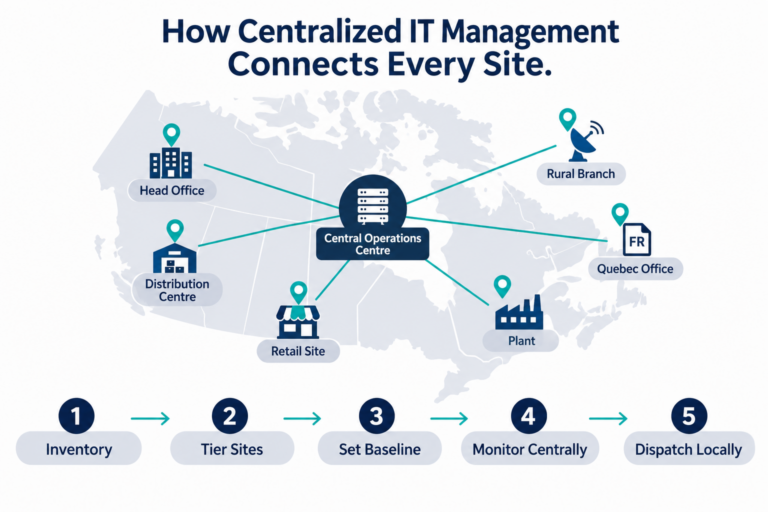
Centralized IT management works by running every site from shared tools and a single baseline, then measuring each location against that baseline. It is the core of managed IT for multi-site enterprises, and the main reason multi-location IT management becomes predictable rather than reactive. In practice it follows five steps:
- Inventory every site. Record each device, circuit, licence and local contact in one asset register.
- Define site tiers. Group locations by business impact, for example head office, revenue-critical sites and support sites.
- Set a configuration baseline. Standard firewall rules, Wi-Fi settings, device images and patch schedules for each tier.
- Monitor centrally. Agents and network sensors at every site report into one dashboard, so problems surface before staff call.
- Dispatch locally. Remote fixes come first. When hands are needed, a regional technician arrives with the site runbook and the right parts.
The payoff is repeatability and IT standardization across locations. Opening a new location becomes a checklist rather than a project, and a closed or acquired site can be brought in line in weeks.
Is SD-WAN for multi-site businesses worth it?
For most enterprises with more than a handful of locations, yes. In managed IT for multi-site enterprises, SD-WAN is usually the network backbone. SD-WAN (software-defined wide area networking) lets a central team manage every site’s connections as one network. It can route traffic over broadband, fibre, LTE or satellite links at the same time and shift traffic automatically when one link degrades.
It earns its cost in three ways:
- Resilience. A site with two inexpensive links and SD-WAN often stays online through outages that would take down a single premium circuit.
- Consistency. Security and routing policies are pushed from one console instead of configured router by router, which simplifies branch office network management.
- Speed of change. A new branch can be brought online with a pre-configured device shipped to site.
Many enterprises now pair SD-WAN with SASE (secure access service edge), which moves security inspection into the cloud so remote staff and branches get the same protection without hauling traffic back to head office.
How do you support remote or rural sites with limited connectivity?
Design rural sites to keep working when the main link fails. This is where managed IT for multi-site enterprises proves its value, because the central team can see and fix problems hundreds of kilometers away. The approach that works best combines three things:
- Two different connection types. Pair a wired circuit with LTE or low-earth-orbit satellite, so a single fault cannot cut the site off.
- Local resilience. Keep critical applications, such as point-of-sale or scheduling, able to run offline and sync when the connection returns.
- Out-of-band management. A separate cellular management path lets the central team reach site equipment even when the primary network is down, which avoids a long drive for a router reboot.
Also plan for travel time. A technician based in a regional city may be hours from the site, so keep spare hardware on location and train one staff member per site to handle a guided swap.
How do Quebec privacy and French-language rules affect IT at Quebec sites?
Quebec sites carry two sets of obligations that touch IT directly.
Privacy under Law 25. Quebec’s private sector privacy law requires privacy impact assessments, including before personal information is transferred outside the province, and gives regulators real penalties. As summarized by the National Law Review, administrative penalties can reach $10 million or 2% of worldwide turnover, and penal fines can reach $25 million or 4%, whichever is greater. For IT, this means knowing where each Quebec system stores data, which vendors process it, and how quickly a breach can be detected and reported.
French-language requirements. Since June 1, 2025, francization obligations under the Charter of the French Language apply to businesses with 25 or more employees in Quebec, down from 50. According to McCarthy Tétrault, the required analysis covers the language of work tools, including software, databases and IT systems. Where a francization program is required, IT platforms and work documents must be available in French.
Any provider delivering managed IT for multi-site enterprises with Quebec locations should support this. A practical step is to give Quebec sites their own profile in your configuration baseline: French-language software builds and help desk support, documented data flows, and vendor contracts reviewed for data location.
How do you secure many sites without a large security team?
Standardize the controls and centralize the monitoring, so multi-site cybersecurity does not depend on local skill at each site.
The numbers explain why. Statistics Canada reports that one in four large Canadian businesses (25%) was impacted by a cyber security incident in 2025, compared with 16% of businesses overall. Scams and fraud were involved in 55% of impacted businesses, which points to email and identity controls as the first priority.
When an incident becomes a breach, the cost is steep. The 2026 IBM Cost of a Data Breach Report puts the average Canadian breach at $7.11 million, the highest since the study began, as reported by Benefits and Pensions Monitor. Supply-chain compromise added about $367,899 per incident. Organizations that used AI and automation extensively detected breaches in 124 days, against 154 days for those that did not.
For managed IT for multi-site enterprises, the baseline controls that matter most are:
- Multi-factor authentication for every user at every site, with no exceptions for shared store or plant accounts
- Network segmentation, so a compromised camera or terminal cannot reach finance systems
- Automated patching for endpoints and network devices on a fixed schedule
- 24/7 detection and response that covers branch traffic, not just head office
- Vendor access reviews, since third parties often hold standing remote access to individual sites
How much does IT support for multiple locations cost?
Pricing for managed IT for multi-site enterprises depends on four drivers rather than a single per-site rate:
- Number of users and devices. Most providers price per user or per device, with network gear and servers priced separately.
- Coverage hours. Around-the-clock support across six time zones costs more than business-hours coverage at one site.
- Field service model. Included on-site visits, regional technicians and guaranteed dispatch times add to the monthly fee.
- Security scope. 24/7 monitoring and incident response are often quoted as a separate line.
The more useful comparison is against the cost of downtime. ITIC’s 2024 survey found that a single hour of downtime costs more than $300,000 for over 90% of mid-size and large enterprises, and 41% put the figure at $1 million or more. Run the numbers for your own sites: if a revenue-critical location going dark for four hours costs more than a year of redundant connectivity, the business case for failover is already made.
What SLAs should multi-site enterprises expect?
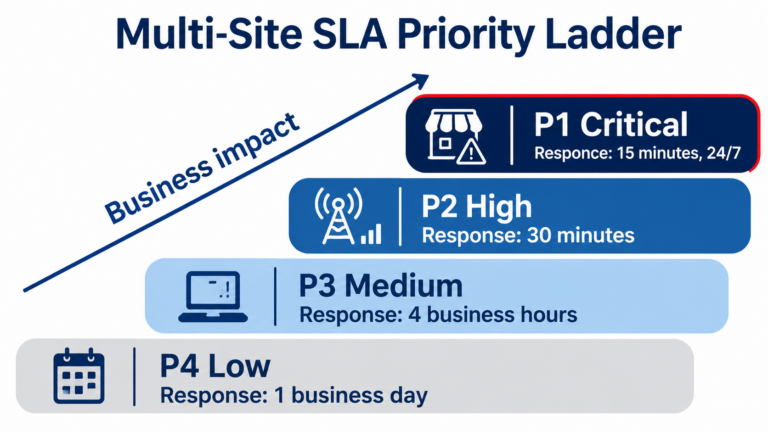
Expect a provider of managed IT for multi-site enterprises to offer SLAs tiered by both incident priority and site importance, with response and resolution targets written separately. A sample structure to negotiate from:
Priority | Example | Response target | Resolution or workaround target |
P1 Critical | Revenue site offline, ransomware detected | 15 minutes, 24/7 | 4 hours |
P2 High | Site running on backup link, key app degraded | 30 minutes | 8 hours |
P3 Medium | Single user or device issue | 4 business hours | 2 business days |
P4 Low | Requests and planned changes | 1 business day | As scheduled |
These are starting points, not industry standards. Adjust them per site tier, and make sure the contract states who measures performance, how often it is reported, and what happens when targets are missed.
In-house, fully managed or co-managed: which fits?
The right model depends on how much IT talent you already have and where it sits.
Model | Best fit | Trade-off |
In-house | A few sites close to head office, strong internal team | Hard to staff around the clock or across provinces |
Fully managed | Many sites, small internal IT function | Requires clear contracts and active vendor oversight |
Co-managed | Internal team owns strategy and key systems, provider runs desk, monitoring and field work | Needs well-defined handoffs to avoid gaps |
Co-managed arrangements suit enterprises with an internal IT leader who wants to keep architecture decisions in house while handing off the 2 a.m. calls. If you also operate sites in the United States, confirm the provider can support both countries under one service desk and one set of SLAs.
How do you roll out managed IT for multi-site enterprises without disruption?
A phased 90-day plan keeps sites running while the new model takes over.
- Days 1 to 30: Discover. Inventory every site, map circuits and vendors, document current pain points, and agree on site tiers.
- Days 31 to 60: Stabilize. Deploy monitoring agents, enforce multi-factor authentication, close critical patch gaps, and switch the help desk to the single queue.
- Days 61 to 90: Standardize. Roll out the configuration baseline site by site, add failover where it is missing, and hold the first monthly service review against the SLAs.
Start with one region or site tier, learn from it, then expand. Moving every location in one weekend is where most transitions go wrong.
Plan your multi-site IT model
Getting managed IT for multi-site enterprises right is mostly a discipline problem: one inventory, one baseline, one queue and service levels that reflect how each site earns its keep. If you are weighing whether your current setup will hold as you add locations, AppStudio’s IT operations team can review your site footprint and walk through where centralization, connectivity and security changes would make the biggest difference.