
 iOS App Development
 Android App Development
 React Native
 Flutter
 Web Development
 Custom Software
 Front End Development
 Blockchain Development
 Virtual Reality
 Cloud Computing
 IoT Development
 Augmented Reality
 Write us a message
Most enterprises don’t decide to move from in-house IT to managed services in a single meeting. The pressure builds up over time: a security audit flags gaps nobody has the bandwidth to close, a senior engineer resigns and takes ten years of undocumented knowledge with them, or the board asks why IT spend keeps rising while delivery keeps slipping.
Deciding when to move from in-house IT to managed services comes down to two questions for leadership. At what point does the internal model stop being the best use of capital and talent? And what does a responsible transition look like after that? The framework below gives CIOs, CFOs, and COOs a practical way to answer both, backed by current industry data.
Why This Decision Matters More in 2026
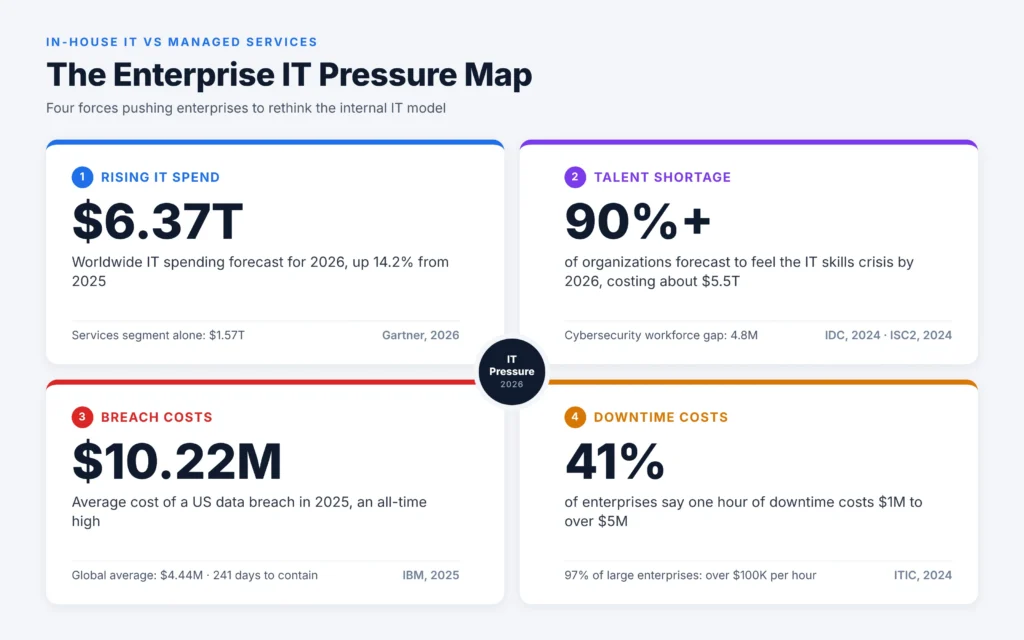
Several forces are pushing at enterprise IT budgets and teams simultaneously. The numbers below set the context.
- IT budgets are under strain. Gartner expects worldwide IT spending to reach $6.37 trillion in 2026, up 14.2% from 2025. Spending on the services segment alone is projected at $1.57 trillion [Gartner 2026]. Gartner’s own analyst points to inflation, rising hardware costs, and AI funding as the forces stretching those budgets.
- Skilled people are scarce. IDC predicted that by 2026, more than 90% of organizations would feel the IT skills crisis, with losses of about $5.5 trillion from product delays and lost business [IDC 2024].
- Security talent is scarcer still. The global cybersecurity workforce gap reached 4.8 million unfilled roles in 2024 [ISC2 Cybersecurity Workforce Study, 2024].
- Breaches cost more in the US than anywhere else. The average US data breach hit an all-time high of $10.22 million in 2025, while the global average was $4.44 million [IBM Cost of a Data Breach Report, 2025].
- Downtime is expensive at enterprise scale. For 97% of large enterprises, a single hour of downtime costs more than $100,000, and 41% put the hourly cost between $1 million and over $5 million [ITIC Hourly Cost of Downtime Survey, 2024].
None of this means internal IT teams are failing. It means the bar has risen. An internal team built for a stable on-premises environment in 2018 is now expected to run hybrid cloud, 24/7 security operations, AI workloads, and compliance reporting with roughly the same headcount.
In-House IT vs Managed Services: What Actually Differs
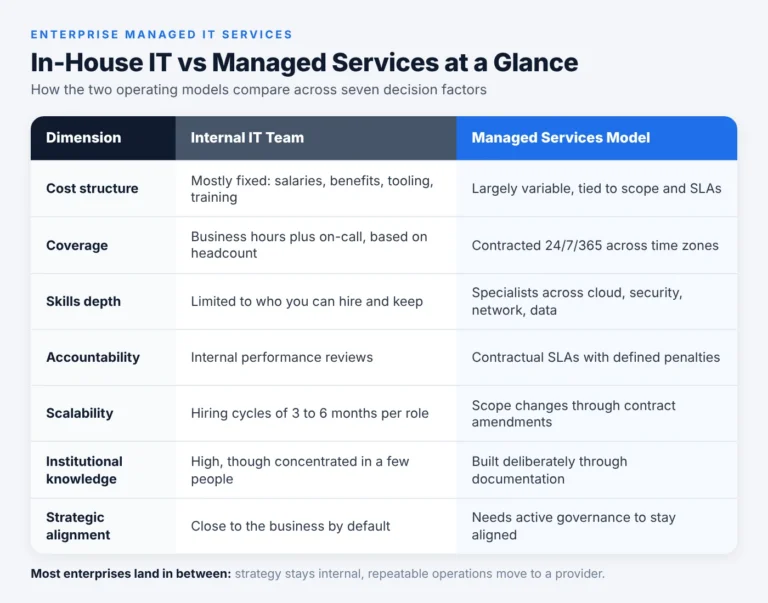
Before comparing internal IT teams with outsourced IT, it helps to pin down what an enterprise managed services model includes. It isn’t staff augmentation, and it isn’t handing over the whole IT function. A managed service provider (MSP) takes contractual responsibility for defined outcomes, such as uptime, ticket resolution times, and patch compliance, under service level agreements (SLAs).
Dimension | Internal IT Team | Managed Services Model |
Cost structure | Mostly fixed (salaries, benefits, tooling, training) | Largely variable, tied to scope and SLAs |
Coverage | Business hours plus on-call, depending on headcount | Contracted 24/7/365 coverage across time zones |
Skills depth | Limited to who you can hire and keep | Access to specialists across cloud, security, network, and data |
Accountability | Internal performance reviews | Contractual SLAs with defined penalties |
Scalability | Hiring cycles of 3 to 6 months per role | Scope changes through contract amendments |
Institutional knowledge | High, though concentrated in a few people | Must be built deliberately through documentation |
Strategic alignment | Close to the business by default | Needs governance to stay aligned |
The trade-off works in both directions. Your internal team knows your business in ways a provider won’t for months. A provider brings depth and coverage that most enterprises can’t economically build on their own. The decision is about which work belongs where.
8 Signals It’s Time to Move From In-House IT to Managed Services
If several of the signals below apply to your organization, it’s time to seriously evaluate the transition from in-house IT to managed IT services.
1. Your Senior Engineers Spend Most of Their Time on Maintenance
When your most expensive people spend their weeks on patching, password resets, and backup checks, you’re paying architect rates for operational work. Ask your CIO for a time allocation breakdown. If more than half of senior capacity goes to keeping the lights on, that capacity is better redeployed.
2. You Can’t Staff 24/7 Coverage Without Burning People Out
A true follow-the-sun model needs roughly five to six full-time engineers per coverage seat once you account for shifts, leave, and attrition. Few enterprises staff this for every critical system. When on-call rotations start driving resignations, the coverage model is broken.
3. Critical Roles Stay Open for Months
Security, cloud architecture, and data engineering roles are the hardest to fill. With a global cybersecurity gap of 4.8 million people [ISC2, 2024], waiting on recruitment means accepting risk in the meantime. Managed services give you access to that expertise while you decide which roles to build internally over the long term.
4. Compliance Demands Are Outpacing Your Team
SOC 2, ISO 27001, HIPAA, PCI DSS, GDPR, and the SEC’s cybersecurity disclosure rules each bring evidence collection, control testing, and reporting deadlines. If audit preparation repeatedly pulls engineers off project work, a provider with established compliance processes can absorb much of that load.
5. Your Mean Time to Detect and Respond Is Measured in Days
IBM found that organizations took an average of 241 days to identify and contain a breach [IBM, 2025]. Detection and escalation was also the largest single cost driver, averaging $1.47 million globally. If your security operations run only during business hours, gaps like these are structural.
6. IT Costs Are Rising Without a Clear Link to Outcomes
When the CFO can’t tie IT spend to measurable service levels, the problem is visibility as well as cost. Managed services contracts force clarity: you pay for defined outcomes and get monthly reporting against them.
7. A Major Change Is Coming
Cloud migrations, M&A integrations, ERP replacements, and AI rollouts all temporarily double the workload. Bringing in a managed provider before the change starts, rather than in the middle of it, protects both the project and day-to-day operations.
8. Key Knowledge Sits With One or Two People
If losing a single administrator would leave you unable to restore a core system, that’s a continuity risk the board should know about. A structured transition forces documentation of runbooks, architecture, and dependencies, which pays off whether or not you outsource.
When Keeping IT In-House Is the Right Call
An honest assessment also covers when not to outsource. Keeping work internal makes sense when:
- The capability is your competitive advantage. Proprietary trading platforms, core product engineering, and customer-facing data science usually belong in-house.
- Regulation requires direct control. Some defense, government, and data residency rules restrict third-party access, although compliant managed models exist for many of these cases.
- Your internal team is performing well and is stable. If SLAs are met, attrition is low, and costs are predictable, a wholesale change adds risk without clear benefit.
- You lack the governance capacity to manage a provider. Outsourcing doesn’t remove management work. It changes that work into vendor oversight. Without a service owner, contracts drift.
Deloitte’s research reflects this nuance: 70% of executives have selectively brought previously outsourced scope back in-house over the last five years, even as 80% plan to maintain or increase their overall outsourcing investment [Deloitte Global Outsourcing Survey, 2024]. Mature enterprises keep adjusting the boundary between internal and external work, choosing what goes where rather than committing to one model for everything.
The Hybrid Option: Co-Managed IT
For most large organizations, the answer to when to outsource IT is “partly, and deliberately.” A co-managed model keeps strategy, architecture, and business-facing work with the internal team, and moves repeatable operational work to a provider.
A typical split looks like this:
- Kept internal: IT strategy and roadmap, enterprise architecture, vendor governance, business relationship management, and core application ownership.
- Moved to the provider: service desk (L1 and L2), infrastructure monitoring, patch management, backup and disaster recovery, network operations, and security operations center (SOC) coverage.
- Shared: cloud operations, identity and access management, and incident response, with clear RACI ownership.
This model lets your internal leaders spend more of their time on the work the business needs from them while the provider handles volume and after-hours coverage.
Building the Business Case: A Total Cost Comparison
Comparing salaries to a monthly MSP fee is the most common mistake in this analysis. Internal IT has costs that rarely show up in a single budget line.
Include these in the in-house total cost:
- Fully loaded salaries (base pay plus benefits, payroll taxes, and bonuses)
- Recruiting fees and time-to-fill vacancy costs
- Training and certifications needed to keep skills current
- Tooling licenses: monitoring, SIEM, ticketing, endpoint management, and backup
- Overtime and on-call premiums
- Attrition costs, including lost productivity during handover
- Risk-adjusted cost of downtime and security incidents
Include these in the managed services total:
- Monthly service fees across all towers in scope
- One-time transition and knowledge transfer costs
- Internal governance roles (service owner, vendor manager)
- Exit and transition-back costs, written into the contract
Illustrative scenario (hypothetical): A 6,000-employee manufacturer runs a 40-person internal IT team. A time study shows that 55% of team capacity goes to service desk, patching, and monitoring. The company moves those functions to a provider under a co-managed agreement and redeploys 12 engineers to an ERP modernization program that had been delayed for two years. Operating costs stay roughly flat in year one because of transition fees. The return comes in year two, from the delivered ERP program and from fewer after-hours escalations reaching senior staff.
How to Transition From In-House IT to Managed Services
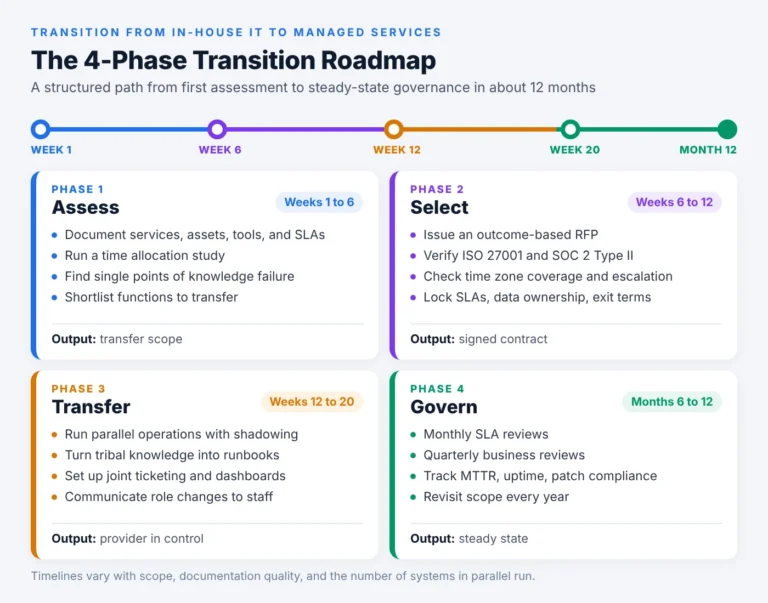
A poorly run transition causes the very disruption you’re trying to avoid. These are the phases we recommend.
Phase 1: Assess (Weeks 1 to 6)
- Document current services, assets, tools, and service levels.
- Run a time allocation study across the IT team.
- Identify single points of knowledge failure.
- Define which functions are candidates for transfer.
Phase 2: Select a Provider (Weeks 6 to 12)
- Issue an RFP with outcome-based requirements rather than headcount-based ones.
- Check certifications (ISO 27001, SOC 2 Type II) and references from organizations of similar size and industry.
- Validate the provider’s time zone coverage and escalation paths.
- Negotiate SLAs, credits, data ownership, and exit terms before signing.
Phase 3: Transfer Knowledge (Weeks 12 to 20)
- Run parallel operations, with the provider shadowing internal staff.
- Convert tribal knowledge into runbooks and architecture documentation.
- Set up joint ticketing and reporting dashboards.
Phase 4: Stabilize and Govern (Months 6 to 12)
- Hold monthly service reviews against SLAs and quarterly business reviews against strategic goals.
- Track the KPIs listed below.
- Revisit scope annually and expand or bring work back in-house based on results.
Communicate early with your internal team. Staff who hear about outsourcing through rumors tend to leave first, and they’re often the people with the knowledge you most need to transfer. Be clear about which roles change, which roles grow, and what the redeployment path looks like.
KPIs to Hold Your Managed Services Provider To
Write these into the contract, and review them every month:
- Availability: uptime for critical systems (commonly 99.9% or higher for tier-one services)
- Mean time to acknowledge (MTTA) and mean time to resolve (MTTR), measured by priority level
- First contact resolution rate at the service desk
- Patch compliance: percentage of critical patches applied within the agreed window
- Security metrics: mean time to detect and contain, plus the number of incidents escalated
- Customer satisfaction (CSAT) from internal users
- Change success rate: changes deployed without causing an incident
The Bottom Line
What matters for an enterprise is whether its current IT model can provide the coverage, skills, and cost visibility it will need over the next three years. Managed services aren’t better than an internal team by default. If several of the signals above apply to you, start with an assessment before you sign a contract. Knowing where your team actually spends its time makes it much easier to decide which work stays in-house and which moves to a provider. AppStudio helps enterprises make this move with enterprise managed IT services, covering everything from 24/7 network monitoring to cloud and security operations, alongside your existing team. Book a consultation with AppStudio’s team to assess your current environment against the eight signals in this guide.
Frequently Asked Questions
When should an enterprise move from in-house IT to managed services?
Consider the move when several of these are true: senior engineers spend most of their time on maintenance, 24/7 coverage isn’t sustainable, critical roles stay open for months, compliance work is pulling people off projects, or a major change such as a cloud migration is coming. One signal by itself rarely justifies a full transition.
What is the main difference between in-house IT and managed services?
Internal IT runs on fixed headcount and internal accountability. Managed services run on contracted outcomes, with SLAs, defined scope, and financial penalties when service levels are missed. The internal team keeps the advantage in business context, while the provider brings specialist depth and round-the-clock coverage.
Is a managed services model cheaper for enterprises?
Not always in year one, because transition costs are real. The financial case usually rests on a fully loaded comparison that includes recruiting, attrition, tooling, and the risk-adjusted cost of downtime and breaches. Many enterprises see the value in capacity they can redeploy and in lower risk, as well as in direct savings.
Will we lose control of our IT environment?
Only if governance is weak. You keep ownership of strategy, architecture, data, and vendor decisions. Contracts should spell out data ownership, access controls, reporting cadence, and exit rights so that you can change providers or bring work back in-house.
Which IT functions should enterprises outsource first?
Start with functions that are high-volume, repeatable, and easy to measure: service desk, infrastructure monitoring, patch management, backup, and SOC coverage. Keep functions that differentiate your business, such as core product engineering and enterprise architecture, internal.
How long does a transition from in-house IT to managed services take?
A structured transition typically takes four to six months to reach steady operations, followed by six to twelve months of stabilization. The timeline depends on scope, documentation quality, and how many systems run in parallel during handover.
What happens to our internal IT staff after the transition?
In a co-managed model, most internal staff move into higher-value work: architecture, security governance, business analysis, and vendor management. Some organizations transfer selected roles to the provider. Communicating openly and early is the most effective way to retain key people through the change.