
 iOS App Development
 Android App Development
 React Native
 Flutter
 Web Development
 Custom Software
 Front End Development
 Blockchain Development
 Virtual Reality
 Cloud Computing
 IoT Development
 Augmented Reality
 Write us a message
Managed IT services in Canada are outsourced IT operations, including network monitoring, support, security, cloud and infrastructure management, delivered by a provider under a defined service agreement. For Canadian enterprises, the right provider is the one that can prove three things: Canadian data handling, alignment with regulations such as OSFI B-10 and Quebec’s Law 25, and measurable service levels across every site you operate.
This guide to Managed IT Services in Canada walks enterprise buyers through the full decision, from understanding service models and pricing to evaluating providers, signing the contract and measuring performance after go-live.
What Managed IT Services Include
A managed services provider (MSP) takes ongoing responsibility for part or all of your IT environment for a predictable fee. Most enterprise engagements in Canada cover some combination of the following:
- Network and infrastructure monitoring: 24/7 visibility into servers, firewalls, switches, Wi-Fi and WAN links, with alerting and escalation
- Service desk: tiered support for employees, including onboarding, offboarding and device management
- Cloud operations: management of Azure, AWS, Google Cloud and Microsoft 365 environments, including cost control
- Security operations: endpoint protection, patching, backup, disaster recovery and incident response
- Application support and modernization: maintaining legacy systems while planning their migration or rebuild
- Strategic advisory: vCIO or vCISO guidance, technology roadmaps and compliance reporting
Service Models: Which One Fits Your Organization
Not every engagement looks the same. The model you choose determines who owns what, and it should match the maturity of your internal IT team.
Model | How it works | Best for |
Fully managed | The MSP runs IT operations end to end and acts as your IT department | Organizations without a large internal IT team |
Co-managed | The MSP extends your internal team, typically covering 24/7 operations, monitoring and routine support | Enterprises that want to keep strategy and architecture in-house |
Project-based | A defined scope with a start and end date, such as a cloud migration or network refresh | One-time initiatives, often as a precursor to an ongoing engagement |
Managed security (MSSP) | Security-only services such as threat detection and response | Organizations that already have IT operations covered and need specialist security |
Many large enterprises choose co-managed. It keeps institutional knowledge inside the business while removing the cost and staffing burden of round-the-clock operations. Note that an MSSP is not a substitute for an MSP: it secures your environment but does not run it.
In-House vs. Managed vs. Hybrid IT
Factor | In-house IT | Fully managed | Hybrid (co-managed) |
24/7 coverage | Requires at least 4.2 FTEs per monitoring seat | Included | Included for the outsourced scope |
Cost structure | Salaries, benefits, tools and training | Predictable monthly fee | Internal salaries plus a smaller managed fee |
Specialist depth | Limited to the skills you hire | Access to the provider’s full bench | Internal leadership plus provider specialists |
Control | Highest | Defined by contract and SLAs | Shared, with clear ownership lines |
Scalability | Slow: hiring takes months | Fast: scale up or down by contract | Fast for operational capacity |
Knowledge retention | Strong, but at risk when staff leave | Held by the provider, so documentation is critical | Strong internally, supported by provider documentation |
Why Canadian Enterprises Are Re-evaluating Their IT Model
Three pressures are pushing Canadian enterprises toward a managed model: rising breach costs, longer detection times and a heavier regulatory load.
Indicator | Figure | Source |
Average cost of a data breach in Canada (2026) | CA$7.11 million, the highest since the study began | IBM |
Average breach lifecycle (identify and contain) | 205 days, up 6% year over year | IBM |
Added cost when a breach involves supply-chain compromise | About CA$367,899 | IBM |
Large Canadian businesses (250+ employees) impacted by cyber incidents in 2025 | 25% | Statistics Canada |
All Canadian businesses impacted in 2025 | 16%, about one in six | Statistics Canada |
Average business spend on cyber security prevention (2025) | $54,772 | Statistics Canada |
Two findings matter most for enterprise buyers:
- Large organizations are hit more often. One in four large Canadian businesses reported an incident in 2025, compared with 15% of small businesses (Statistics Canada).
- Third parties now drive costs on their own. Supply-chain compromise is the single largest factor increasing breach costs in Canada (IBM Canada). Your MSP is part of that supply chain, so choosing one is itself a security decision.
Federal and Provincial Regulations Your MSP Must Support
Canadian enterprises stay accountable for outcomes even when operations are outsourced. Requirements vary by sector and by province, so your provider must understand where you operate, not just what you do.
Federal requirements
Framework | Who it applies to | What it means for your MSP |
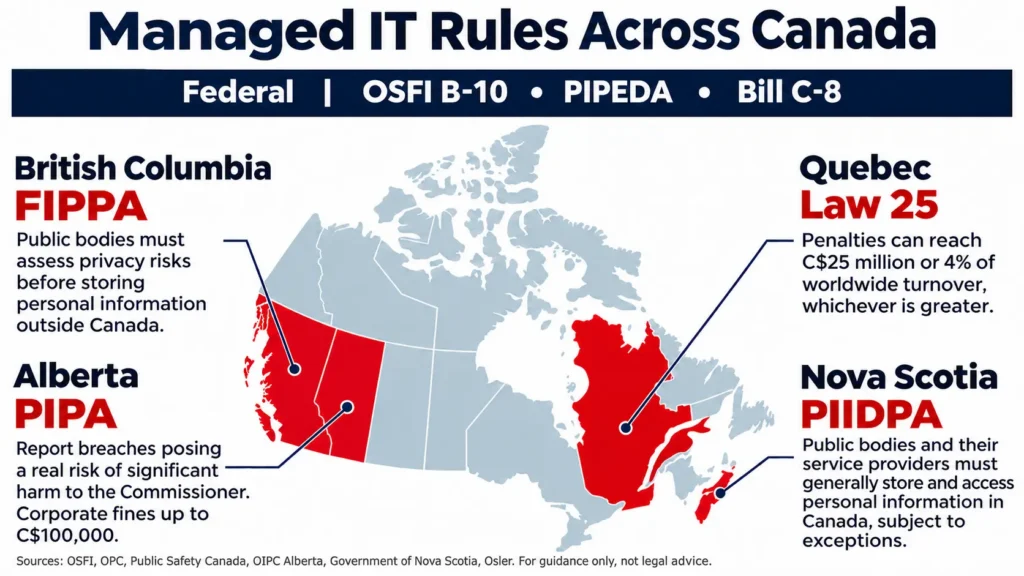
OSFI Guideline B-10 (Third-Party Risk Management) | Federally regulated financial institutions | Written contracts, audit rights, subcontractor transparency, prompt incident notification and documented exit plans |
PIPEDA breach requirements | Private-sector organizations handling personal information in the course of commercial activity | Breaches with a real risk of significant harm must be reported to the OPC and affected individuals; records of every breach must be kept for two years |
Bill C-8, An Act Respecting Cyber Security (Royal Assent 2026) | Designated operators in finance, telecom, energy and transportation | Stronger security programs and reporting of significant incidents, phased in over time |
Cyber Centre ITSM.50.030 | Guidance for any organization buying managed services | Recommends keeping medium and high sensitivity data within Canada, and defining SLAs, access controls and exit terms |
PIPEDA requires breach records to be kept for two years, whether or not the breach was reportable (Office of the Privacy Commissioner of Canada). Your MSP’s ticketing and incident logs should feed that record automatically.
Provincial requirements
Province | Law | What it means for your MSP |
Quebec | Law 25 | Penal fines up to C$25 million or 4% of worldwide turnover, whichever is greater; administrative penalties up to C$10 million or 2% |
Alberta | Personal Information Protection Act (PIPA), s. 34.1 | Breaches with a real risk of significant harm must be reported to the Commissioner without unreasonable delay; failure to notify can bring fines of up to $100,000 for organizations |
Nova Scotia | Personal Information International Disclosure Protection Act (PIIDPA) | Public bodies, municipalities and their service providers must keep personal information in Canada, with limited exceptions |
British Columbia | Freedom of Information and Protection of Privacy Act (FIPPA) | The 2021 amendments removed the strict data residency requirement for public bodies, but storing information outside Canada now requires a privacy impact assessment |
Penalties under Law 25 scale with company size. For an enterprise with C$800 million in worldwide turnover, 4% equals C$32 million, which is more than the C$25 million figure (Osler).
In Alberta, the duty to notify the Commissioner sits with the organization that controls the data, not with the provider (OIPC Alberta). That’s why your contract must require the provider to alert you immediately.
If you serve the public sector, data residency rules differ sharply by province:
- Nova Scotia: PIIDPA applies directly to service providers retained by public bodies (Government of Nova Scotia).
- British Columbia: the province moved to a risk-based model, so storing data outside Canada must go through a privacy impact assessment (UBC Privacy Matters).
How to Choose Managed IT Services in Canada by Use Case
What you evaluate depends on what you need the provider to do. Below are the four scenarios Canadian enterprise buyers ask about most.
Financial services enterprises
Financial institutions should check providers against OSFI’s B-10 guideline first and assess capability second. B-10 sets three core expectations:
- Third-party arrangements are backed by a written contract.
- The institution and OSFI have the right to evaluate the arrangement.
- Providers promptly notify the institution of technology and cyber incidents, including incidents at their subcontractors (OSFI).
Ask every shortlisted provider for:
- A contract template that already includes audit rights, subcontracting notice and termination assistance
- A list of subcontractors and where each one stores or processes data
- Incident notification timelines measured in hours, not days
- A tested exit plan that returns your data in a usable format
The financial sector also faces some of the highest breach costs in Canada, at CA$9.97 million per breach in 2025 (IBM Canada, 2025).
Enterprises modernizing legacy systems
Legacy modernization needs a provider that can do two jobs at once: keep the existing system stable and help retire it. Many MSPs only offer the first.
Look for a partner with application development and cloud migration capability alongside operations. Ask them:
- How would you run the legacy system and the target platform in parallel?
- How do you document undocumented code and integrations?
- How do you hand over knowledge at each phase?
A provider that manages infrastructure but can’t work on the application layer leaves you managing two vendors through the riskiest part of the program.
Multi-site enterprises
For organizations with offices, plants, branches or warehouses across provinces, the core test is consistency. Every site should get the same monitoring, patching standards and response targets, whether it’s in Toronto, Calgary or a regional location.
Key questions include:
- Can the provider dispatch onsite technicians in each province you operate in, and how quickly?
- Is network monitoring centralized in one dashboard across all sites?
- Do SLAs apply per site or as a company-wide average? An average can hide a poorly served location.
- Is bilingual (English and French) support available for Quebec sites and staff?
- Does the provider understand the different provincial privacy rules that apply to each location?
Network monitoring
Network monitoring is where managed IT services deliver the clearest return, because 24/7 coverage is expensive to staff internally. Compare providers on:
- Coverage: true 24/7/365 monitoring by staffed analysts, not overnight alerts sent to an inbox
- Scope: WAN, SD-WAN, firewalls, wireless, cloud networks and internet links
- Response targets: time to acknowledge and time to start fixing, by severity level
- Reporting: monthly uptime, incident trends and capacity forecasts
Faster detection reduces breach impact. IBM’s 2026 Canadian findings compared organizations that use AI extensively in security operations with those that don’t:
- Extensive AI use: breaches identified in 124 days and contained in 57, at an average cost of CA$5.5 million
- No AI: 154 days to identify and 71 to contain, at an average cost of CA$8.91 million
That’s a lifecycle 44 days shorter and about CA$3.4 million cheaper per breach.
How Managed IT Services in Canada Are Priced
Canadian providers use four common pricing models. Knowing them helps you compare quotes on equal terms.
Pricing model | How it works | Watch for |
Per user | A monthly fee for each employee, covering all their devices | Clear definitions of who counts as a user (contractors, shared accounts) |
Per device | A monthly fee for each endpoint, server or network device | Costs rising quickly as device counts grow |
Tiered packages | Bundled service levels, such as basic, advanced and premium | Critical services (security, backup) sitting only in higher tiers |
Flat monthly fee | A fixed fee based on a scoped environment | How changes in scope are priced mid-contract |
Enterprise pricing depends on:
- The number of sites
- Coverage hours
- Compliance requirements
- Onsite support needs
- The complexity of legacy systems
When comparing quotes, ask each provider to price the same scope, then measure the total against your current in-house cost.
What 24/7 Network Monitoring Costs In-House
Staffing round-the-clock monitoring internally takes more people than most budgets assume.
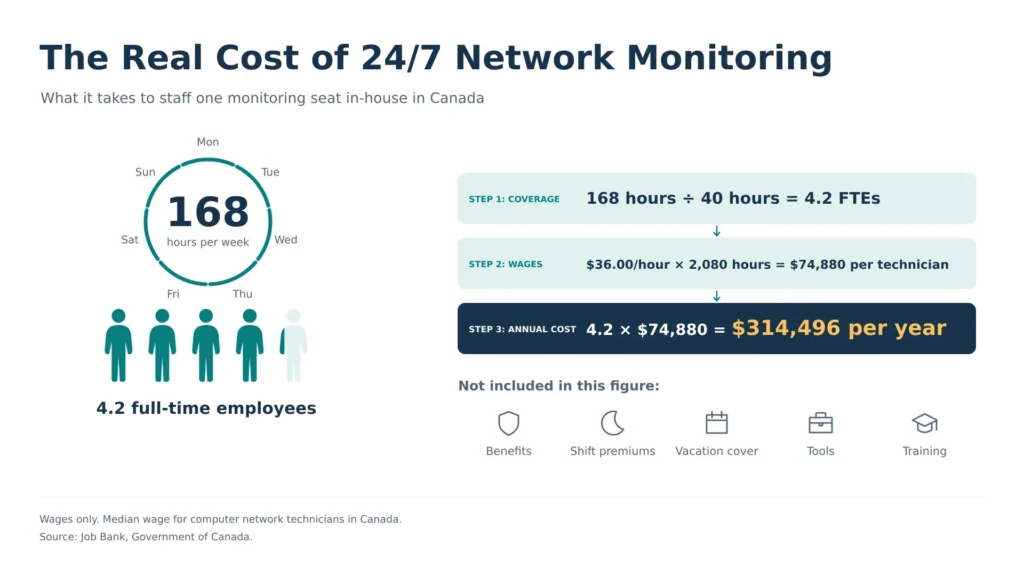
Step 1: Hours to cover. A week has 168 hours, and one full-time employee works 40 of them.
168 ÷ 40 = 4.2 full-time employees to staff a single monitoring seat around the clock
Step 2: Wages. The median wage for computer network technicians in Canada is $36.00 per hour (Job Bank).
$36.00 × 2,080 hours = $74,880 per technician per year
Step 3: Annual cost.
4.2 × $74,880 = $314,496 per year in wages alone
That figure is a minimum. It leaves out:
- Benefits and payroll taxes
- Shift premiums and vacation coverage
- Monitoring tools and training
- Management time
It also covers only one seat, with no backup for sick days or overlapping incidents. A managed provider spreads that staffing cost across many clients. That’s why enterprises can get 24/7 coverage for a fraction of the in-house cost.
Understanding SLAs
A service level agreement is the most important document in any managed IT engagement. A strong SLA defines severity levels, response and resolution targets for each level, and what happens when targets are missed.
The table below shows how a well-structured SLA is typically organized. Targets vary by provider and contract, so treat this as a framework for negotiation, not a benchmark.
Severity | Example situation | What the SLA should define |
P1: Critical | Core network or business-critical system down across a site | Response within minutes, continuous work until resolved, executive escalation |
P2: High | Major function degraded or a large group of users affected | Response within an hour, a defined resolution target and regular status updates |
P3: Medium | A single user or non-critical system affected, with a workaround | Same-business-day response and a defined resolution window |
P4: Low | Requests, questions and planned changes | Response within an agreed number of business days |
Ask each provider:
- How do you measure SLA compliance?
- How often do you report on it?
- What service credits apply when targets are missed?
An SLA without consequences is a goal, not a commitment.
A 7-Step Selection Process
- Define scope and outcomes. Document which services you want managed, which sites are in scope and what success looks like in 12 months.
- Map your regulatory obligations. List the federal and provincial requirements that apply to your sector and each location.
- Build a shortlist of three to five providers. Prioritize Canadian presence, relevant industry experience and enterprise references.
- Issue an RFP using the scorecard below. Ask every provider to respond to the same scope so quotes are comparable.
- Validate with evidence. Request SOC 2 reports, sample SLA reports, client references in your industry and a walkthrough of the monitoring platform.
- Negotiate the contract. Confirm data residency, subcontractor terms, incident notification timelines, service credits and exit assistance in writing.
- Plan the transition. Agree on a phased onboarding plan with milestones before signing.
The 10-Point Evaluation Scorecard
This scorecard draws on the Canadian Centre for Cyber Security’s guidance for consumers of managed services (Cyber Centre ITSM.50.030).
# | Criteria | What strong looks like |
1 | Data residency | Medium and high sensitivity data stored in Canada, confirmed in the contract |
2 | Data ownership | You keep legal ownership of all data and logs |
3 | Service levels | Response and resolution targets by severity, with defined penalties for misses |
4 | Uptime commitments | Uptime and maximum tolerable downtime stated per service |
5 | Privileged access | Least-privilege access, separate admin accounts, multi-factor authentication and audit trails |
6 | Incident response | Defined roles, notification timelines and a direct escalation path |
7 | Subcontractors | Full list disclosed, with notice of changes and the right to object |
8 | Independent assurance | Current SOC 2 report or equivalent third-party audit available on request |
9 | Regulatory support | Proven experience with OSFI B-10, PIPEDA, Law 25 and relevant provincial laws |
10 | Exit and portability | Documented exit plan, data returned in usable formats, secure data destruction |
Score each provider from 1 to 5 on every criterion. In regulated environments, a score below 3 on criteria 1, 6, 7 or 10 should rule a provider out.
Onboarding: What the First 90 Days Look Like
A structured transition protects uptime and sets the tone for the relationship. A typical enterprise onboarding plan follows four phases.
Phase | Typical timing | What happens |
Discovery and assessment | Weeks 1 to 2 | Environment audit, asset and credential inventory, security risk assessment, review of existing documentation |
Stabilization | Weeks 3 to 6 | Monitoring agents deployed, backups and patching validated, critical gaps closed, escalation paths agreed |
Integration | Weeks 7 to 10 | Service desk live, ticketing integrated with internal teams, runbooks and documentation completed |
Optimization | Weeks 11 to 13 | First performance report, SLA review, roadmap planning for modernization and cost reduction |
Timelines depend on the number of sites and systems, and on how good your existing documentation is. Ask each provider for a written transition plan with named owners for every phase.
KPIs to Track After Go-Live
Signing the contract is the start, not the finish. To get full value from managed IT services in Canada, review these metrics monthly and discuss trends quarterly.
KPI | What it tells you |
SLA compliance rate | Whether the provider is meeting response and resolution targets |
Mean time to resolve, by severity | How quickly issues are actually fixed |
Network and system uptime | Whether infrastructure is stable across all sites |
Patch compliance | The share of devices with current security updates |
Backup success and restore testing | Whether you can actually recover data when needed |
Ticket volume trends | Whether recurring problems are being fixed at the root |
User satisfaction score | How employees experience the service |
Red Flags to Watch For
- SLAs that list availability hours but no response or resolution times
- Reluctance to name subcontractors or offshore support locations
- No SOC 2 report or equivalent independent audit
- Long-term contracts with no termination assistance clause
- Monitoring that relies on automated alerts, with no staffed analyst reviewing them overnight
- No experience with the provincial privacy laws that apply to your locations
Frequently Asked Questions
What are managed IT services in Canada?
Managed IT services in Canada are outsourced IT operations delivered by a provider for a predictable recurring fee. They typically include network monitoring, service desk support, security, backup, cloud management and strategic IT advisory.
How much do managed IT services cost in Canada?
Most providers price per user, per device, through tiered packages or as a flat monthly fee. Enterprise pricing depends on the number of sites, compliance requirements and coverage hours. Compare quotes against the in-house benchmark: staffing one 24/7 monitoring seat costs at least $314,496 a year in wages.
Do managed IT providers in Canada need to store data in Canada?
It depends on your sector and province. The Canadian Centre for Cyber Security recommends storing medium and high sensitivity data within Canada. Nova Scotia requires public bodies and their service providers to keep personal information in Canada. British Columbia requires a privacy impact assessment for storage outside Canada.
What should financial institutions require from an MSP?
They should require contracts aligned with OSFI B-10. That means audit rights, subcontractor transparency, prompt incident notification and a documented exit plan.
What is the difference between an MSP and an MSSP?
An MSP manages and runs your IT operations. An MSSP focuses only on security services. Many enterprises need both capabilities, either from one provider or from two.
Is co-managed IT a good fit for large enterprises?
Yes, for most. Co-managed IT lets internal teams keep ownership of strategy and architecture while the provider covers 24/7 operations, monitoring and routine support.
How long does it take to transition to a managed IT provider?
A phased transition like the one in this guide is typically planned over about 13 weeks, covering discovery, stabilization, integration and optimization. Actual timing depends on the number of sites and systems, and on how good your existing documentation is.
Choosing a Partner That Fits Your Roadmap
The strongest managed IT relationships in Canada start with clarity on data, on accountability and on how the provider will support your modernization goals over the next three to five years. AppStudio works with Canadian enterprises to run, secure and modernize their IT environments, from 24/7 network monitoring to legacy application migration. If you’re building a shortlist, book a consultation with AppStudio’s team to assess your current environment against the scorecard in this guide.