
 iOS App Development
 Android App Development
 React Native
 Flutter
 Web Development
 Custom Software
 Front End Development
 Blockchain Development
 Virtual Reality
 Cloud Computing
 IoT Development
 Augmented Reality
 Write us a message
A help desk SLA is the contract clause that turns “24/7 support” into something measurable. It defines what counts as urgent, how fast the provider must respond and resolve, who escalates, and what happens when targets are missed. For enterprises, the strongest 24/7 help desk SLAs also cover nights and weekends at the same standard as business hours, and tie security incidents to fixed notification times.
The cost of getting it wrong is significant:
- 25% of large Canadian businesses were affected by a cyber security incident in 2025 (Statistics Canada).
- The average data breach in Canada cost CA$6.98 million in 2025, up 10.4% in a year (IBM Canada).
- 97% of large enterprises say one hour of downtime costs more than US$100,000 (ITIC, 2024).
This guide sets out what an enterprise help desk SLA should contain, the metrics worth tracking, benchmark figures to test proposals against, and the clauses most often missing.
What Is a Help Desk SLA?
A help desk SLA (service level agreement) is a written commitment between an IT support provider and the business it serves. It sits alongside two related documents:
- SLA: the external promise to the business, covering response, resolution and availability targets
- OLA (operational level agreement): internal commitments between teams that make the SLA achievable, such as network or security teams supporting the help desk
- XLA (experience level agreement): measures of how employees experience support, such as satisfaction and effort
A service desk SLA covers the same ground as a help desk SLA, but usually extends to service requests, access changes and IT service management processes beyond break-fix support.
Why Does 24/7 Coverage Change the SLA?
Business-hours agreements quietly pause the clock overnight. A 24/7 IT support SLA cannot. That changes three things:
- The clock never stops: response and resolution targets apply at 3 a.m. on a Sunday exactly as they do at 11 a.m. on a Tuesday
- Staffing must be explicit: the agreement should state whether after-hours cover is staffed or on call
- Escalation must reach people who are awake: named roles at both the provider and the client for every priority level
If a proposal for 24/7 managed IT support does not separate after-hours performance in its reporting, the true night-time service level stays invisible.
What Should an Enterprise Help Desk SLA Include?
Every enterprise help desk SLA should cover these ten components to avoid gaps and disputes later:
- Scope: users, sites, systems and applications covered, plus explicit exclusions in writing
- Service hours: 24/7/365, or defined windows for specific services, including public holidays
- Priority matrix: P1 to P4 definitions tied to business impact and urgency
- Response targets: time to acknowledge and begin active work, by priority
- Resolution targets: time to restore service or provide a workaround, by priority
- Escalation path: named roles and timeframes at each level, on both sides
- Communication rules: update frequency and channels during open P1 and P2 incidents
- Security incident clauses: detection, containment and notification times
- Service credits: financial remedies, caps and exit rights for repeated failure
- Reporting and review: monthly service reviews and quarterly executive reviews
How Should Priority Levels Be Defined?
Priority should reflect business impact, not the seniority of the person calling. The table below shows illustrative targets for a 24/7 IT support SLA. Your own targets should come from a business impact assessment.
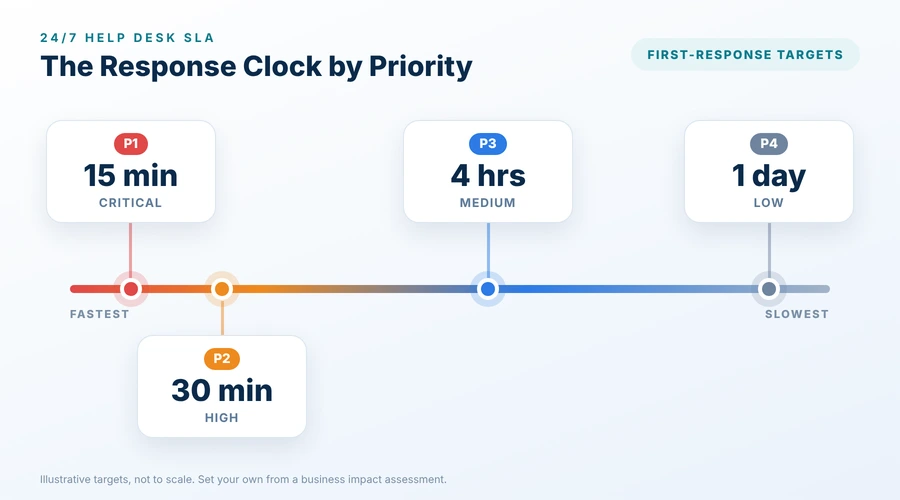
Priority | Definition | Illustrative response | Illustrative resolution or workaround | Update frequency |
P1 Critical | Business-wide outage or confirmed security incident | 15 minutes | 4 hours | Every 30 minutes |
P2 High | Major function or many users affected | 30 minutes | 8 hours | Every 2 hours |
P3 Medium | Single user or workaround available | 4 hours | 2 business days | Daily |
P4 Low | Requests and minor issues | 1 business day | 5 business days | On completion |
Response time measures how quickly work starts. Resolution time measures how quickly service is restored. A help desk response time SLA on its own is not enough, because a fast acknowledgement with a slow fix still leaves users waiting. The strongest 24/7 help desk SLAs set both.
Which IT Help Desk SLA Metrics Matter Most?
Strong help desk SLA metrics balance speed, quality and cost. MetricNet’s 2023 service desk benchmarks, drawn from organizations in 19 countries, give useful reference points (MetricNet, 2023):
Metric | What it measures | 2023 benchmark average |
First contact resolution | Issues fixed on the first contact | 70.2% |
Customer satisfaction (voice) | User satisfaction with support | 81.1% |
Call abandonment rate | Callers who hang up before answer | 5.8% |
Calls answered in 60 seconds | Speed of answer | 48.5% |
Cost per analyst-assisted contact | Unit cost of support | US$20.61 |
Annual analyst turnover | Staff stability | 43.1% |
Add these to the reporting pack for 24/7 help desk SLAs:
- Mean time to acknowledge (MTTA) by priority
- Mean time to resolve (MTTR) by priority
- SLA attainment: percentage of tickets meeting targets
- Reopen rate: tickets closed and then reopened
- After-hours performance: the same metrics reported separately for nights and weekends
High analyst turnover is worth watching. At 43.1% a year on average, it is often the hidden reason SLA performance drifts after the first year of a contract.
What Makes a 24/7 Helpdesk SLA Different After Hours?
Night and weekend support is where many agreements weaken, and where a 24/7 helpdesk SLA earns its value. Include these clauses:
- Equal targets: after-hours P1 and P2 targets match business-hours targets
- Staffing statement: confirmation that the desk is staffed overnight, not paged
- Remote action rights: what the overnight team can change without waiting for approval
- Executive notification: who is called, and how quickly, for a P1 outside business hours
- Separate reporting: after-hours metrics shown on their own, not averaged into daily results
These clauses are what separate a genuine round-the-clock agreement from a business-hours contract with an answering service.
How Should Enterprises Set Their SLA Targets?
Targets copied from a template rarely fit. Use this five-step process instead:
- Map services to business impact: rank systems by the revenue, safety or compliance exposure of an outage
- Baseline current performance: pull 6 to 12 months of ticket data to see real response and resolution times
- Set targets per priority: start from the baseline and tighten for the most critical services
- Pilot for 90 days: run the new targets with weekly reviews before they carry service credits
- Lock and review: confirm targets in the contract and revisit them at least once a year
This approach produces targets the provider can meet and the business can defend.
How Should Security Incidents Be Handled in the SLA?
Security events need tighter terms than standard incidents. An IT service desk SLA for regulated organizations should define:
- Detection to triage time for security alerts raised by monitoring
- Containment actions the provider may take immediately, such as isolating a device
- Notification time to the client’s security and legal teams after an incident is confirmed
- Evidence handling: log retention and chain-of-custody for investigations
- Regulatory support: help preparing breach reports under PIPEDA, provincial privacy laws and sector rules
AppStudio’s managed cybersecurity services are one example of security operations built into the same support agreement as the help desk.
How Should Service Credits Work?
Credits only motivate performance if they are meaningful and simple to calculate.
- Tie credits to monthly SLA attainment, for example a percentage of the monthly fee for each point below target
- Weight P1 failures more heavily than P3 or P4 misses
- Cap total credits at a level both parties accept
- Add an exit right after repeated failures within a set period
- Avoid credit-only remedies for chronic problems; require a remediation plan as well
How Do Help Desk SLAs Fit Into a Wider Managed IT Contract?
In most managed IT agreements, 24/7 help desk SLAs are one schedule among several. Enterprise contracts usually also include:
- Infrastructure availability SLAs: uptime targets for networks, servers and cloud services
- Security monitoring SLAs: detection, triage and notification times
- Change management terms: approval windows and emergency change rules
- Application support SLAs: targets for custom and business-critical software
Strong providers align these schedules so priorities and escalation paths match. Gaps between them are where incidents stall.
How Do You Compare SLAs Across Providers?
Put every bidder’s agreement into the same template, then compare like for like. Comparing 24/7 help desk SLAs side by side shows quickly which providers have built for enterprise operations.
- Are P1 to P4 definitions based on business impact?
- Do targets apply equally after hours?
- Are help desk SLA metrics reported monthly, with after-hours results separated?
- Are service credits automatic or claim-based?
- Is security incident notification time stated in hours?
Ask each bidder for six months of anonymized SLA reports, not just the template. Providers with mature 24/7 help desk SLAs should be able to share real attainment figures. Our guides to questions to ask a managed IT provider , and how to shortlist managed IT providers cover the wider evaluation.
What Are the Most Common Mistakes in 24/7 Help Desk SLAs?
- Priority set by caller, not impact: executives’ minor issues crowd out real outages
- Response-only targets: fast acknowledgements with no resolution commitment
- Paused clocks: “business hours” wording hidden inside a 24/7 contract
- Blended reporting: after-hours failures averaged away
- No review cycle: targets never updated as the business changes
- Vague exclusions: third-party outages used to excuse every miss
How Does AppStudio Structure 24/7 Help Desk SLAs?
AppStudio builds its IT help desk services around service levels agreed before go-live, as part of its 24/7 managed IT services.
- Response baseline: a typical target of under 10 minutes to first response on critical issues and under 30 minutes on standard requests
- Coverage: real people supporting users, systems and urgent incidents at any hour, weekends included
- Security: endpoint, firewall and SIEM operations watched 24/7
- Governance: programs mapped to HIPAA, PCI DSS, ISO 27001 and SOC 2, with support from governance, risk and compliance services
- Certifications: AppStudio reports ISO 27001 and ISO 9001 certification
- Sector experience: including managed IT for healthcare organizations and financial institutions
For budgeting, see our guide to managed IT services cost per user in Canada
Frequently Asked Questions
What Is a Good First Contact Resolution Rate?
MetricNet’s 2023 benchmark average was 70.2%. Enterprise help desks should set a target based on their ticket mix, then track it monthly.
What Is the Difference Between a Help Desk and a Service Desk Agreement?
A help desk agreement focuses on incident response and resolution. Service desk agreements usually also cover service requests, access management and wider IT service management processes.
Should After-Hours Targets Be Different?
For P1 and P2 incidents, no. A 24/7 agreement should apply the same targets at all hours and report after-hours performance separately.
How Often Should an SLA Be Reviewed?
Review performance monthly and the agreement itself at least once a year, or after any major change to systems or business priorities.
What Should Happen When a Provider Misses Targets Repeatedly?
Service credits should apply, followed by a remediation plan. Repeated failure within a set period should trigger an exit right.
Conclusion: Make Every Hour Count
24/7 help desk SLAs are only as strong as their weakest hour. Define priorities by business impact, apply the same targets day and night, report after-hours results separately and attach real consequences to missed targets. Those steps turn a support contract into a service your board can rely on.
Book a 24/7 help desk SLA review with AppStudio to benchmark your current agreement against enterprise standards.