

Apple Watch App Development Company
Apple Watch App Development Company | Wearable Technology Expertise, Native Development & IoT Integration
Extend existing mobile capabilities to wearable technology with AppStudio's expertise in watchOS, iOS integration, UX, and application engineering. We help organizations assess, develop, and integrate Apple Watch capabilities within their broader technology environment.
Talk to a watchOS Developer
We only use your info to contact you about your project.



















Why Choose Our Apple Watch App Development Company
We Design for the Watch Face First
The complication and glance are the surface people actually touch, so we design those before the app screens.
Battery and Runtime Budgeted Up Front
watchOS gives apps very little background time. We settle what the app can realistically do in week one, not month four.
Real Devices, Not Just the Simulator
We test on real hardware across watch sizes and watchOS versions, because the simulator hides the things that matter.
Honest About When Not to Build
If a notification would serve users better than an app, we say so in the first conversation, even at the cost of the project.
Services
Our iWatch App Development Services
Custom Apple Watch App Development
- Native watchOS in Swift and SwiftUI.
- Built around one clear job, not a phone port.
- Complication and app designed together.
Complications & Smart Stack Widgets
- WidgetKit complications across every face family.
- Smart Stack presence for the right moment.
- The highest-value real estate on the device.
Health & Fitness App Development
- HealthKit reads and writes done properly.
- Workout sessions for real background runtime.
- Heart rate, HRV, calories and GPS routes.
Apple Watch Utility App Development
- Single-purpose tools built for a glance.
- Timers, trackers, scanners, controls and checks.
- Utility app development at watch scale.
Smartwatch UI & UX Design
- Apple Watch app UI built for seconds, not minutes.
- Digital Crown and Double Tap as real inputs.
- Legible at 41mm, in sunlight, while moving.
Wearable App Version Upgrade
- Older WatchKit apps moved to SwiftUI.
- ClockKit complications migrated to WidgetKit.
- Support for current watchOS without a rewrite.
Independent watchOS Apps
- Runs and installs without a companion iPhone app.
- Own networking over LTE and Wi-Fi.
- Listed directly on the Watch App Store.
Apple Watch E-Commerce Apps
- Order status, delivery and pickup alerts.
- Loyalty and pass integration.
- Honest scoping: nobody shops on a watch.
Notifications & Live Activities
- Custom long-look notification interfaces.
- Live Activities that mirror to the wrist.
- Often the entire watch strategy you need.
Wear OS & Android Wear Builds
- Kotlin and Compose for Wear OS.
- Tiles and watch faces on the Android side.
- Shared backend, two native front ends.
App Maintenance & Support
- Annual watchOS releases handled before September.
- Battery and crash telemetry watched.
- New hardware sizes supported on launch.
Hire Apple Watch Developers
- watchOS engineers and designers, monthly.
- You interview them before anyone starts.
- Embedded in your team, not behind a wall.

Earn a place on the watch face.
Book A Free Consultation ›We asked for a full watch version of our app. They talked us down to a complication, two notification actions and one screen. It is the most used part of our product now, and far smaller than the full build we first asked for.Head of Product, Field Services Platform
What to Expect From an Apple Watch App Development Company
Business Priorities
Industry Gaps
Our Proven Advantage
Global Standards. Built-In Trust.
Wearables gather the most personal data of any consumer device, so we keep health and location data on the watch where the feature allows, encrypt it when it has to move, and use granular consent with an auditable record of how each data type is used. Handling is PIPEDA and GDPR aware, and HIPAA aligned where a US clinical partner is involved.






Book a Free Consultation
Pick a time that suits you. Tell us what your users are doing with their hands when they would need your product, because that answer usually decides whether a watch app makes sense at all. Half an hour, no charge, no obligation.
Among the Top Apple Watch App Developers in Canada
Product teams work with AppStudio because we have shipped watchOS since the first Apple Watch, through the shifts from WatchKit to SwiftUI and ClockKit to WidgetKit. Clutch, DesignRush and GoodFirms rate us among the top agencies for custom Apple Watch app development in Canada, and we are as willing to talk you out of a watch app as into one.



Apple Watch Technologies Our Developers Work With
Grouped the way a watchOS project is actually built. Note that the watch face surfaces come before the app itself, and that connectivity and battery share a group, because on this platform they are the same conversation.


 WidgetKit Complications
 Smart Stack Widgets
 Rich Notifications
 Live Activities
 App Intents & Siri
 Always-On Display States
 HealthKit
 Workout Sessions
 Heart Rate & HRV
 Core Motion
 Blood Oxygen & ECG Data
 Sleep & Mindfulness
 Digital Crown
 Double Tap & Gestures
 Core Location & GPS
 MapKit
 Haptics & Sound
 Accessibility & VoiceOver
 Watch Connectivity
 Independent LTE & Wi-Fi
 Core Bluetooth
 Background Refresh Budgets
 Extended Runtime Sessions
 CloudKit & iCloud Sync
 Node.js & Python APIs
 PostgreSQL
 Push Notifications
 On-Device Testing Matrix
 TestFlight & App Store
 Crash & Battery Telemetry
How We Scope and Build for the Watch
The version worth building is almost always smaller than the version clients arrive asking for. A complication, a notification interface and one focused screen is a fraction of a full second application, and it is the version people actually use.
What moves the number is not screen count. It is whether the app needs to be independent of the phone, whether it needs background runtime, and whether it touches health data. Each of those adds real engineering and, in the health case, potentially a regulatory conversation.
Below are the technical decisions that shape a watch build, and the platform details worth understanding before you brief anyone.
seconds — the glance budget each watchOS screen is designed to fit
years building on Apple platforms, watchOS included
client reviews across our Canadian and US work
What Our Clients Say About Working With Us
Projects We Have Delivered

Empowering Future Talent in Trades and Technology
Commissioned by Skills Compétences Canada, we built a national bilingual platform with native apps, a secure CMS, and Canadian cloud infrastructure to promote trades and technology careers at scale.

Digitizing Wildlife Surveillance for National Resilience
For the Canadian Wildlife Health Cooperative, we replaced siloed tools with a cloud-native platform that unifies field reports, lab diagnostics, and cross-province analytics in real time.
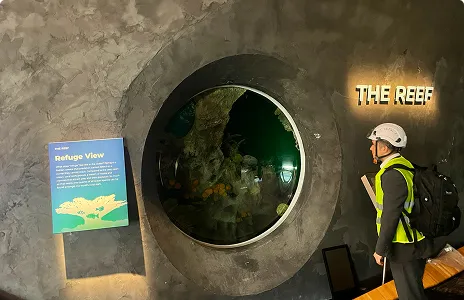
Interactive Learning Through Digital Experience
We unified kiosks, ticketing, and mobile into one cloud-native platform for Seattle Aquarium, raising visitor engagement and streamlining operations across every touchpoint.
Our Portfolio

Mindset is the Ultimate Source for Motivation, Self-development and Wisdom. With Mindset, you can play the world’s best motivational, inspirational and educational audios for free.


As part of the vision 2030, the Kingdom of Saudi Arabia has established a partnership with Zazz to modernize their nation wide mobile apps.
Canada Ontario
Built for the government of Ontario, to champion and stimulate the development of world-class technological and employability skills in Ontario youth.
Get cooking with The Roundup™, the definitive guide to buying, cooking & enjoying North American beef! This app has information on beef cuts, recipes, cooking & cuts videos to help you buy the proper cut and cook it confidently.
The app serves as a one-stop solution for Ontario’s electrical contractor community to organize and manage events, and conferences, talk to other members and share updates.
The Ideal Protein App is the digital pocket companion to the Ideal Protein Protocol. This personalized Protocol assistant is designed to help people achieve their weight loss goals and support a new, healthy lifestyle through three prioprietary phases: Weight Loss, Stabilization, and Maintenance.
Designed & Developed to save lives, and help prevent the spread of COVID 19, by providing the most reliable and up to date information needed by Employers across Canada.
Apple Watch Apps by Industry
The wrist wins wherever hands are busy or a phone is impractical. These are the settings where watch apps genuinely get used.

Health & Life Sciences
Health & Life Sciences
- Symptom and medication logging.
- HealthKit trends for clinicians.
- Wellness claims kept clear of diagnosis.
Fitness & Wellness
Fitness & Wellness
- Workout sessions with real runtime.
- Heart rate zones and HRV.
- GPS routes without draining the battery.
Field Service & Trades
Field Service & Trades
- Job alerts on the wrist.
- Hands-free status updates.
- Works on a ladder or under a sink.

Logistics & Delivery
Logistics & Delivery
- Scan confirmation by Double Tap.
- Next-stop and route nudges.
- Gloved-hand interaction design.

Manufacturing
Manufacturing
- Line and machine alerts.
- Andon acknowledgement at the station.
- No phone on the plant floor.
Hospitality & Restaurants
Hospitality & Restaurants
- Table and ticket alerts for floor staff.
- Discreet haptic prompts.
- Hands full, no screen time.

Retail
Retail
- Pickup and click-and-collect alerts.
- Loyalty and Wallet passes.
- Honest scope: browsing stays on phone.

Financial Services
Financial Services
- Balance and threshold complications.
- Fraud alerts with one-tap response.
- Nothing sensitive in Always-On.
Insurance
Insurance
- Wellness programme tracking.
- Claim status at a glance.
- Consent-first health data use.
Sports & Recreation
Sports & Recreation
- Live scores and event timing.
- Coach and athlete telemetry.
- Outdoor GPS tested outdoors.
Transportation
Transportation
- Shift and dispatch prompts.
- Hands-free acknowledgement.
- Vehicle checks at the wrist.
Education
Education
- Attendance and schedule nudges.
- Timers and exam prompts.
- Minimal distraction by design.
Embrace Innovation and Excellence with iWatch App Development Solutions
The best Apple Watch app development companies are the ones willing to argue for a smaller build. A watch is not a small phone, it is a glance, and the products that win on it are the ones that answer a single question in the time it takes to lift a wrist. That constraint is the whole discipline, and it is why smart watch app development solutions that start from a phone app almost never land.
As an Apple Watch app development company we cover strategy, smartwatch UI/UX design services, smartwatch UX development, native watchOS app development, complications and Smart Stack widgets, HealthKit and workout integration, Wear OS builds where you need Android coverage, App Store submission, and the annual maintenance that keeps a watch app working through each September release. Strategy sprints, full watchOS builds, and Apple Watch developers you can hire into your own team, including design expertise for the interface rather than only the engineering.
Explore wearable technology app development, iOS app development, Swift development, hire iOS developers, Android and Wear OS, UI and UX design, IoT applications, or MVP development to test an idea first.
Book A Free Consultation →
Frequently Asked Questions
Build. Launch. Grow.
Trust AppStudio to maximize the usability of your Apple Watch apps. Book a free consultation and tell us what your users are doing with their hands.
Book A Free Consultation →
Request a Consultation
Tell us what your users would need at a glance, whether you already have an iOS app, and whether health data is involved. One of our Apple Watch developers will come back with an approach rather than a brochure.

