
 iOS App Development
 Android App Development
 React Native
 Flutter
 Web Development
 Custom Software
 Front End Development
 Blockchain Development
 Virtual Reality
 Cloud Computing
 IoT Development
 Augmented Reality
 Write us a message
Picture a company with offices in Halifax, Toronto, Calgary and Vancouver. Its network has to be ready when the first Halifax employee logs in at 8 a.m. Atlantic time, and it’s still busy when the Vancouver team signs off at 5 p.m. Pacific, which is 9 p.m. back in Halifax. Somewhere in between, a branch firewall reboots, a Wi-Fi controller loses a site, or an internet circuit starts dropping packets.
Good network monitoring catches those moments early and gets them fixed before most people notice. When Canadian enterprises compare managed IT services for network monitoring, six things separate a strong provider from an average one:
- Coverage: every site, circuit, firewall, switch, access point and cloud connection is watched
- Detection quality: alerts are tuned against a baseline of normal traffic, so real problems stand out
- Response and escalation: a 24/7 network operations centre (NOC) acts on alerts with clear priorities
- Resilience: monitoring and management keep working even when the main network doesn’t
- Canadian fit: coverage across Canada’s time zones, clarity on where monitoring data is stored, and support for multi-province operations
- Reporting: regular, plain-language reports on uptime, incidents and capacity
The sections below show what each one looks like in practice, followed by a scorecard you can use with any provider.
What Managed IT Services for Network Monitoring Should Cover
Network monitoring is the NOC side of managed IT: availability, performance and capacity. Security monitoring is handled separately by a security operations centre (SOC), and the two share data. This guide focuses on the network side.
Layer | What to monitor | Why it matters |
Internet and WAN circuits | Availability, latency, packet loss, failover status | Branch offices and cloud apps depend on them first |
Firewalls and routers | Health, CPU and memory, configuration changes, VPN tunnels | A single misconfiguration can affect every site |
Switches and Wi-Fi | Port status, access point health, client counts | Users notice issues here first |
Cloud connectivity | Links to Microsoft 365, AWS, Azure or Google Cloud | Hybrid work runs through these paths |
Servers and critical apps | Response times from the user’s point of view | Shows what employees actually experience |
Capacity | Bandwidth trends and growth over months | Lets you upgrade before slowdowns start |
Ask each provider which of these layers it monitors by default, and which cost extra.
Detection Quality: Baselines Before Alerts
More alerts don’t mean better monitoring. Monitoring is useful when it knows what normal looks like, so the unusual stands out.
The Canadian Centre for Cyber Security recommends this approach. Its network logging and monitoring guidance advises organizations to:
- Establish “a baseline behaviour of your network traffic patterns and performance metrics”
- Centralize log data
- Use tools that “automatically trigger alerts on relevant events”
A strong provider spends the first weeks of an engagement learning your network’s rhythm: when month-end traffic peaks, which sites go quiet on weekends, how much bandwidth a Monday morning video call uses. After that, its alerts mean something, and your team stops ignoring them.
Response and Escalation
An alert only has value if someone acts on it. When you compare providers, look for:
- A NOC staffed 24/7, including weekends and statutory holidays
- Priorities defined in advance, so a site outage is handled ahead of a slow printer
- A named escalation path for major incidents, including when your own team gets a call
- A written root-cause review after every major incident
The last point gets less attention than it deserves. Root-cause reviews are how the same problem stops coming back.
Resilience: Lessons From the 2022 Rogers Outage
On July 8, 2022, a Rogers outage left more than 12 million customers without wireless and wireline services for about 26 hours. It affected home internet, business customers, electronic payments and 9-1-1 calling.
The CRTC’s independent review found that staff had removed a routing filter during a configuration change, which overwhelmed the core routers. Restoration took longer partly because the network used to manage the system depended on the same core that had failed (CRTC).
The review’s recommendations translate directly into questions for any enterprise network:
- Keep management separate. The report recommended separating the management network from the data network, physically and logically. For an enterprise, that means out-of-band access to key firewalls and switches, so engineers can still reach them during an outage.
- Have backup connectivity from a different provider. Critical sites should have a second circuit from another carrier.
- Control changes carefully. The report recommended lab testing, fewer changes per maintenance window and automatic rollback. A good managed provider applies the same discipline to your network changes.
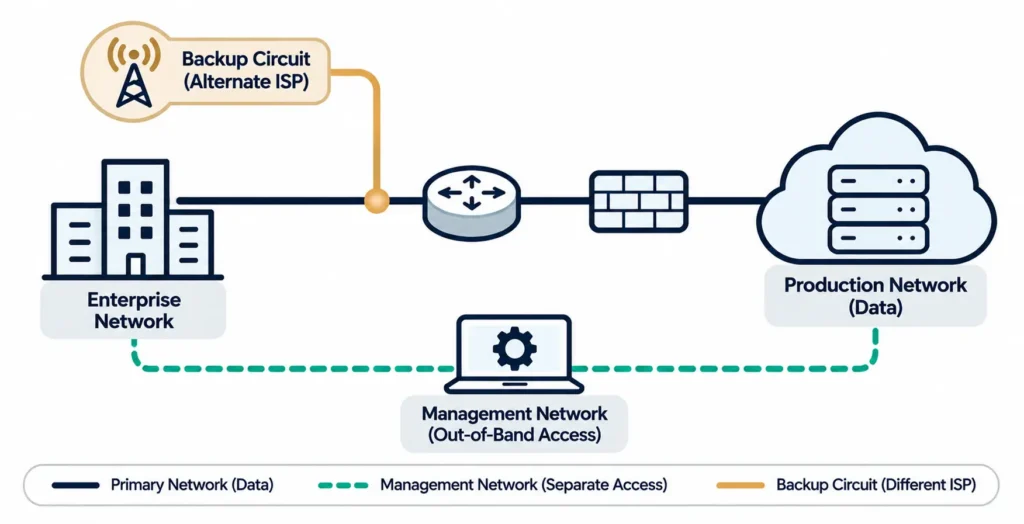
The review found Rogers’ measures since the outage satisfactory, and the same lessons are worth building into your own network.
Canadian Fit
Three questions matter more for Canadian enterprises than for most US buyers.
Does coverage match your time zones?
Canada spans six time zones, from Newfoundland to the Pacific. For a company with offices from Halifax to Vancouver, the working day across the country is longer than any one office’s:
8 a.m. Atlantic start to 5 p.m. Pacific finish = 8 a.m. to 9 p.m. Atlantic, or 13 hours of business-day coverage
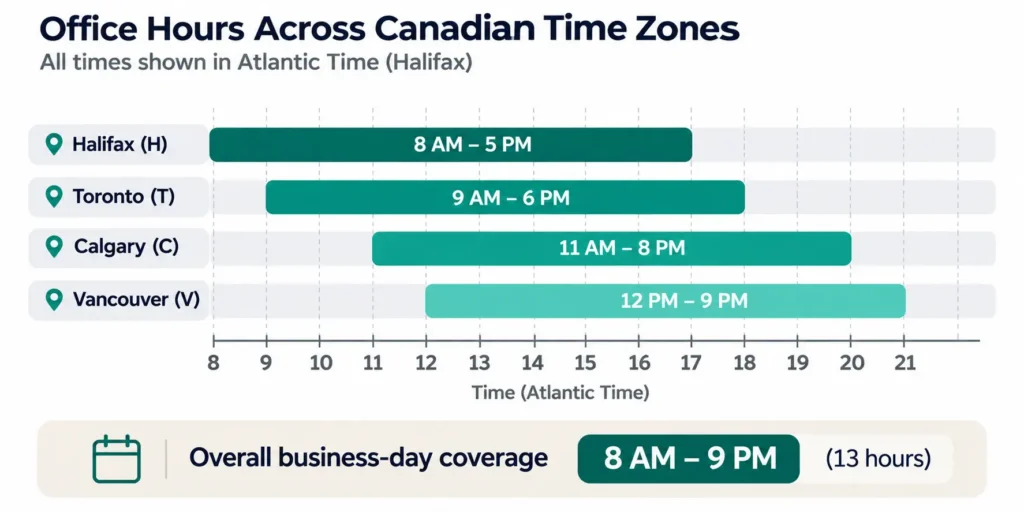
That’s 4 hours more than a single 9-hour office day. A provider whose “business hours” support follows one time zone leaves gaps at one end of the country. Ask how the NOC is staffed across all of your sites’ working hours, and what changes after hours.
Where is monitoring data stored?
Monitoring tools collect logs, device names, IP addresses and traffic details. Ask where that data is stored and processed, how long it’s kept, and who can access it. If your contracts or internal policies require data to stay in Canada, confirm in writing that the provider can meet that.
Can it support every province you operate in?
If you have sites in several provinces, check that the provider can:
- Coordinate on-site work where needed
- Manage carriers in each region
- Support teams in the language they work in
Reporting That Leaders Can Use
Monthly reports should answer three questions in plain language: how available was the network, what went wrong and why, and where capacity is heading.
These reports also support your wider security posture. The Cyber Centre’s Cross-Sector Cyber Security Readiness Goals, published in October 2024, include maintaining an asset inventory and network topology, collecting logs for detection and incident response, and storing logs centrally (Cyber Centre). A provider that keeps your topology and logs current makes those goals much easier to meet.
Canadian businesses are already investing in this work. Statistics Canada reports that businesses spent $11.0 billion on cyber security prevention and detection in 2023, up from $9.7 billion in 2021. Over the same period, the share of businesses affected by cyber security incidents fell to 16% in 2023, from 21% in 2019 (Statistics Canada).
The Comparison Scorecard
Use this table to score managed IT services for network monitoring side by side. Give each provider 0 to 2 points per row: 0 for no, 1 for partly, 2 for yes with evidence.
Criterion | Question to ask | What a strong answer includes |
Coverage | Which network layers do you monitor by default? | Circuits, firewalls, switches, Wi-Fi, cloud links and user experience |
Baselines | How do you tune alerts for our network? | A baseline period and regular tuning reviews |
NOC staffing | Who watches our network at 2 a.m. on a holiday? | A staffed 24/7 NOC with defined priorities |
Escalation | What happens in the first hour of a site outage? | A written playbook and named contacts |
Root cause | Do we get a review after major incidents? | A written root-cause report with follow-up actions |
Out-of-band access | Can you reach our core devices if the main network is down? | Separate management access to critical equipment |
Carrier diversity | Will you help design and monitor backup circuits? | Monitoring of failover, plus carrier coordination |
Time zones | How does coverage work across all our sites’ hours? | Coverage matched to every office’s working day |
Data location | Where is our monitoring data stored, and for how long? | A clear answer in writing |
Reporting | What will leadership see each month? | Uptime, incidents, capacity and recommendations |
With 10 rows, the maximum score is 20:
- 16 or more: a strong candidate
- 12 to 15: workable, but the gaps should be closed in the contract
Where Network Monitoring Fits in Managed IT
Monitoring tells you something is wrong, but it can’t prevent every outage on its own. A carrier fibre cut or a regional cloud issue will still happen. What monitoring changes is how quickly you know, how quickly the right people act, and whether failover works as planned. That’s why the best results come when monitoring is part of a broader managed service that also covers configuration, change control and capacity planning.
How AppStudio Monitors Canadian Enterprise Networks
AppStudio’s IT infrastructure management services are built around a 24/7 network operations centre for organizations across Canada. They include:
- Live monitoring of network availability, latency and traffic, with alerts triaged as they fire
- Management of switches, routers, firewalls and wireless across every site
- VLAN segmentation and access rules that keep a problem contained to one zone
- A major-incident playbook covering rapid triage, immediate engineer engagement, regular updates to your team and a root-cause review afterward
- Regular reports on uptime, incidents, patch status, capacity and SLA performance, with recommendations
- Capacity forecasting, so upgrades are planned before slowdowns start
- One managed estate across cloud, on-premises and hybrid environments, including equipment in offices, data centres and colocation
Our managed IT services team works with monitoring platforms including Datadog, Zabbix, PRTG, Site24x7 and ManageEngine OpManager, and with network platforms including Cisco Meraki and Ubiquiti UniFi. During business hours, average first response is under 10 minutes for critical issues. Onboarding typically starts within the first week, and most environments reach a fully managed steady state in 2 to 4 weeks.
AppStudio has delivered 1,300+ projects since 2015. It holds ISO 9001 and ISO/IEC 27001 certifications and a SOC 2 Type II attestation.
Frequently asked questions
How should Canadian enterprises compare managed IT services for network monitoring?
Compare providers on six areas:
- Coverage across every network layer
- Detection quality based on traffic baselines
- 24/7 NOC response and escalation
- Resilience through out-of-band access and backup circuits
- Canadian fit: time zones, data location and multi-province support
- Clear monthly reporting
What is the difference between a NOC and a SOC?
A network operations centre (NOC) monitors availability, performance and capacity. A security operations centre (SOC) monitors for threats and attacks. They often share data and work together.
What should a network monitoring service include?
It should monitor internet circuits, firewalls, routers, switches, Wi-Fi, cloud connections and user-facing performance. It should also include baselining, alert triage, 24/7 escalation, root-cause reviews and capacity reporting.
What did the Rogers outage teach enterprise IT teams?
The CRTC’s review recommended three things:
- Keep management networks separate from data networks
- Add backup connectivity from another provider at critical sites
- Apply stronger change control, including testing and automatic rollback
Should network monitoring data be stored in Canada?
It depends on your contracts, sector and internal policies. Ask each provider where monitoring data is stored and processed, how long it’s kept and who can access it, and get the answer in writing.
How long does it take to set up managed network monitoring?
With AppStudio, onboarding typically starts within the first week. Most environments reach a fully managed steady state in 2 to 4 weeks, depending on size and complexity.
Choose Monitoring That Covers the Whole Country
The right managed IT services for network monitoring watch every site, know what normal looks like, respond around the clock and report clearly, across all the time zones your business works in.
Book a free 30-minute call with AppStudio. We’ll review how your network is monitored today and show you how we’d cover every site, circuit and time zone.