
 iOS App Development
 Android App Development
 React Native
 Flutter
 Web Development
 Custom Software
 Front End Development
 Blockchain Development
 Virtual Reality
 Cloud Computing
 IoT Development
 Augmented Reality
 Write us a message
Modernization programs are usually framed as development projects: choose a target architecture, rewrite or migrate the application, and switch users over. What gets far less attention is everything that has to keep working while that happens. The legacy system still processes payroll, claims, or orders. Integrations still run overnight. Security patches still need applying to platforms that may be years past vendor support. And for a period that can stretch across many months, the enterprise is running two environments at once.
That operational layer is where many modernization programs stall. This article answers the questions Canadian IT leaders most often ask about managed IT support for legacy modernization, from which services each modernization approach requires to how data residency rules, security, and decommissioning should be handled.
What does managed IT support for legacy modernization include?
The managed IT services that suit legacy modernization are the ones that keep both the old and new environments stable at the same time. For most Canadian enterprises, the core managed IT services are:
- Legacy application and infrastructure management to keep existing systems running and patched
- Managed cloud migration services to build, operate, and optimize the target environment in Canadian regions
- Unified monitoring and incident response across legacy and cloud systems
- Managed security covering identity, vulnerabilities, and logging in both environments
- Integration and data migration support to keep data flowing between systems during the transition
- Backup, disaster recovery, and data retention management
- Decommissioning services to retire legacy platforms safely once the new system is proven
The right mix depends on the modernization approach, which is covered in detail below.
Why is legacy modernization an operations challenge, not just a development project?
Legacy modernization becomes an operations challenge because the old system cannot be switched off until the new one is fully proven. During that overlap, IT teams must support two architectures, two sets of integrations, and two security models with the same staff and budget.
The scale of the problem is visible across Canada. In its 2023 report on modernizing federal IT systems, the Office of the Auditor General of Canada found that only 38% of the federal government’s roughly 7,500 IT applications were considered healthy, and that about one third of 1,480 mission-critical applications remained in poor health. Private-sector enterprises face the same pattern on a smaller scale: core systems that still work, but that are increasingly expensive, fragile, and hard to staff.
At the same time, the destination is shifting to the cloud. Statistics Canada’s Survey of Digital Technology and Internet Use found that 48% of Canadian businesses used cloud computing in 2023. Every one of those migrations from on-premise systems creates a period where legacy and cloud environments must be operated together.
Managed IT support for legacy modernization fills that gap by giving internal teams the capacity to run the present while engineering teams build the future.
What managed services does each modernization approach require?
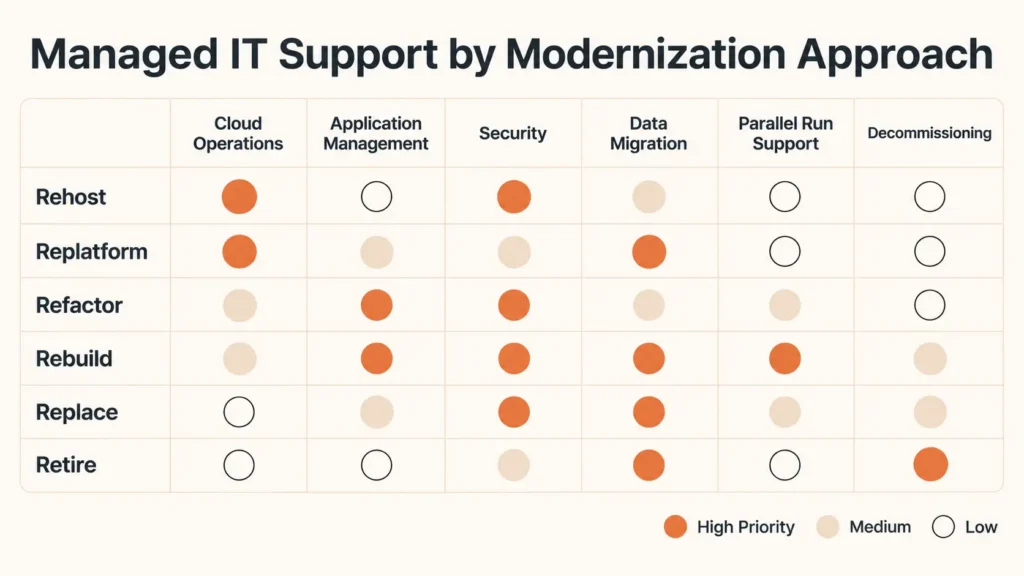
Each modernization approach changes a different layer of the system, so each one needs a different mix of managed IT support. The table below maps the widely used “6 R” approaches to the managed services that matter most for each.
Modernization approach | What changes | Managed IT support priorities |
Rehost (lift and shift) | Infrastructure moves to the cloud; application stays the same | Managed cloud operations, cost monitoring, backup and disaster recovery, security baselines for the new environment |
Replatform | Minor changes to use managed cloud components such as databases | Database administration, performance monitoring, change management, integration testing |
Refactor | Application code is restructured, often into services or containers | Application management, CI/CD and release support, observability across services, managed security for APIs |
Rebuild | Application is rewritten on a new architecture | Parallel run support for legacy and new systems, data migration, user support during cutover |
Replace | Legacy system is swapped for a commercial or SaaS product | SaaS administration, identity and access management, integration support, vendor management |
Retire | Legacy system is shut down | Data archiving and retention, access removal, licence and contract termination, secure hardware disposal |
Most enterprises use several of these approaches across their application portfolio. A provider offering managed IT support for legacy modernization should be able to support all six, rather than only the infrastructure-focused ones.
How do you keep legacy systems running while the new platform is built?
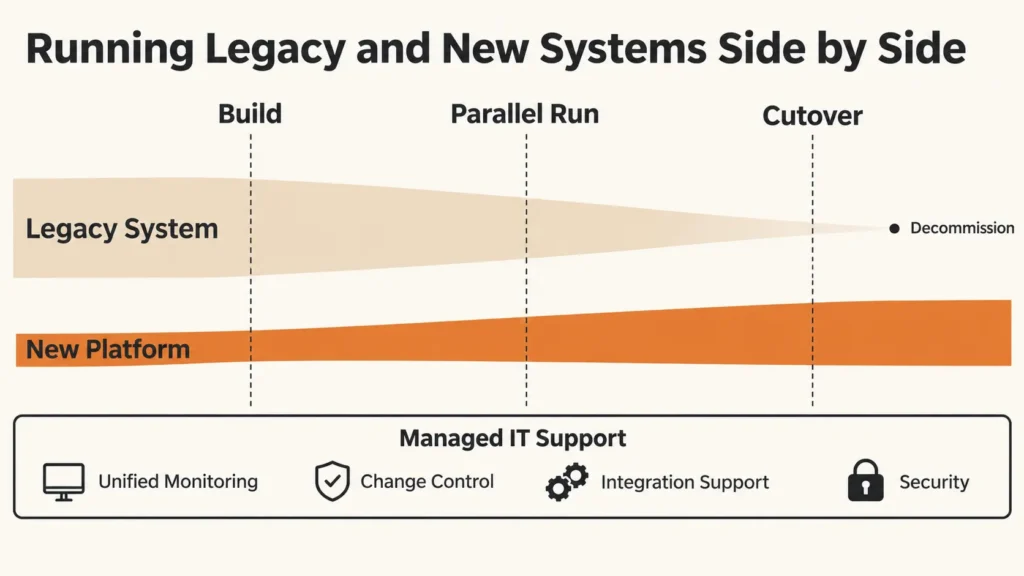
Keeping legacy systems running during modernization requires a deliberate parallel run model, a form of hybrid IT operations where both environments are monitored, supported, and secured as one service until cutover is complete. Five practices make the difference:
One monitoring view across both environments. Separate dashboards for legacy and cloud systems hide the integration failures that cause most transition incidents. A unified view lets support teams see end-to-end transactions, such as an order created in a new front end and fulfilled by a legacy back end.
Coordinated change windows. Changes to the new platform can break legacy integrations, and vice versa. A shared change calendar, with agreed freeze periods around month-end processing or peak seasons, prevents avoidable outages.
Retained legacy expertise. Knowledge of older platforms, languages, and custom integrations often sits with a handful of long-tenured staff. Managed IT support can document that knowledge and provide backup coverage, so the program does not depend on individuals who may retire or move on mid-project.
Integration support as its own service. Temporary bridges between old and new systems, such as data synchronization jobs, middleware, and API wrappers, need monitoring and ownership just like production applications.
Clear cutover and rollback runbooks. Every migration wave should have a tested plan for moving forward and for reverting if something goes wrong.
How do Canadian data residency and privacy rules affect legacy migration?
Canadian data residency and privacy rules affect legacy migration because moving data to a new platform changes where it is stored, who can access it, and which contracts govern it. Enterprises remain accountable for that data throughout the transition.
Canadian hosting options are now broad enough to keep most workloads in the country. AWS opened its Canada West (Calgary) region in December 2023, adding a second Canadian region alongside Montreal, and Microsoft Azure and Google Cloud also operate regions in Canada. This allows enterprises to design primary and disaster recovery environments that both remain within Canadian borders.
Privacy obligations still apply at every step. Under PIPEDA, organizations remain responsible for personal information they transfer to service providers for processing. In Quebec, Law 25 requires a privacy impact assessment before personal information collected in the province is communicated outside Quebec. Legacy systems often hold years of personal data with unclear classification, so a migration is the right moment to inventory, classify, and minimize what moves.
Managed IT support for legacy modernization should include data mapping, Canadian region selection, encryption and key management, and documentation that supports privacy assessments. For enterprises with Quebec employees or customers, bilingual support during cutover is also worth planning for.
What happens to security when legacy and cloud systems run side by side?
When legacy and cloud systems run side by side, the attack surface temporarily grows. Older platforms may no longer receive vendor patches, new cloud services introduce fresh configurations, and the integrations that connect them often rely on service accounts and credentials that were created quickly and reviewed rarely.
Managed security during modernization should focus on four areas:
- Identity across both environments. Users and service accounts should be governed through a single identity platform where possible, with privileged access reviewed throughout the program.
- Compensating controls for unsupported systems. Network segmentation, application allowlisting, and enhanced monitoring can reduce risk on legacy platforms that cannot be patched.
- Secure integrations. Temporary bridges between systems should use managed secrets, encrypted connections, and least-privilege permissions, and they should be removed when no longer needed.
- Centralized logging. Security events from legacy and cloud systems should feed the same detection and response process, so attacks that move between environments are visible.
How should enterprises decommission legacy systems safely?
Enterprises should decommission legacy systems only after the new platform has run in production long enough to prove stable, and only once data retention, access, and contractual obligations have been addressed.
A safe legacy system decommissioning process covers:
- Data archiving and retention. Keep the records that business, legal, and regulatory requirements demand, in a searchable archive, and dispose of the rest. Tax records, for example, generally need to be kept for six years under Canada Revenue Agency rules.
- Access removal. Disable user accounts, service accounts, and network paths to the retired system.
- Licence and contract termination. Cancel software licences, support agreements, and hosting contracts to realize the savings that justified modernization.
- Secure hardware disposal. Wipe or destroy storage media using documented, auditable methods.
- Final documentation. Record what was retired, where data now lives, and who approved the shutdown.
Decommissioning is often the step that gets skipped once the new system is live, which leaves enterprises paying for, and defending, platforms that no longer serve a purpose.
Should modernization and managed IT come from the same provider?
In most cases, combining modernization and managed IT under one provider reduces risk during the parallel run phase, when accountability matters most. A single partner owns both the application changes and the operational impact, so issues are resolved without debate over which vendor caused them.
Separate providers can work when an enterprise already has a strong managed services partner and a specialist modernization firm with a proven working relationship. In that case, a joint governance model with shared change control, shared monitoring, and clear escalation paths is essential.
How AppStudio Delivers Managed IT Support for Legacy Modernization
AppStudio brings both sides of modernization together under one team, delivering managed IT services for Canadian enterprises alongside the modernization work itself. Our legacy software modernization services cover the full path, from assessment and roadmap through rehosting, refactoring, API enablement, data migration, mainframe and COBOL modernization, and cloud-native rebuilds. Our managed IT services keep the environment running throughout, with 24/7 helpdesk support, managed cloud, managed cybersecurity, backup and disaster recovery, application management, and IT compliance and risk management.
For Canadian enterprises, that combination means:
- One accountable partner for the legacy system, the new platform, and everything that connects them
- Parallel run support with unified monitoring, change control, and integration management
- Canadian-focused delivery, including data residency planning and support for PIPEDA and Quebec Law 25 obligations
- Proven scale, with more than 1,300 projects delivered since 2015 and a team of over 275 people
- Fast onboarding, typically starting within 5 to 7 business days
If your organization is planning or already running a modernization program, book a consultation with AppStudio. Our team will review your legacy environment, recommend the right modernization approach for each system, and show you how AppStudio can keep operations stable from the first migration wave to final decommissioning.
Frequently Asked Questions
What is managed IT support for legacy modernization?
Managed IT support for legacy modernization is the operational support that keeps legacy and new systems stable, secure, and integrated while an enterprise modernizes. It typically includes legacy and cloud operations, unified monitoring, managed security, data migration support, and decommissioning.
What are the 6 R modernization approaches?
The 6 R approaches are rehost, replatform, refactor, rebuild, replace, and retire. Each changes a different layer of a legacy system, from moving infrastructure to the cloud without code changes to shutting a system down entirely.
Do Canadian enterprises need to host modernized systems in Canada?
Not every workload legally requires Canadian hosting, but many enterprises choose it to simplify privacy compliance and customer expectations. Canadian cloud regions from AWS, Microsoft Azure, and Google Cloud make it possible to keep both production and disaster recovery environments in Canada.
How long should legacy and new systems run in parallel?
The parallel run should last until the new platform has handled a full business cycle, such as month-end or a peak season, without critical issues. The exact timeline depends on system complexity, data volume, and risk tolerance.
Can managed IT services support mainframe and COBOL systems?
Yes. Managed IT support for legacy modernization can include operating, documenting, and stabilizing mainframe and COBOL systems while they are rehosted, refactored, or replaced, which reduces dependence on a small number of internal specialists.