
 iOS App Development
 Android App Development
 React Native
 Flutter
 Web Development
 Custom Software
 Front End Development
 Blockchain Development
 Virtual Reality
 Cloud Computing
 IoT Development
 Augmented Reality
 Write us a message
The inspection app on a utility technician’s phone does a lot of quiet work. It pulls the day’s work orders from the ERP, caches asset records for a substation with no signal, captures photos and signatures, and syncs everything back when the truck reaches coverage. When it works well, nobody thinks about it. That’s the goal.
Secure mobile workforce applications rely on five managed IT services for mobile workforce apps:
- Secure app engineering and testing
- App protection and distribution
- Identity and access for apps
- Backend and API operations
- Ongoing app lifecycle support
Device management matters too, but these five cover the application itself, which is where your company’s data actually lives on the phone.
We build and support workforce apps for enterprises across Canada and the US. Below, we explain each service the way we would to an IT director or product owner planning their next app, or tightening security on one already in the field.
The Services Behind Secure Mobile Workforce Applications
Managed service | What it protects | Who usually owns it today |
Secure app engineering and testing | The code, local storage and network calls inside the app | The development partner or in-house dev team |
App protection and distribution | Company data inside the app, even on personal devices | IT or the endpoint team |
Identity and access for apps | Who can sign in, from where, and on which device | IT or security |
Backend and API operations | The cloud services and APIs the app depends on | Cloud or platform team |
App lifecycle support | Compatibility, updates and performance after launch | Often nobody, which is why it’s worth naming |
Most enterprises already have a clear owner for two or three of these. The biggest gains from managed IT services for mobile workforce apps usually come from assigning the rest.
1. Secure App Engineering and Testing
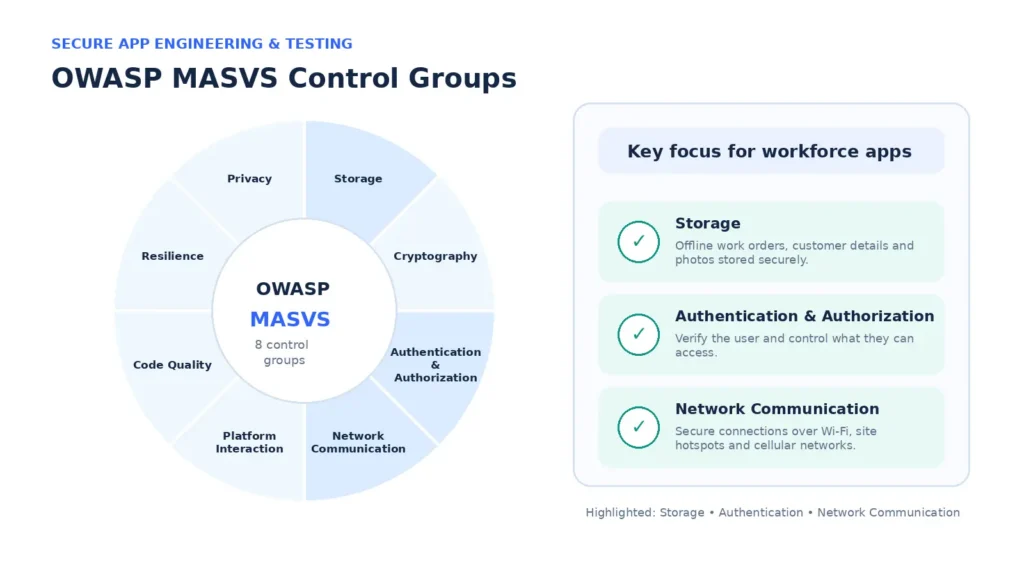
Security for a workforce app starts in the code. A widely used benchmark is the OWASP Mobile Application Security Verification Standard (MASVS). It organizes requirements into eight control groups (OWASP MAS):
- Storage
- Cryptography
- Authentication and authorization
- Network communication
- Platform interaction
- Code quality
- Resilience against reverse engineering and tampering
- Privacy
For workforce apps, three groups tend to carry the most weight:
- Storage, because offline-first apps keep work orders, customer details and photos on the device between syncs
- Authentication and authorization, because the app has to know who’s using it and what they’re allowed to see
- Network communication, because field apps connect over hotel Wi-Fi, job-site hotspots and cellular networks
A provider that tests against MASVS during every sprint, rather than once before launch, catches issues while they’re still cheap to fix. Ask to see how security findings are tracked from discovery to release.
2. App Protection and Distribution
App protection policies are one of the most useful tools in enterprise mobility, and many organizations underuse them. Microsoft describes Intune app protection policies as a way to keep an organization’s data “safe or contained in a managed app.” They can run independently of any MDM solution, on enrolled and unenrolled devices alike (Microsoft Learn).
In practice, that means you can:
- Block copy and paste from a work app into personal apps
- Stop work files being saved to local storage or personal cloud accounts
- Require a PIN or biometric to open the app
- Wipe company data from the app without touching the employee’s photos or personal apps
That last point makes BYOD programs far easier to approve. Employees keep their privacy, and IT keeps control of the data.
There’s one design decision worth making early. Microsoft officially supports its Intune App SDK and App Wrapping Tool for apps built natively on iOS (Swift or Objective-C) and Android. If app protection policies are central to your plan, that can shape whether a custom app is built natively or with a cross-platform framework. A good development partner raises this in the first workshop.
Distribution belongs here too. Workforce apps usually reach devices through managed app stores and MDM assignment. The right people get the right version automatically, and updates roll out on your schedule.
3. Identity and Access for Apps
Single sign-on improves security and makes life easier for field staff at the same time. When a field app signs in through the same identity provider as email and the ERP, users stop juggling passwords and IT gets one place to apply rules.
The managed identity service behind a workforce app should cover:
- SSO through your identity provider, such as Microsoft Entra ID or Okta
- Multi-factor authentication suited to field conditions, including options that work with gloves or poor signal
- Conditional access, so the app only opens on devices that meet your policy
- Role-based access, so a technician sees their work orders and a supervisor sees the whole region
- Same-day access removal when someone leaves
Microsoft recommends pairing app protection policies with Conditional Access so those policies are enforced. It’s a good example of how these services work best together.
4. Backend and API Operations
The app on the phone is the visible part. Behind it sit APIs, sync services, databases, push notifications and integrations with ERP, CRM, field service and HR systems.
As part of managed IT services for mobile workforce apps, this layer keeps those components monitored around the clock, patched and scaled for demand. For workforce apps, the details that matter most are:
- Sync health: how many devices are waiting to upload
- API error rates by app version
- Certificate expiry dates, since an expired certificate can stop every device from connecting at once
5. App Lifecycle Support
Mobile platforms move quickly, so workforce apps need steady care after launch. Each major iOS and Android release, new device models and changes to third-party SDKs can affect how an app behaves.
Here’s an illustrative example of the workload. An enterprise runs six workforce apps on both iOS and Android, and each platform ships one major OS release a year:
6 apps × 2 platforms × 1 major release each = 12 regression test cycles a year
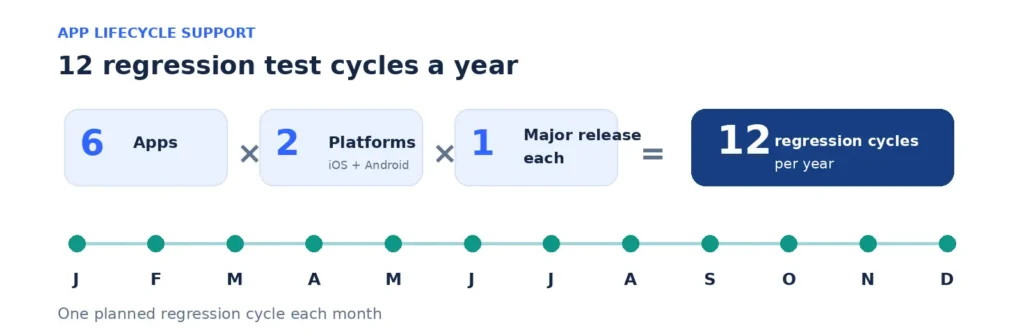
That’s one full regression cycle a month before counting minor OS updates, SDK upgrades or new features. Planned in advance, it’s routine work. Left to chance, a September OS update turns into a support queue.
Good lifecycle support also includes crash and performance monitoring, a regular release schedule, and a clear path for users to report problems from the field.
Why the App Layer Deserves Its Own Plan
Device management gives you a strong foundation, and app-level controls build on it. Zimperium’s 2025 Global Mobile Threat Report found that nearly 25% of enterprise devices have sideloaded apps, and about 25% of mobile devices in use can’t upgrade to the latest operating system (Help Net Security).
For an organization with 800 mobile users, that’s roughly:
800 × 0.25 = about 200 devices with sideloaded apps, and a similar number that can’t run the newest OS
The encouraging part is that app protection, secure storage and conditional access keep company data contained even on those devices. Security travels with the app, so the device doesn’t have to be perfect.
Example: A Lost Phone on a Job Site
This scenario is illustrative. A technician uses a personal Android phone for work under a BYOD policy and leaves it at a customer site at 3:40 p.m.
- 3:40 p.m.: The phone is left behind. The work app is locked behind a PIN and times out after five minutes of inactivity
- 4:15 p.m.: The technician reports it to the help desk from a colleague’s phone
- 4:20 p.m.: IT issues a selective wipe of company data from the work app. The technician’s personal photos and apps are untouched
- 4:22 p.m.: The account’s active sessions are revoked through the identity provider
- Next morning: The technician signs in on a replacement device through SSO, and the app syncs that day’s work orders automatically
No customer data leaves the company’s control, and the technician loses about half a day rather than a week. Each step depends on a different service from this list working as planned.
Questions to Ask a Provider
These questions show quickly whether a provider can support secure mobile workforce applications end to end.
- Do you test workforce apps against OWASP MASVS, and how often?
- How will our app work with Intune app protection or our existing MDM?
- Which identity providers have you integrated for SSO and conditional access?
- How do you protect data stored offline on the device?
- Who monitors our APIs and sync services, and what are the alert thresholds?
- How do you prepare our apps for each major iOS and Android release?
- Can the same team build new features and support the app in production?
How AppStudio Supports Secure Mobile Workforce Applications
AppStudio works on both sides of the screen: the app your people use and the environment that keeps it running.
On the app side, our enterprise app development team builds:
- Native iOS and Android apps with Swift, Kotlin and Jetpack Compose
- Cross-platform apps with Flutter and React Native
- Offline-first experiences with enterprise SSO and MDM support
- Access control, encryption and audit trails, built in from the first sprint
DevSecOps and security testing run in every sprint. Integrations connect apps to ERP, CRM and line-of-business systems through APIs and middleware. After launch, our team handles updates, proactive monitoring, tuning and lifecycle management.
On the environment side, our managed IT team supports endpoint management with platforms including Microsoft Intune, Jamf Pro, VMware Workspace ONE and IBM MaaS360. Our managed cloud services run the AWS, Azure or Google Cloud backends your apps depend on, with 24/7 monitoring.
If you’re planning the device side of your program as well, our guide to managed IT services for enterprise mobility covers ownership models and device lifecycle.
AppStudio has delivered 1,300+ projects since 2015. It holds ISO 9001 and ISO/IEC 27001 certifications and a SOC 2 Type II attestation.
Frequently asked questions
Which managed IT services support secure mobile workforce applications?
Five services work together: secure app engineering and testing, app protection and distribution, identity and access management, backend and API operations, and app lifecycle support. Device management provides the foundation underneath them.
What do managed IT services for mobile workforce apps include?
They cover the app and everything it depends on: secure development and testing, app protection policies, single sign-on and conditional access, monitoring of the APIs and sync services behind the app, and ongoing updates for each new iOS and Android release.
What is OWASP MASVS?
The OWASP Mobile Application Security Verification Standard is a widely used benchmark for mobile app security. It groups requirements into eight areas, including storage, cryptography, authentication, network communication and privacy.
Can company data be protected on personal devices without full device management?
Yes. App protection policies, such as those in Microsoft Intune, can protect company data inside managed apps on devices that aren’t enrolled. They can block copy and paste, and wipe only company data.
Should enterprise workforce apps be native or cross-platform?
Both can work well. If you plan to rely on Intune app protection for a custom app, factor in that Microsoft’s SDK and wrapping tool officially support native iOS and Android development. Decide early, alongside your security requirements.
How should offline data in a field app be secured?
Store only what users need for the task and encrypt it on the device. Clear it on sign-out or selective wipe, and sync it back to the server as soon as a connection returns.
Who should support a workforce app after launch?
Ideally the team that built it, with clear responsibility for OS release testing, crash monitoring, updates and backend operations.
Give Your Mobile Teams Apps They Can Trust
Secure mobile workforce applications are among the most valuable tools an enterprise can put in employees’ hands. With secure engineering, app protection, strong identity, reliable backends and steady lifecycle care, they stay fast for users and safe for the business.
Book a free 30-minute call with AppStudio to talk through the workforce apps you’re planning or running today, and the managed IT services for mobile workforce apps that will keep them secure. We’ll show you how we’d build, secure and support them as one program.