
 iOS App Development
 Android App Development
 React Native
 Flutter
 Web Development
 Custom Software
 Front End Development
 Blockchain Development
 Virtual Reality
 Cloud Computing
 IoT Development
 Augmented Reality
 Write us a message
A field technician opens a work order on a phone in a client’s parking lot. A regional manager approves an invoice from an airport lounge. A nurse checks a patient record on a shared tablet. Each of those moments depends on a device the IT team rarely sees, on a network it doesn’t control, running apps that hold sensitive company data.
That’s enterprise mobility today. It’s why organizations are looking for managed IT services for enterprise mobility instead of treating phones and tablets as an afterthought to laptop management. The best services manage the full picture: the devices, the apps on them, the identities behind them and every stage of their life, from purchase to secure retirement.
This guide is organized around the two decisions that shape every mobility program: how devices are owned, and how they’re managed across their lifecycle. It then shows what to expect from a provider at each stage.
What the Best Enterprise Mobility Services Deliver
The strongest enterprise mobility IT services share six capabilities:
- Device management across every platform, covering iOS, iPadOS, Android and Windows devices from one console
- Ownership-aware policies that protect company data on personal devices without intruding on personal use
- Identity-first security, including phishing-resistant multi-factor authentication and conditional access
- App management, controlling how business apps are deployed, configured and protected
- Lifecycle operations that handle procurement, enrollment, support, refresh and secure wipe
- Clear reporting on compliance, patch status, and lost or retired devices
A provider that only enrolls devices in a management console covers a fraction of this list.
Decision 1: Choose Your Ownership Model
Every mobility program starts with a simple question: who owns the device? The answer determines how much control IT can apply and how much privacy employees can expect. That’s why NIST’s guidelines for managing mobile devices in the enterprise and the Canadian Centre for Cyber Security’s enterprise mobility guidance both treat organization-provided and personally owned devices separately.
Model | Who owns the device | Level of IT control | Best suited for |
Corporate-owned, business only (COBO) | The organization | Full control of the device | Regulated roles, shared or frontline devices |
Corporate-owned, personally enabled (COPE) | The organization | Full control of work data, with limited personal use allowed | Managers and staff who need one device for both |
Choose your own device (CYOD) | The organization, from an approved list | Similar to COPE, with more employee choice | Organizations balancing standardization and preference |
Bring your own device (BYOD) | The employee | Limited to work apps and data | Knowledge workers handling low to moderately sensitive data |
Dedicated or kiosk devices | The organization | Locked to one app or a few | Warehouses, retail, field service, healthcare carts |
Most enterprises run a mix. The best IT MSP for enterprise mobility can apply different policies to each model from the same platform, rather than forcing one approach on everyone.
Decision 2: Manage the Full Device Lifecycle
Mobility risk rarely comes from a single failure. It builds up in the gaps between stages: a device shipped without being enrolled, a phone left unpatched for months, a departing employee whose tablet is never wiped. NIST frames its guidance around the secure deployment, use and disposal of mobile devices across their lifecycle (NIST). A strong managed service follows the same arc.
Lifecycle stage | What the provider should handle | What goes wrong without it |
Procure | A standard device catalogue, ordering, asset tagging | Unsupported models, untracked devices |
Enroll | Automated enrollment, so devices arrive configured | Manual setup, inconsistent settings, delays for new hires |
Secure | Encryption, passcodes, OS update rules, app controls | Unprotected data on lost or stolen devices |
Support | A help desk for mobile issues, remote troubleshooting | Lost productivity in the field |
Update | Monitored OS and app patching | Known vulnerabilities left open |
Retire | Remote wipe, unenrollment, reuse or certified disposal | Company data on devices that have left the business |
Why Mobile Is Now a Frontline Risk
Mobile devices are no longer a secondary target for attackers. Verizon’s 2025 Mobile Security Index surveyed nearly 800 professionals and found that 85% of organizations report a surge in mobile device attacks. Among organizations that had a mobile-related security incident:
- 47% experienced downtime.
- 45% lost data.
- 40% faced financial penalties or fines.
63% reported significant repercussions from downtime, up from 47% a year earlier (SecurityWeek).
Management tools alone aren’t the answer. The Canadian Centre for Cyber Security’s May 2026 enterprise mobility guidance states plainly: “Do not rely on an MDM (mobile device management) solution to make up for poor mobile device security.” It recommends three safeguards (Cyber Centre ITSM.80.001):
- Use phishing-resistant multi-factor authentication.
- Secure organization-issued devices before users get access.
- Don’t rely on app store vetting alone to judge whether an app is safe.
In practice, the best managed mobility services combine device management with identity controls, app vetting and ongoing user awareness.
MDM, EMM and UEM: What You’re Actually Buying
These terms are often used interchangeably, but each covers a different scope:
- Mobile device management (MDM): controls the device itself, including enrollment, configuration, passcodes, encryption, updates and remote wipe.
- Enterprise mobility management (EMM): everything in MDM, plus deeper capabilities. The Cyber Centre says EMM adds advanced containerization (walling work data off from personal data), management of corporate credentials and authentication, advanced mobile app management, and integration with other enterprise platforms.
- Unified endpoint management (UEM): applies the same management approach to mobile devices, laptops and desktops from a single console.
For most enterprises, the goal is a unified approach, so one employee’s phone, tablet and laptop all follow consistent policies.
The Joiner, Mover and Leaver Math
Mobility workload grows quietly with headcount and turnover. Here’s an illustrative example for an organization with 400 mobile users.
Device changes from turnover. At 15% annual turnover, about 60 people leave and 60 join each year:
60 joiners + 60 leavers = 120 device events a year from turnover alone
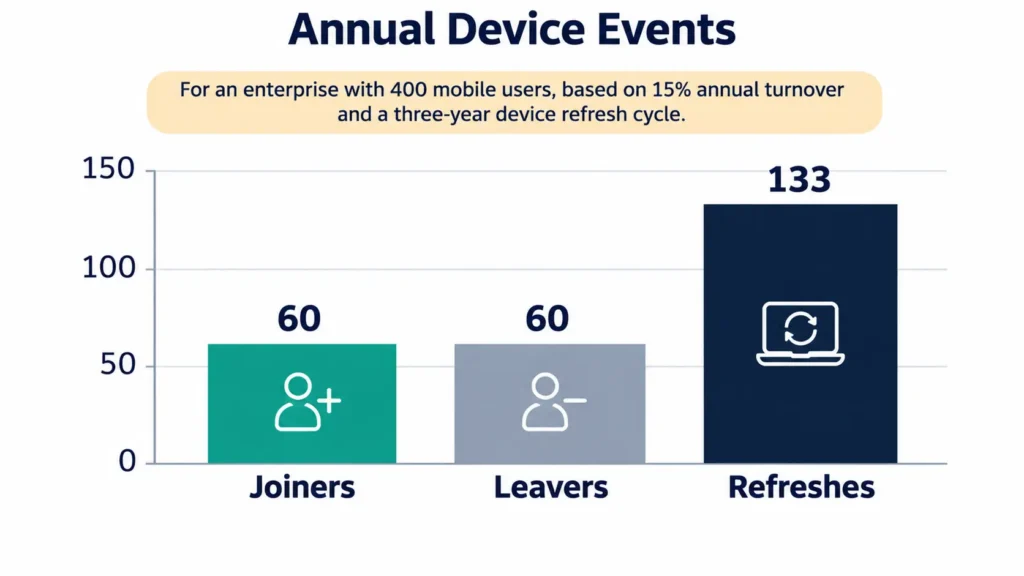
Device changes from refresh. If devices are replaced every three years:
400 ÷ 3 = about 133 devices to provision and retire each year
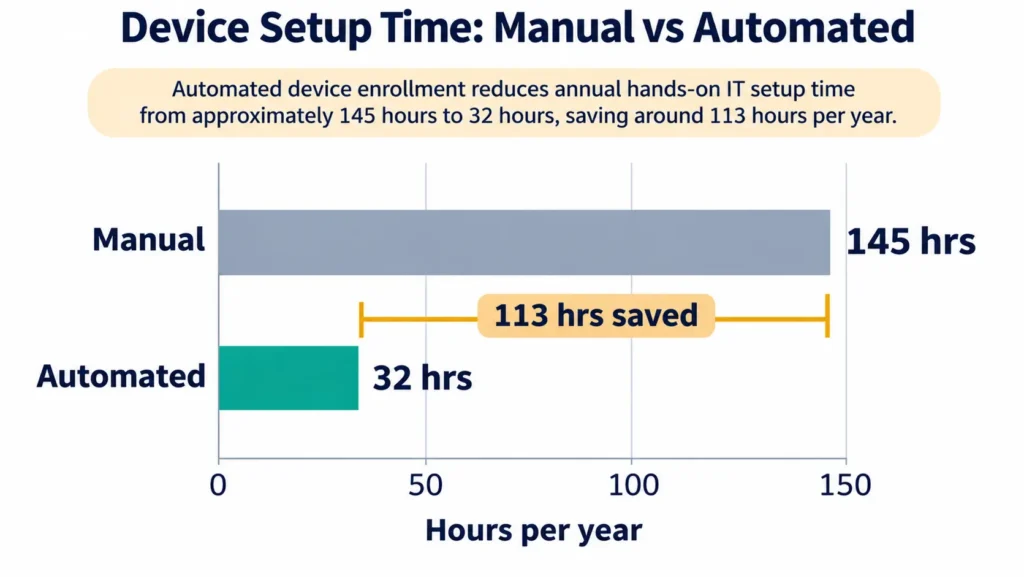
Time at stake. That’s 193 new or replacement devices a year (60 joiners plus 133 refreshes). Suppose manual setup takes 45 minutes per device, and automated enrollment cuts hands-on time to 10 minutes:
- Manual: 193 × 45 minutes = 8,685 minutes, about 145 hours
- Automated: 193 × 10 minutes = 1,930 minutes, about 32 hours
- Saved: about 113 hours of IT time a year
The setup times are assumptions for illustration, so substitute your own figures. The bigger point is risk. Every one of the 60 leavers has a device that must be wiped or recovered, and any that slips through is company data walking out the door.
Apps Are Half of Mobility
Managing devices is only half the job. The other half is the business apps employees use on them, from field service and sales tools to approval workflows and customer records.
The best mobility programs make sure business apps are built and deployed to work with device management, not around it. That means apps that:
- Support single sign-on
- Follow device management policies
- Protect data stored offline
- Can be configured and updated centrally
This is where many providers stop short. Their enterprise mobility IT services cover devices, but they can’t build or modernize the apps that run on them, so enterprises end up coordinating two or three vendors to keep mobile workflows secure.
Questions to Ask a Managed Mobility Provider
These questions separate the best IT MSP for enterprise mobility from providers that only enroll devices.
- Which platforms and ownership models can you manage from one console?
- How do you protect company data on personal devices while respecting employee privacy?
- How are new devices enrolled, and how long does a new hire wait for a working device?
- What happens, step by step, when an employee leaves or reports a device lost?
- How do you combine device management with phishing-resistant MFA and conditional access?
- Which mobile device management platforms do you operate?
- Can you build or adapt our business apps to work with our device policies?
- What will monthly reports show us about compliance, updates, and retired devices?
How AppStudio Supports Enterprise Mobility
AppStudio combines two capabilities that many providers keep separate: managed device operations and enterprise app development.
On the device side, AppStudio’s managed IT services include:
- Endpoint management with cloud-native tools, on platforms including Microsoft Intune, Jamf Pro, VMware Workspace ONE and IBM MaaS360
- IT asset management that tracks every device, application and license through its full lifecycle, from purchase to retirement
- Structured onboarding and offboarding that handles joiners, movers and leavers consistently, with access tied to your policies
- Onboarding that can begin within 5 to 7 business days for most environments
On the app side, AppStudio’s enterprise app development team builds native iOS, Android and cross-platform apps for mobile workforces. That includes offline-first field, sales and operations apps with enterprise SSO and MDM support. Access control, encryption and audit trails are built in from the start.
As a result, one accountable partner can plan and run the devices, the apps and the policies that connect them. AppStudio has delivered 1,300+ projects since 2015, holds ISO 9001 and ISO/IEC 27001 certifications, and has a SOC 2 Type II attestation.
Frequently asked questions
What are the best managed IT services for enterprise mobility?
The best services:
- Manage devices across iOS, Android and Windows
- Apply different policies to corporate and personal devices
- Enforce phishing-resistant MFA
- Manage business apps
- Handle the full device lifecycle, from procurement to secure wipe
- Provide regular compliance reporting
What is the difference between MDM and EMM?
MDM manages the device itself, covering enrollment, passcodes, encryption and remote wipe. EMM adds deeper capabilities, including containerization, credential management, mobile app management and integration with other enterprise systems.
Is BYOD safe for enterprises?
BYOD can be safe under three conditions: company data is kept separate from personal data, access is protected with strong authentication, and policies and user agreements are clear. The Canadian Centre for Cyber Security publishes specific guidance on BYOD policies and user agreements.
What happens to company data when an employee leaves?
A managed provider should follow a defined offboarding process. It removes the employee’s access, wipes company data from personal devices or fully wipes corporate devices, and recovers or redeploys the hardware.
How do I choose the best IT MSP for enterprise mobility?
Look for a provider that can do four things:
- manage every platform and ownership model from one console
- combine device management with phishing-resistant MFA
- run joiners, movers and leavers end to end
- report monthly on compliance and retired devices
If your teams rely on custom mobile apps, give extra weight to a provider whose enterprise mobility IT services include building and updating those apps.
Can one provider manage both devices and mobile apps?
Yes, and it makes security simpler. When the same partner manages the devices and builds the apps that run on them, policies, authentication and data protection can be designed to work together.
Build Mobility Around the Way Your People Work
Enterprise mobility works when devices, apps and identities are managed as one system across their whole life. Choose the right ownership model, close the gaps between lifecycle stages, and pair device management with secure apps, and mobility becomes an advantage instead of a risk.
If you’re planning or reworking your mobility program, book a free 30-minute call with AppStudio. We’ll review your current devices, apps and policies, and map the ownership model and management approach that fits your workforce.