
 iOS App Development
 Android App Development
 React Native
 Flutter
 Web Development
 Custom Software
 Front End Development
 Blockchain Development
 Virtual Reality
 Cloud Computing
 IoT Development
 Augmented Reality
 Write us a message
Attackers don’t keep office hours, and the time between a first alert and real damage keeps shrinking. That’s why more Canadian and US organizations are turning to managed IT security services for 24/7 threat monitoring. A team of analysts watches endpoints, identities, networks and cloud environments around the clock. It investigates anything suspicious and starts containment before a small intrusion becomes a costly breach.
This guide explains how round-the-clock monitoring works, what it covers, what it costs to staff in-house, and how to evaluate a managed provider. Every statistic is sourced, and most come from research published in 2026.
Why Round-the-Clock Coverage Now Matters
Three findings from 2026 research explain why business-hours security is no longer enough.
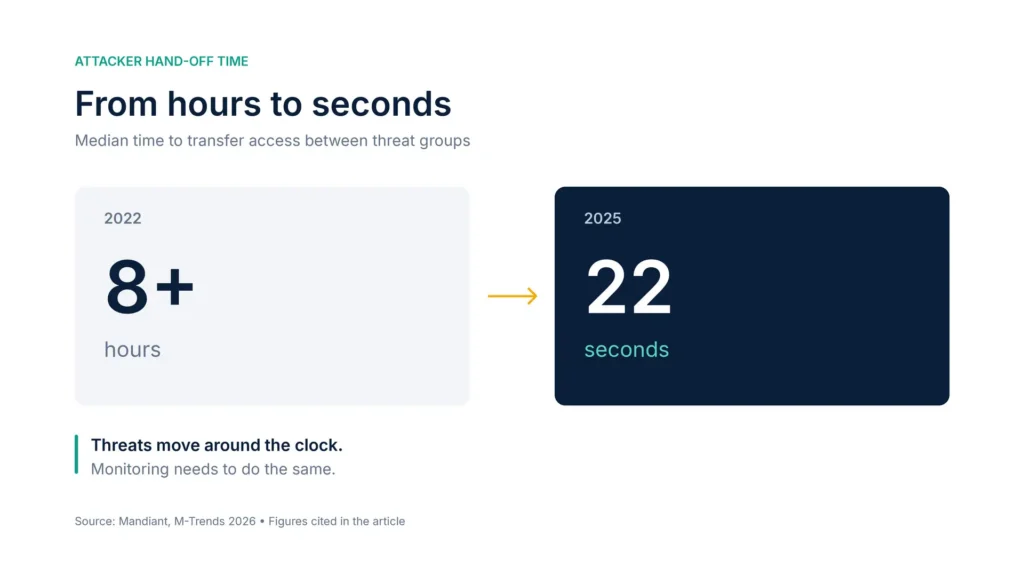
Attacks move faster than ever. Mandiant’s M-Trends 2026 report looked at how long it takes a group that breaks into a network to hand that access to a second threat group. The median fell from more than 8 hours in 2022 to just 22 seconds in 2025 (Google Cloud, M-Trends 2026). The same report estimates a mean time to exploit of minus 7 days, which means vulnerabilities are often exploited before a patch exists.
Attackers stay hidden for days, or much longer. Dwell time is how long an attacker is inside before being detected. The global median rose from 11 days to 14 days in 2025, and for cyber espionage incidents it was 122 days.
Slow detection is expensive. IBM’s 2026 Cost of a Data Breach research found it took an average of 247 days to identify and contain a breach. Breaches that ran past 200 days cost $5.65 million on average, compared with $4.32 million for those contained sooner (eSecurity Planet). In Canada, the average breach cost reached a record CA$7.11 million, with an average lifecycle of 205 days (IBM Canada).
The data has good news too. Mandiant found that organizations detected 52% of intrusions internally in 2025, up from 43% in 2024. Detection is improving, and continuous monitoring is how organizations keep that trend going.
The Coverage Gap: What Business-Hours Monitoring Misses
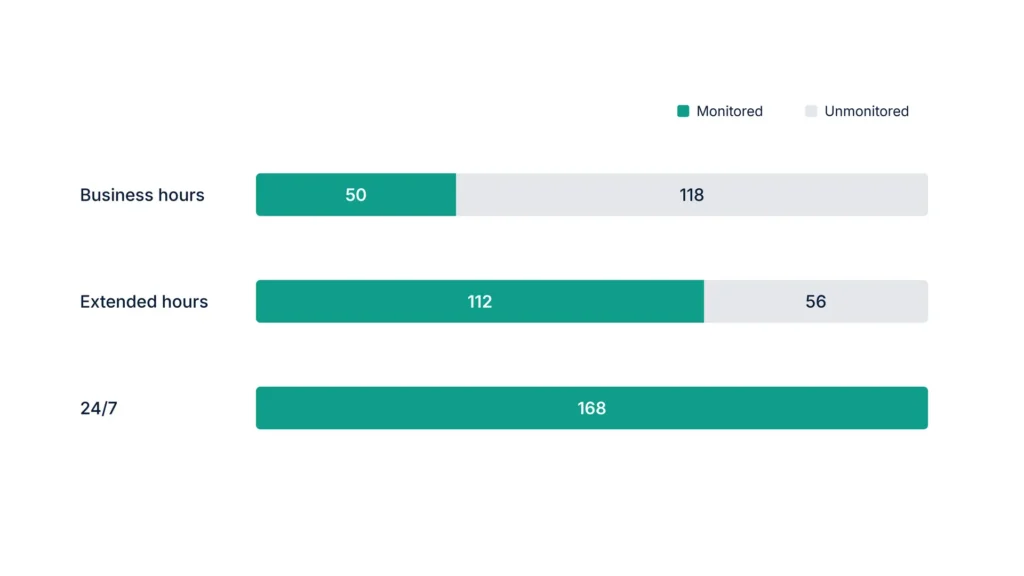
A week has 168 hours. A typical business-hours security team, working 8 a.m. to 6 p.m. on weekdays, covers 50 of them.
168 − 50 = 118 unmonitored hours every week
118 ÷ 168 = about 70% of the week with no one watching
Coverage model | Monitored hours per week | Unmonitored hours per week | Unmonitored hours per year |
Business hours (8 a.m. to 6 p.m., Monday to Friday) | 50 | 118 | 6,136 |
Extended hours (7 a.m. to 11 p.m., 7 days) | 112 | 56 | 2,912 |
Full 24/7 coverage | 168 | 0 | 0 |
A single weekend shows the risk. From 6 p.m. Friday to 9 a.m. Monday is 63 hours. Access can change hands in 22 seconds, and attackers typically go undetected for two weeks. So an attacker who gets in on Friday evening has nearly three full days to move before anyone looks.
How 24/7 Threat Monitoring Works
Managed threat monitoring follows a continuous cycle. The provider should clearly own each step, and you should be able to see it.
- Collect: logs and activity data flow from endpoints, identity systems, firewalls, cloud platforms and email into a central platform, usually a SIEM (security information and event management system).
- Correlate: detection rules link related events. A suspicious login followed by unusual data access is treated as one incident, not two separate alerts.
- Triage: analysts review each alert, discard false positives and assign a severity level.
- Investigate: for real threats, analysts establish what happened, which systems are affected and how far the attacker got.
- Contain: depending on the agreed playbook, the provider isolates devices, disables accounts or blocks traffic, or escalates to your team for approval.
- Report and improve: every incident feeds into detection tuning, monthly reporting and recommendations to close the gap that allowed it.
What Round-the-Clock Monitoring Should Cover
Attackers rarely stay in one place, so monitoring has to span every layer of the environment.
Area | What analysts watch for | Example response |
Endpoints (laptops, servers) | Malware, ransomware behaviour, suspicious processes | Isolate the device from the network |
Identities and access | Logins from impossible locations, MFA fatigue attacks, privilege escalation | Disable the account and reset credentials |
Email and collaboration | Phishing, business email compromise, malicious attachments | Quarantine messages across all inboxes |
Network and firewall | Unusual outbound traffic, scanning, connections to attacker-controlled servers | Block the destination and investigate the source |
Cloud platforms (AWS, Azure, Google Cloud) | Misconfigurations, unusual API activity, exposed storage | Revoke keys and correct the configuration |
Vulnerabilities | Newly disclosed flaws on internet-facing systems | Prioritize patching or apply a temporary fix |
Identity monitoring deserves special attention. Mandiant found voice phishing was the second most common way attackers got in during 2025, at 11% of intrusions, behind exploited vulnerabilities at 32%. Voice phishing typically aims to steal legitimate credentials. That’s why monitoring how accounts behave matters as much as endpoint protection.
What 24/7 Monitoring Costs to Staff In-House
Covering one analyst seat around the clock takes more than one analyst.
168 hours ÷ 40 hours per analyst = 4.2 full-time analysts per seat
That’s before vacations, sick days, training and turnover. Here’s what that minimum looks like in wages alone:
Market | Median analyst wage | Calculation | Minimum annual wages for one 24/7 seat |
United States | $129,180 per year, information security analysts (BLS) | 4.2 × $129,180 | $542,556 |
Canada | CA$49.52 per hour, cybersecurity analysts (Job Bank) | 4.2 × (CA$49.52 × 2,080) | CA$432,607 |
These figures cover only one seat. They also exclude:
- Benefits
- SIEM and endpoint detection licensing
- Threat intelligence feeds
- Management time
- The senior engineers needed for incident response
A managed provider spreads analysts, tools and expertise across many clients. That’s how many mid-sized organizations get round-the-clock coverage at a fraction of the in-house cost.
In-House, Managed or Co-Managed?
Model | How it works | Best for |
In-house SOC | Your own analysts, tools and processes, staffed 24/7 | Large enterprises with the budget and hiring capacity |
Fully managed monitoring | The provider runs monitoring, triage and response end to end | Organizations without a dedicated security team |
Co-managed monitoring | The provider covers nights, weekends and triage, and your team handles strategy and escalations | Organizations with a small security team that can’t cover 168 hours a week |
How to Evaluate a Managed Threat Monitoring Provider
Ask every provider the same questions:
- Who is watching at 3 a.m.? Ask about named analysts, shift rotations and how many analysts are on duty overnight.
- What can you do without asking us first? Agree in writing which containment actions the provider can take immediately and which need your approval.
- What are your response targets? Agree severity levels with defined response and escalation times before go-live.
- Where does our data live? Confirm whether logs stay in your own tenant and where they’re stored. This matters especially for Canadian data residency requirements.
- How are you certified? Look for ISO 27001 and a SOC 2 Type II report, and ask to see them.
- How fast can you go live? Ask when core monitoring starts and when detections will be fully tuned.
- What will we see each month? Request a sample monthly report and a quarterly executive review.
Red flags to watch for:
- Monitoring that only sends automated alerts overnight, with no analyst reviewing them
- No clear authority to contain a threat
- Vague answers about where analysts are located
- No evidence of certifications
How AppStudio Delivers Round-the-Clock Monitoring
AppStudio provides managed security for organizations across Canada and the US. Since 2015 it has delivered 1,300+ projects, with 275+ people across 8 countries.
- Round-the-clock coverage: named analysts on set shift rotations, including nights, weekends and holidays, monitoring endpoints, identities, networks and cloud.
- Analyst-validated alerts: the security operations team triages and investigates alerts before they reach you, using defined severity levels and pre-built runbooks.
- Fast onboarding: onboarding usually starts within 5 business days and core monitoring goes live in the first week. Typical mid-sized environments are fully tuned in 2 to 4 weeks.
- Your data, your tenant: AppStudio operates SIEM platforms including Splunk, Microsoft Sentinel, Elastic and QRadar, and keeps your data in your own tenant.
- Compliance-ready evidence: monitoring evidence is mapped to SOC 2, ISO 27001, HIPAA and PCI DSS.
- Certified operations: ISO 9001 (2021), ISO/IEC 27001 (2023) and a SOC 2 Type II attestation (2023).
- Clear reporting: monthly reports and quarterly executive reviews.
Frequently Asked Questions
What is 24/7 threat monitoring?
24/7 threat monitoring is continuous, around-the-clock watching of an organization’s endpoints, identities, networks, email and cloud environments. Security analysts investigate suspicious activity and begin containment at any hour.
How is 24/7 threat monitoring different from antivirus?
Antivirus blocks known threats on individual devices. Continuous monitoring connects activity across the whole environment, so it catches attacks that use legitimate credentials or tools. It also puts a human analyst behind every serious alert.
How much does it cost to run 24/7 monitoring in-house?
One analyst seat needs about 4.2 full-time analysts. At median wages, that’s about $542,556 a year in the US or CA$432,607 in Canada, before benefits, tools and management.
How quickly can managed threat monitoring be set up?
With AppStudio, onboarding usually starts within 5 business days and core monitoring goes live in the first week. Typical mid-sized environments are fully tuned in 2 to 4 weeks.
Can a managed provider work alongside our internal security team?
Yes. In a co-managed model, the provider covers nights, weekends and alert triage, while your team keeps ownership of strategy, architecture and major decisions.
Close the 118-Hour Gap
Business-hours security leaves about 70% of the week unwatched, while attackers can hand off access in seconds. Managed IT security services for 24/7 threat monitoring close that gap without the cost of building a full in-house SOC. To find out where your coverage stands today, book a security consultation with AppStudio to review your monitoring, response readiness and compliance evidence.