
Oil and Gas App Development Company
Oil and Gas App Development Company | Offline-First Field Apps, Read-Only SCADA Integration, and GIS-Linked Inspection Records
Our oil and gas mobile app development covers work orders, inspections, and HSE reporting for crews at wellsites, compressor stations, and along pipeline rights-of-way. The apps keep working without signal, and production data reaches them through a read-only layer with no write path to your control systems.
Tell Us About Your Oil and Gas App Development Project
We only use your info to contact you about your project.
















Why Producers Pick AppStudio as Their Oil and Gas Software Development Company
Built for No-Signal Sites
Offline storage is the first requirement in oil and gas mobile app development: forms, drawings, and asset lists stay on the device and sync when a crew reaches coverage or site Wi-Fi. When two offline edits collide, a supervisor sees both versions.
Read-Only Access to Control Data
Apps read SCADA and historian tags from a replica in your DMZ, so the app has no write path to a controller or setpoint. We plan that connection around the IEC 62443 zones and conduits your OT team already defines.
Each Integration Priced Separately
In custom oil and gas software development, cost follows the systems an app touches: SAP, the historian, GIS, and your permit system. Each system is quoted separately, so adding one is priced before work on it starts.
Tested on Site With Your Crews
Our oilfield app development starts with the operators, inspectors, and HSE advisors who fill in the forms today. Field tests use gloves, low light, and the rugged devices your crews already carry.
Services
Oil and Gas App Development Services for Field and Office Teams
Field Operations & Work Order Apps
- Run sheets, well checks, and work orders that open offline.
- Readings, photos, and signatures saved against each task.
- Jobs pulled from SAP PM or Maximo and closed out there when done.
Pipeline Inspection & Integrity Apps
- Dig sheets, ILI follow-ups, and right-of-way patrol forms.
- Findings tied to stationing and segments in your ArcGIS model.
- Cathodic protection readings logged against each test post.
SCADA & Historian Dashboards
- Read-only tag feeds from AVEVA PI, Ignition, or Canary.
- Well, compressor, and tank screens with alarm and trend history.
- Separate views for control room, field, and engineering staff.
HSE, Permit & Incident Apps
- Near-miss, incident, and spill reports with photos and GPS.
- Field level hazard assessments signed by each crew member.
- Hot work and confined space permits issued and closed in the app.
IoT Sensors & Remote Monitoring
- Gas detector, tank level, and pump sensors on LoRaWAN or LTE.
- MQTT and OPC UA gateways that buffer readings through outages.
- Text and push threshold alerts that sit alongside your fire and gas system.
SAP, ERP & GIS Integration
- SAP S/4HANA connectors for work orders, materials, and costs.
- ArcGIS feature services shared by field and office apps.
- An API layer so new apps never write straight into SAP.
Asset Maintenance & Reliability Apps
- Preventive maintenance routes drawn from your CMMS schedule.
- Equipment history and manuals opened by scanning a QR tag.
- Failure codes recorded in the field for reliability reviews.
Production Data & Analytics
- Production, downtime, and flaring data in one time-series store.
- Daily production and deferment reports built from historian data.
- Forecast models for decline curves and equipment failure risk.
AR Training & Remote Assist
- Step-by-step AR overlays for valve and pump procedures.
- Video calls where a remote expert marks up the live view.
- 3D facility walkthroughs for orientation before site access.
Mobile Security & OT Risk Testing
- Device management, certificate pinning, and remote wipe for lost tablets.
- Testing against OWASP MASVS ahead of every major version.
- Network tests confirming apps have no route into control networks.
Dedicated Engineers for Energy Projects
- Integration, mobile, and QA engineers placed in your project team.
- Engineers who have worked with historian, SAP, and ArcGIS APIs.
- Headcount changed between build, rollout, and support phases.
Post-Launch Support & Managed IT
- Sync queues and failed uploads watched daily after go-live.
- Releases timed around winter drilling season and spring breakup.
- Device fleet, network, and helpdesk support for field offices.

Oil and gas mobile app development for sites past the last cell tower.
Book a Free Oil and Gas App Consultation ›Our operators filled in paper run sheets and the field office re-keyed them every Friday. Readings from leases with no coverage now reach our engineers the same day the truck gets back in range.Production Superintendent, Heavy Oil Producer, Lloydminster, SK
What Changes With Custom Oil and Gas Software Development
Business Priorities
Industry Gaps
Our Proven Advantage
Security Standards for Oil and Gas Software Development
Field data is handled to ISO 27001 security and ISO 9001 quality practices, with access governed by SOC 2 criteria. OT connections are designed with IEC 62443, API 1164, and CSA Z246.1 guidance, and personal data is handled under PIPEDA and Alberta PIPA. The inspection and incident records our apps capture give your team the source data for AER, BCER, and CER reporting.



Talk Through Your Oil and Gas App With an Engineer
Share one form your crews still fill in by hand and roughly how many sites use it. An engineer walks through where that data should go and what the first release of your oil and gas app development project would include.
Rated by Clients of Our Oil and Gas App Development Company
Verified reviews on these platforms score AppStudio on quality, schedule, cost, and willingness to refer.


AppStudio’s Oilfield App Development Tech Stack
Field apps are written in native Swift and Kotlin, or shared React Native and Flutter, with SQLite holding records until sync. On the server side, PI Web API and OPC UA connectors read your historian, MQTT carries sensor readings from the edge, Kafka streams them into InfluxDB or Snowflake, and ArcGIS and SAP connectors keep one asset record.
 OPC UA
 MQTT
 Eclipse Mosquitto
 Node-RED
 AVEVA PI System
 Ignition SCADA
 Modbus
 ArcGIS
 QGIS
 Mapbox
 Google Maps
 OpenStreetMap


 InfluxDB
 Grafana
 PostgreSQL
 Snowflake
 Databricks
 Power BI


 Unity
 Autodesk
 Unreal Engine
 Microsoft Azure
 AWS
 Google Cloud
 Kubernetes
 Terraform
 GitHub Actions
 Okta
 Keycloak
 OWASP
 Snyk
 Sentry
Five Stages of AppStudio’s Oil and Gas Application Development
We open every oil and gas app development project with a site visit. We ride along on an operator’s run, photograph each form the crew fills in, and trace where its data ends up: SAP, the historian, GIS, or a shared drive.
OT security approves the integration design before any historian connection opens, and field supervisors approve each screen after testing it on site.
of stored field work replayed in our offline sync tests
from site visit to the first build on pilot crew devices
mobile and web apps launched for Canadian and US clients
Feedback From Operators on Our Oilfield App Development
Recent Client Work From AppStudio Engineers

Empowering Future Talent in Trades and Technology
Commissioned by Skills Compétences Canada, we built a national bilingual platform with native apps, a secure CMS, and Canadian cloud infrastructure to promote trades and technology careers at scale.
Digitizing Wildlife Surveillance for National Resilience
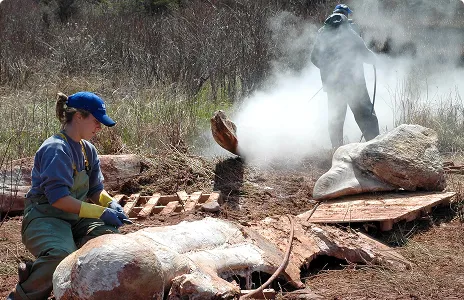
For the Canadian Wildlife Health Cooperative, we replaced siloed tools with a cloud-native platform that unifies field reports, lab diagnostics, and cross-province analytics in real time.
Interactive Learning Through Digital Experience
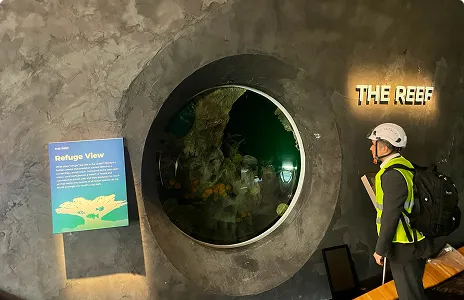
We unified kiosks, ticketing, and mobile into one cloud-native platform for Seattle Aquarium, raising visitor engagement and streamlining operations across every touchpoint.
Our Portfolio

Mindset is the Ultimate Source for Motivation, Self-development and Wisdom. With Mindset, you can play the world’s best motivational, inspirational and educational audios for free.


As part of the vision 2030, the Kingdom of Saudi Arabia has established a partnership with Zazz to modernize their nation wide mobile apps.
Canada Ontario
Built for the government of Ontario, to champion and stimulate the development of world-class technological and employability skills in Ontario youth.
Get cooking with The Roundup™, the definitive guide to buying, cooking & enjoying North American beef! This app has information on beef cuts, recipes, cooking & cuts videos to help you buy the proper cut and cook it confidently.
The app serves as a one-stop solution for Ontario’s electrical contractor community to organize and manage events, and conferences, talk to other members and share updates.
The Ideal Protein App is the digital pocket companion to the Ideal Protein Protocol. This personalized Protocol assistant is designed to help people achieve their weight loss goals and support a new, healthy lifestyle through three prioprietary phases: Weight Loss, Stabilization, and Maintenance.
Designed & Developed to save lives, and help prevent the spread of COVID 19, by providing the most reliable and up to date information needed by Employers across Canada.
Other Industries We Build Field Apps For
The offline sync, GIS, and sensor work behind our oil and gas app development also serves these sectors.

Healthcare & Life Sciences
Healthcare & Life Sciences
- Home care visit apps for low-signal rural routes
- Location tracking for infusion pumps and hospital beds
- Intake forms that write straight to the clinic EMR

Pharmaceuticals & MedTech
Pharmaceuticals & MedTech
- Cold room temperature monitoring with alarm escalation
- Batch record entry on tablets beside the line
- Visit and sample logging for field representatives

Retail & Consumer Commerce
Retail & Consumer Commerce
- Store audit and planogram checks for district managers
- Barcode inventory counts that save offline
- Delivery slot booking tied to warehouse stock

Government & Public Sector
Government & Public Sector
- Road and culvert inspection apps for municipal crews
- Permit applications with document upload and fees
- Public works asset registers shared with GIS

Logistics, Supply Chain & Transportation
Logistics, Supply Chain & Transportation
- Proof of delivery with photos and signatures
- Dangerous goods papers carried in the driver app
- Yard checks for drop trailers and chassis

Telecom & Connectivity
Telecom & Connectivity
- Tower climb checklists and antenna audit photos
- Fibre route patrol forms mapped in GIS
- Self-serve apps for plan and bill views

Education & eLearning
Education & eLearning
- Trades training modules that run without internet
- Lab safety sign-offs for technical programs
- Course schedules and room booking for campuses

Travel, Hospitality & Aviation
Travel, Hospitality & Aviation
- Aircraft turnaround checklists for ground crews
- Booking apps for remote lodges on weak connections
- Maintenance logs for hotel plant and equipment

High-Tech, SaaS & Software Product Companies
High-Tech, SaaS & Software Product Companies
- Offline-first mobile clients for existing SaaS platforms
- Device onboarding and fleet consoles for IoT products
- Usage metering that feeds subscription billing

Real Estate & PropTech
Real Estate & PropTech
- Building system dashboards fed by BMS sensors
- Move-in and move-out unit inspection apps
- Tenant maintenance requests routed to trades

Manufacturing & Industrial
Manufacturing & Industrial
- OEE dashboards fed by PLC and historian data
- Quality inspections with photo defect logging
- Isolation checklists for maintenance crews

Media & Entertainment
Media & Entertainment
- Site build schedules for event production crews
- Streaming apps with downloads for offline viewing
- Royalty and rights reporting portals

Legal Services & Law Firms
Legal Services & Law Firms
- Matter intake and conflict checks submitted from mobile
- Secure document portals for client files
- Filing deadline reminders for legal teams

Nonprofit Organizations
Nonprofit Organizations
- Field survey apps for conservation volunteers
- Pledge and donation capture at events
- Program outcome dashboards for funders

Accounting & Financial Services
Accounting & Financial Services
- Engagement time capture for audit field staff
- Receipt capture and expense claims for field staff
- Client portals with secure document exchange
Energy App Development for Carbon Capture, Hydrogen, and Utilities
Energy transition work extends our oil and gas application development to carbon capture and hydrogen, which add records such as CO2 injection volumes, storage monitoring data, and the measurement behind carbon credits. We build CCUS monitoring apps, LDAR and methane sensor dashboards, and reporting tools for federal and Alberta methane rules.
For gas and electric utilities, our energy app development covers meter and outage apps for field crews, customer portals for usage and billing, and control room views that combine SCADA feeds with GIS. Demand and equipment-failure forecasts use models from our machine learning app development work, trained on your historian data.
Book a Free Energy App Consultation →
Common Questions on Oil and Gas App Development
Digitize Run Sheets, Inspections, and Incident Reports
With oil and gas app development built offline-first, crews stop re-keying forms at the field office, and engineers review readings and incidents as soon as each device syncs.
Book a Free Field App Consultation →
Book a Free Oil and Gas App Development Consultation
Tell us which form your crews fill in most and where its data ends up. In a free consultation, we walk through a phased plan for your oil and gas application development and the integrations it needs.
