
 iOS App Development
 Android App Development
 React Native
 Flutter
 Web Development
 Custom Software
 Front End Development
 Blockchain Development
 Virtual Reality
 Cloud Computing
 IoT Development
 Augmented Reality
 Write us a message
Every enterprise has backups. Far fewer have a recovery plan they’d bet the business on. The gap between the two usually stays hidden until a ransomware note appears, a storage array fails or a cloud tenant is wiped. By then, the only question that matters is how fast clean systems and data can come back.
That’s why more enterprises are moving to managed IT services for backup and disaster recovery. Many organizations treat backup as a nightly job and disaster recovery as a binder on a shelf. A managed provider instead runs protection, monitoring, testing and recovery as one continuous service, measured against recovery targets the business has agreed to.
This guide covers what an enterprise-grade managed backup and disaster recovery service should include, how to size recovery targets and storage, and what Canadian and US guidance expects. It also shows how to tell a capable provider from one that only sells software licences. It’s written for digital transformation and IT leaders who need data protection that holds up under real pressure.
What Managed Backup and Disaster Recovery Means
Managed IT services for backup and disaster recovery combine three responsibilities under one provider:
- Protecting data with secure, monitored backups
- Restoring systems quickly through planned and tested failover
- Keeping the business running through documented continuity procedures
The provider handles the day-to-day work and reports on it. The business decides the recovery targets.
The three layers are related but not interchangeable:
Layer | Question it answers | Typical measure | Example |
Backup | Can we get the data back? | Recovery point objective (RPO): how much data can be lost | Restoring a deleted SharePoint library from last night’s copy |
Disaster recovery | Can we get the systems running again? | Recovery time objective (RTO): how long recovery can take | Failing over an ERP platform to a replicated environment |
Business continuity | Can the business keep operating meanwhile? | Maximum tolerable disruption to critical processes | Switching order processing to a manual workflow during an outage |
Enterprise backup solutions only cover the first row. A managed service is valuable because it connects all three.
Why Backups Fail When They’re Needed Most
Backups rarely fail because nobody bought them. They fail because attackers target them, because no one tested them, or because recovery takes far longer than anyone planned.
Ransomware is the clearest example. CISA and its partners publish a joint guide called the #StopRansomware Guide. It warns that “many ransomware variants attempt to find and subsequently delete or encrypt accessible backups.” It recommends that organizations “maintain offline, encrypted backups of critical data” and “regularly test the availability and integrity of backups in a disaster recovery scenario” (CISA).
The impact shows up in recovery data. Sophos’s State of Ransomware 2025 report found that only 54% of organizations whose data was encrypted used backups to restore it, the lowest rate in six years. The average cost to recover from an attack was $1.53 million (Sophos).
There’s a positive signal too. In the same report, 53% of victims fully recovered within a week, up from 35% a year earlier. Recovery is getting faster for organizations that prepare.
The Recovery Math Most Plans Skip
Two calculations show whether a backup strategy can actually meet its recovery targets.
How long will a full restore take?
Restore time depends on how much data has to move and how fast it can move:
Restore time = data size in bytes × 8 ÷ connection speed in bits per second
For 10 TB of data:
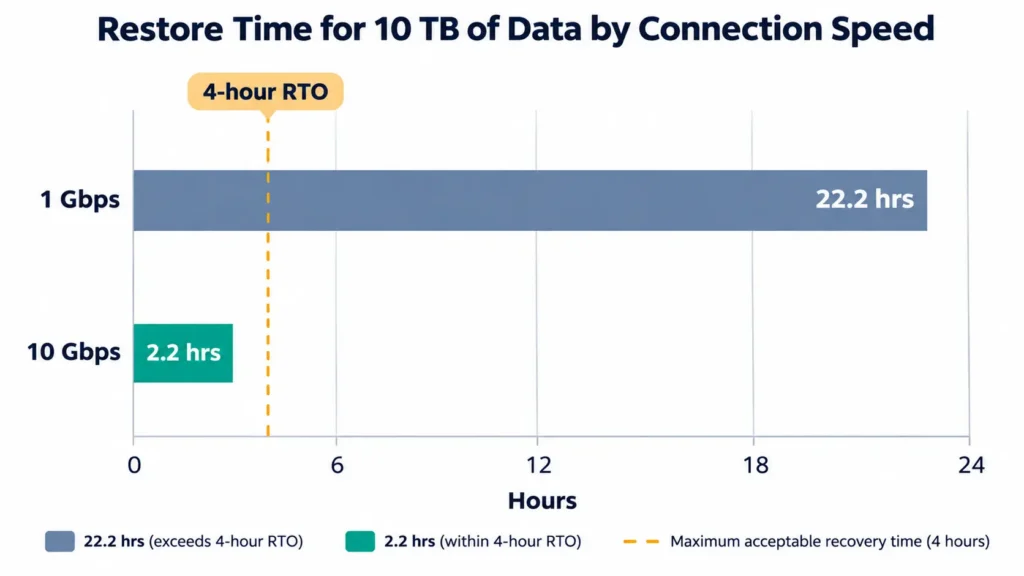
- At 1 Gbps: 10,000,000,000,000 bytes × 8 ÷ 1,000,000,000 bits per second = 80,000 seconds, or about 22 hours.
- At 10 Gbps: 8,000 seconds, or about 2.2 hours.
These are theoretical maximums. Real restores are usually slower once storage speed, compression and verification are factored in.
So if the business has agreed to a four-hour RTO for a 10 TB system, a 1 Gbps link to a remote backup store can’t meet it. That’s why enterprise disaster recovery services protect critical systems with replication, local recovery copies and orchestrated failover, rather than relying on a full restore from scratch.
How much backup storage do you need?
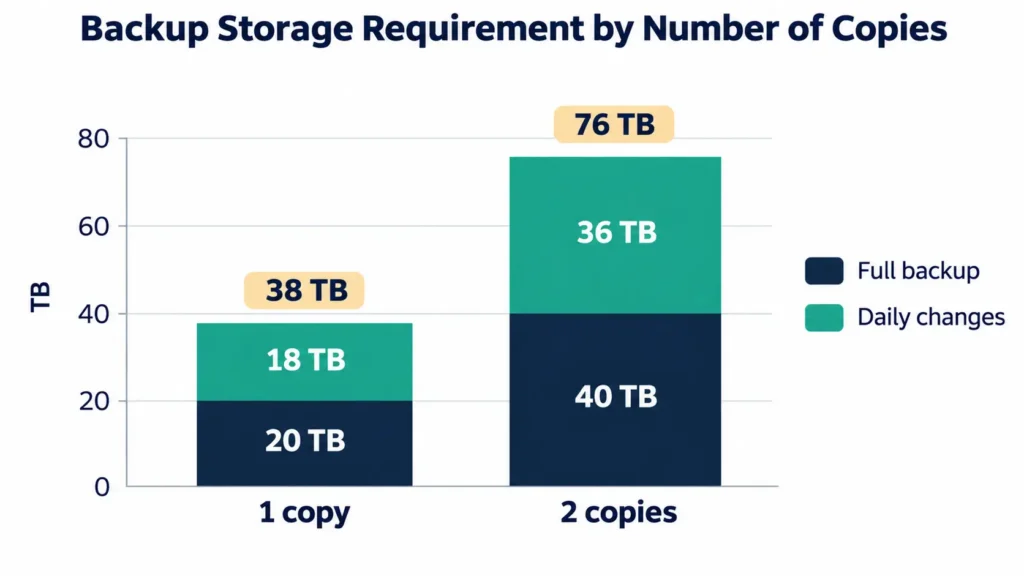
Retention policy drives storage cost. Take an environment with 20 TB of primary data, where about 3% changes each day, with backups kept for 30 days:
- One full backup: 20 TB
- Thirty daily incremental backups: 30 × 0.6 TB = 18 TB
- Total per backup copy: 38 TB
Good practice keeps more than one backup copy in different locations. A design with two backup copies therefore needs about 76 TB of raw backup capacity before compression and deduplication. A managed provider should show you this math before you sign, not after the first storage invoice.
The Architecture of a Recoverable Backup
Government guidance on both sides of the border points to the same core design.
Keep three copies on two media types, with one offsite. The Canadian Centre for Cyber Security recommends the 3-2-1 rule: “3 copies of your information (1 original and 2 backups),” on 2 different media types, with 1 copy offsite. It also recommends keeping at least one backup offline, disconnected from the network (Cyber Centre).
Make backups tamper-resistant. CISA advises enabling “delete protection or object lock on storage resources often targeted in ransomware attacks.” It also notes that some cloud vendors offer immutable storage.
Prepare clean rebuild points. CISA recommends maintaining and regularly updating “golden images” of critical systems. It also recommends keeping offline backups of infrastructure templates so resources can be redeployed quickly.
Protect SaaS data separately. Microsoft 365, Google Workspace and other SaaS platforms hold critical business data. Backing them up to an independent location means a compromised admin account or a mass deletion can’t take the only copy with it.
Encrypt everything. The Cyber Centre recommends encrypting sensitive data and applying security controls, such as encryption, to storage devices and to cloud or vendor backups.
Matching Recovery Targets to Business Impact
Not every system needs the same protection. A tiered approach puts investment where downtime hurts most.
Tier | Example systems | Illustrative RTO | Illustrative RPO | Protection approach |
Tier 1: Mission-critical | ERP, payment platforms, customer-facing applications | Minutes to a few hours | Minutes | Continuous replication, orchestrated failover, immutable copies |
Tier 2: Business-essential | Email, collaboration, CRM, file services | Within a business day | A few hours | Frequent backups, SaaS backup, tested restores |
Tier 3: Supporting | Archives, development and test environments | Several days | 24 hours | Daily backups with longer retention |
These targets are illustrative. The right numbers come from a business impact analysis. They should be agreed with each system’s owner, then tested against reality.
What Canadian and US Requirements Expect
Recovery capability is increasingly a compliance requirement, not just good practice.
- Healthcare (US): the HIPAA Security Rule requires covered entities to maintain three plans: a data backup plan that creates “retrievable exact copies” of electronic protected health information, a disaster recovery plan to “restore any loss of data,” and an emergency mode operation plan. It also covers periodic testing of those plans (45 CFR 164.308).
- Privacy (Canada): under PIPEDA, organizations must keep records of every breach of security safeguards for two years (OPC). Backup and recovery logs often become part of that evidence trail.
- Guidance (Canada and US): the Cyber Centre and CISA both recommend offline or immutable backups, encryption and routine restore testing.
A managed provider should map your backup and recovery evidence to the frameworks you report against, so audit preparation doesn’t become a separate project.
Scope Checklist: What a Complete Managed Service Includes
Component | What to expect | Question to ask a provider |
Coverage | Endpoints, servers, virtual machines, databases and SaaS platforms | Which of our systems won’t be covered? |
Immutability | Copies that can’t be altered or deleted for a set retention period | How are backups protected if an admin account is compromised? |
Offline or isolated copy | At least one copy separated from the production network | Where is the isolated copy, and who can reach it? |
Monitoring | 24/7 backup monitoring, with failure alerts and fixes | What happens when a backup job fails at 2 a.m.? |
Restore testing | Scheduled restore and failover tests, with documented results | When was your last full failover test for a client like us? |
Disaster recovery orchestration | Runbooks and automated failover and failback for critical systems | How do you sequence dependent systems during recovery? |
Reporting | Coverage, success rates and test results, plus audit-ready logs | What will we see each month? |
Ransomware recovery | Recovery to a known-good state, coordinated with the security response | How do you confirm restored data is clean? |
How to Evaluate a Managed Backup and DR Provider
Strong IT infrastructure management partners can answer these questions with evidence:
- What RTO and RPO will you commit to for each tier, and how do you prove them?
- Can you show a redacted restore test report from the past quarter?
- How is backup storage isolated from our production accounts and network?
- Which SaaS platforms do you back up, and how granular is recovery?
- What’s your process when ransomware reaches production systems?
- Which certifications cover your own operations, such as ISO 27001 or SOC 2?
- How quickly can you protect our most critical systems after signing?
How AppStudio Delivers Managed Backup and Disaster Recovery
AppStudio’s backup and disaster recovery services are built for organizations across Canada and the US that need recovery they can rely on, and evidence they can show auditors.
- Automated, monitored protection: scheduled backups across endpoints, servers and cloud applications, with encrypted, immutable copies. 24/7 monitoring flags any failure and fixes it.
- SaaS coverage: Microsoft 365, Google Workspace and key SaaS applications, with granular recovery of mailboxes, files and shared content.
- Disaster recovery as a service (DRaaS): replicated systems that can be brought online when primary infrastructure fails, with orchestrated failover and failback. You get this without the cost of a second data center.
- Ransomware recovery: immutable, air-gapped copies, and recovery to a known-good state coordinated with the security response.
- Targets set per system: RTO and RPO are defined for each system based on business impact. Restore and failover tests run on a schedule, and the results are documented.
- Continuity planning: business continuity plans, runbooks, defined roles and communication procedures.
- Audit-ready evidence: reporting on backup status and coverage, audit-ready logs and regular reviews.
- Fast protection: critical systems can be protected within days, with full rollout in 2 to 4 weeks depending on scope.
- Certified operations: AppStudio holds ISO 9001 and ISO/IEC 27001 certifications and a SOC 2 Type II attestation. It has delivered 1,300+ projects since 2015.
Frequently asked questions
How much backup storage does an enterprise really need?
It depends on data volume, daily change rate, retention period and the number of backup copies. For example, 20 TB of primary data with a 3% daily change rate, kept for 30 days, needs about 38 TB per backup copy, or about 76 TB for two copies. That’s before compression and deduplication.
Can a 10 TB system be restored within four hours?
Not with a full restore over a 1 Gbps connection. That takes about 22 hours at theoretical line speed. Meeting a four-hour target for a system that size usually requires replication, local recovery copies or orchestrated failover, rather than restoring everything from scratch.
What is an immutable backup, and why does it matter for ransomware?
An immutable backup can’t be changed or deleted for a set retention period, even by someone with administrator access. That matters because CISA warns that many ransomware variants actively look for backups to delete or encrypt.
Do Canadian organizations need to keep backups in Canada?
It depends on the data and the sector. The Canadian Centre for Cyber Security recommends keeping medium and high sensitivity data within Canada when using managed services. Confirm where every backup copy is stored before signing with a provider.
What does HIPAA require for backup and disaster recovery?
The HIPAA Security Rule requires covered entities to maintain three plans: a data backup plan that creates retrievable exact copies of electronic protected health information, a disaster recovery plan to restore lost data, and an emergency mode operation plan. Periodic testing and revision of these plans is also addressed.
How soon can AppStudio start protecting our critical systems?
Critical systems can usually be protected within days of starting, with the full rollout completed in 2 to 4 weeks, depending on scope.
Make Recovery a Measured Capability
What separates a backup from a recovery is proof. Some enterprises define recovery targets, isolate their backups, test regularly and hand day-to-day operations to an accountable partner. They turn data protection into a capability they can measure. To find out whether your current backups would meet your recovery targets under pressure, talk to AppStudio about a recovery readiness assessment.