
 iOS App Development
 Android App Development
 React Native
 Flutter
 Web Development
 Custom Software
 Front End Development
 Blockchain Development
 Virtual Reality
 Cloud Computing
 IoT Development
 Augmented Reality
 Write us a message
The average large organization now runs close to 957 applications, yet only around 27 percent of them are actually connected, according to MuleSoft’s Connectivity Benchmark. That leaves nearly three quarters of business systems sitting in isolation, and for any leadership team rolling out a new mobile app, that single number is the whole problem. A mobile app is only as valuable as the data behind it, and most of that data already lives inside aging ERP and CRM platforms that were never designed for a phone in a warehouse or a sales rep’s pocket.
This is the moment enterprise app integration stops being a technical footnote and becomes a strategic decision. The modern workforce is not waiting at a desk for information to reach it. People are on factory floors, at job sites, in client meetings, and on delivery routes, and organizations consistently report productivity gains of 20 to 40 percent in field operations once those workers can act on live data from their phones. Done well, enterprise app integration turns a static screen into a real-time window onto the business. Done badly, it produces conflicting records, security gaps, and an app that field teams quietly abandon. This guide walks through the main integration approaches, the challenges that derail them, and a practical way to choose the right path for your environment.
Why Enterprise App Integration Is Harder Than It Looks
On the surface, connecting an app to SAP, Oracle, Salesforce, or Microsoft Dynamics sounds like a solved problem. In practice, the systems holding your most important data are often the least cooperative. A Saritasa survey of more than 500 U.S. IT professionals found that 62 percent of organizations still rely on legacy software, and 43 percent named security vulnerabilities as a major concern with those platforms. These are precisely the systems your app needs to talk to, and many of them predate modern APIs entirely.
The track record reflects that difficulty. Research compiled by Integrate.io puts the share of system integration projects that fail or partially fail at 84 percent, with the usual culprits being underestimated legacy complexity, thin testing, and poor coordination between vendors. Banking shows the pattern plainly: roughly 70 percent of banks report that integrating with legacy systems is at least somewhat of an obstacle, which is why so many wrap their old cores in modern interfaces instead of ripping them out.
The market reflects how seriously enterprises now take the problem. Mordor Intelligence values the enterprise application integration market at roughly 17.67 billion dollars and projects it to reach 36.56 billion by 2030, a compound growth rate above 15 percent. That spending signals demand, but it does not guarantee outcomes. The same money buys success or expensive failure depending entirely on the approach a team chooses and how honestly it scopes the work before writing any code.
The legacy reality
Many ERP and CRM deployments were built around batch processing, on-premise databases, and assumptions that no longer hold once thousands of mobile users expect live data. Some still run on infrastructure that is decades old. Successful enterprise app integration has to respect those constraints rather than pretend they do not exist, which is why the strongest projects begin with a clear-eyed audit of what each system can and cannot do.
The cost of getting it wrong
The financial exposure is concrete. Cleo’s research found that 24 percent of supply chain companies lose more than 500,000 dollars a year because their software systems are poorly integrated. When records disagree across sales, finance, and operations, the cost compounds quietly through duplicated work, slower decisions, and eroded trust in the data. Weak enterprise app integration is rarely a single dramatic failure; it is a steady tax on everything the business tries to do.
The Core Integration Approaches and When Each Fits
There is no single correct way to connect a mobile app to ERP and CRM systems. Four patterns dominate the field of enterprise app integration, and most mature architectures end up combining several of them rather than betting on one.
Point-to-Point Integration
The simplest approach connects the app directly to each system with a custom link. It is quick to build for one or two connections and tempting for a first release. The problem is scale. Every new system multiplies the number of brittle, individually maintained connections, and the web of links becomes unmanageable. Point-to-point enterprise app integration works for a narrow pilot, but it rarely survives contact with a growing app and a growing list of systems.
Middleware and the Enterprise Service Bus
Middleware sits between the app and your back-end systems, translating and routing data so the app never talks to ERP or CRM directly. The enterprise service bus is the classic expression of this idea, long used to centralize on-premise integration. Middleware adds a layer to maintain, but it decouples the app from the systems behind it, which is exactly what protects you when a back-end platform is upgraded or replaced. For heavy on-premise estates, this style of enterprise app integration remains a workhorse.
API-Led Integration
API-led integration exposes each system’s data through well-defined, reusable interfaces. Modern platforms such as Salesforce and Dynamics ship robust APIs, and even older ERP systems can be wrapped in an API layer that hides their complexity. This is the dominant direction for new builds: design the contract between the mobile layer and the back end first, then build both sides against it in parallel. Agreeing on that contract up front removes the multi-week integration scramble that tends to appear when mobile and back-end teams build in isolation and only meet at the end. Reusable APIs also mean the next app or channel does not start from zero, which makes API-led enterprise app integration the most future-friendly of the four patterns.
Integration Platform as a Service
An iPaaS delivers integration in the cloud, with pre-built connectors for common ERP and CRM platforms, low-code workflows, and managed API governance. Tools like MuleSoft and Boomi have made this the fastest-growing category of enterprise app integration. Oracle has reported that cloud-native iPaaS can cut total cost of ownership by up to 70 percent compared with traditional middleware, which is part of why even risk-averse enterprises are moving toward it for new connections.
What a Modern Enterprise App Integration Architecture Looks Like
Whatever pattern you choose, the strongest designs share a common shape: the mobile app never touches ERP or CRM directly. Requests flow from the app, through an API gateway and an integration or abstraction layer, and only then into the back-end systems. That layered model is the backbone of durable enterprise app integration.
The abstraction layer is non-negotiable
The middle layer is what keeps the app stable while the systems behind it evolve. A backend-for-frontend pattern, in which a dedicated API layer returns only what the app needs and aggregates data from several systems into a single response, reduces network round trips and keeps screens fast even on weak connections. It also concentrates security, logging, and error handling in one place rather than scattering them across the app, which makes the whole enterprise app integration far easier to monitor and secure.
Real-time versus batch synchronization
Not every data flow needs to be instant. Inventory lookups, order status, and customer records usually demand real-time or near-real-time sync, while reporting and reconciliation can run comfortably in batches. The right enterprise app integration mixes both: event-driven updates for anything a user acts on, and scheduled jobs for everything else. Forcing real-time everywhere drives up cost and load with no real benefit to the people using the app.
The Challenges That Derail Integration and How to De-Risk Them
Most failures trace back to a short list of predictable problems. Naming them early is the cheapest insurance an enterprise app integration program can buy.
Data consistency and the single source of truth
With multiple systems holding overlapping records, the hardest question is which system wins. Define a single source of truth for each data type, customers in the CRM, financials in the ERP, and let the integration layer enforce it. Incompatible data formats are a leading cause of integration failure, so agree on a canonical data model early rather than reconciling mismatches after launch.
Security and access control
Mobile expands the attack surface, and the back-end systems behind an app are often the crown jewels. One industry analysis found that more than half of enterprise apps reuse shared access tokens across multiple applications, which can expose entire back ends if a single app is compromised. Sound enterprise app integration leans on short-lived, rotating credentials, OAuth-based authentication, role-based access control, and encryption both in transit and at rest. The API gateway is the natural place to enforce authentication, rate limiting, and input validation, and the OWASP guidelines are a sensible baseline for the whole pipeline. Keys should never be embedded in app code.
Performance, latency, and offline access
Field workers are not always online. The best enterprise app integration designs cache intelligently, queue actions taken offline, and sync once connectivity returns, so a warehouse, a job site, or a delivery route never stalls the workflow. Performance testing under realistic load belongs in the plan from the start, not after users complain.
Adoption and change management
Technology is only half the battle. A large share of software rollouts fail not because the integration broke, but because people never adopted the tool. Pair the build with training, clear ownership, and a real feedback loop, or even a flawless enterprise app integration will sit unused while staff drift back to spreadsheets and email.
How to Choose the Right Integration Approach
The right approach depends on a handful of honest questions, not on whichever technology happens to be fashionable. Weigh these factors before committing:
- How many systems must connect, now and over the next few years.
- Whether your data flows genuinely need real-time sync or can tolerate batches.
- Whether your legacy ERP and CRM systems already expose usable APIs.
- The volume and sensitivity of the data moving between systems.
- Compliance obligations such as GDPR, HIPAA, or industry-specific rules.
- The integration skills you have in-house versus what you would outsource.
- Your realistic budget and timeline.
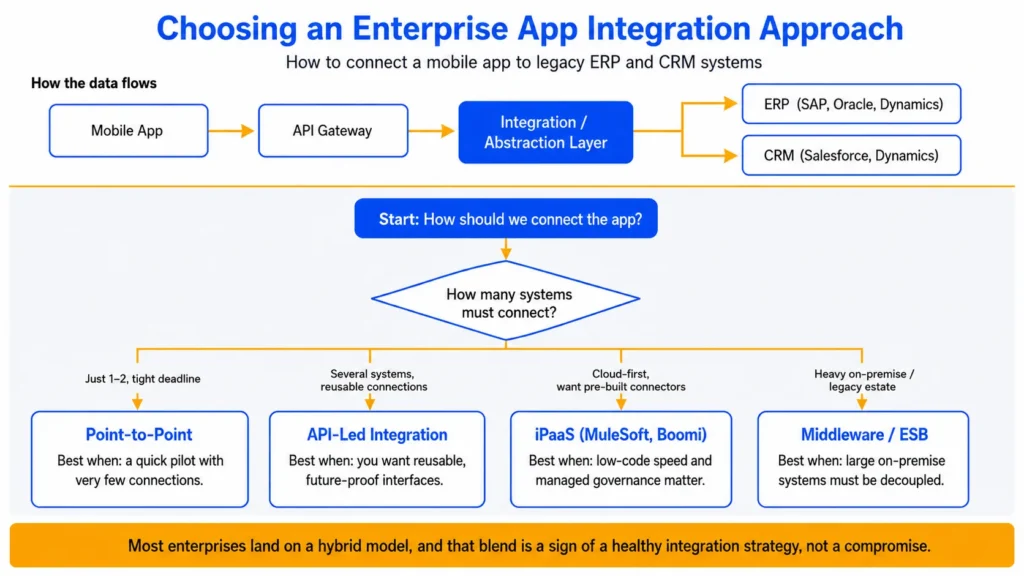
As a rule of thumb, a single connection on a tight deadline can start point-to-point, several systems with real-time needs point toward API-led integration or an iPaaS, and heavy on-premise estates often still need middleware in the mix. Most enterprises land on a hybrid model, and that blend is a sign of a healthy enterprise app integration strategy rather than a compromise.
Integrate Rather Than Replace: What Leading Enterprises Actually Do
The most reassuring lesson from recent large deployments is that you rarely have to choose between your new app and your existing systems. Nestlé completed one of the largest SAP S/4HANA programs ever run, going live for more than 50,000 users across 112 countries while integrating with, rather than discarding, existing operations. Tyson Foods connected its legacy plant systems to Google Cloud and a network of IoT sensors across its facilities, with its first factory live in roughly six weeks.
The returns justify the effort. Kyndryl’s mainframe modernization research reports ROI ranging from about 288 percent for modernizing applications on the platform to 362 percent for moving workloads off it. IDC has found that organizations with mature integration capabilities reach far higher returns on their AI initiatives, around 10.3 times, compared with 3.7 times for those hampered by poor connectivity. The timing math favors integration too: full ERP replacements commonly carry payback periods of two to five years, while a well-scoped connection can show value in a fraction of that. Strong enterprise app integration is increasingly the foundation that everything else, including AI, gets built on.
Planning an enterprise app that has to talk to your ERP and CRM? The systems you connect to, and how you connect them, will shape what the app can do for years. AppStudio helps enterprise teams map the integration, choose the right approach, and build mobile apps that work cleanly with legacy ERP and CRM systems. Schedule a free consultation with our team.
Frequently Asked Questions
What is the best way to integrate a mobile app with ERP and CRM?
For most enterprises, an API-led approach routed through an integration or abstraction layer is the most durable choice, frequently delivered through an iPaaS platform. It keeps the app decoupled from back-end systems and makes every future connection reusable, which is the core of sustainable enterprise app integration.
Should we integrate with or replace our legacy systems?
Integration is usually faster and lower risk. Full ERP replacements often carry payback periods measured in years, while a focused integration can deliver value far sooner. Replace a core system only when it genuinely cannot support where the business is heading, and integrate everywhere else.
How long does enterprise app integration take?
It depends on the number of systems and whether they expose modern APIs. A tightly scoped integration can take weeks, while complex programs spanning on-premise and cloud estates run considerably longer. Defining the data flows precisely up front is the single biggest lever you have on the timeline.