
 iOS App Development
 Android App Development
 React Native
 Flutter
 Web Development
 Custom Software
 Front End Development
 Blockchain Development
 Virtual Reality
 Cloud Computing
 IoT Development
 Augmented Reality
 Write us a message
A mobile app migration to a new technology stack is one of the highest-stakes decisions an engineering organization can make. The upside is real: reduced technical debt, faster feature velocity, lower maintenance overhead, and access to a modern talent pool. The risk is equally real. Industry research consistently places migration and modernization failure rates between 30 and 80 percent, with one widely cited Gartner figure indicating that 83 percent of data migration projects either fail outright or overrun their budgets and timelines.
The encouraging news is that failure is rarely a technology problem. It is almost always a planning and sequencing problem. Organizations that treat a tech stack migration as an incremental, data-first engineering discipline rather than a single dramatic cutover consistently protect both their systems and their users. This guide explains how to approach an enterprise mobile application migration methodically, keep users unaffected throughout, and retire the legacy stack with confidence.
Why Enterprise Mobile App Migrations Disrupt Users
Before designing a low-disruption mobile app migration strategy, it helps to understand where disruption originates. Most user-facing incidents during mobile app modernization trace back to a small set of predictable causes, and each one can be engineered out of the plan in advance.
The Big Bang Cutover Risk
The first and most damaging cause is the big bang cutover, where teams attempt to replace the entire technology stack in a single release. This approach concentrates all risk into one event, and if anything fails, there is no gradual fallback. Current best practice for legacy app migration has moved decisively away from all-or-nothing migrations in favor of phased, incremental approaches that prioritize business continuity.
Undocumented Dependencies
The second cause is undocumented dependencies. Research on migration delays attributes a significant share of overruns to legacy dependencies that were never identified during the assessment phase. When a hidden coupling between modules, services, or data stores surfaces mid-migration, it often does so as a production outage that users feel immediately.
Data Inconsistency Between Old and New Systems
The third cause is data inconsistency. When the legacy stack and the new stack run in parallel without reliable synchronization, users encounter stale records, duplicated entries, or lost writes. Because poor data quality affects the majority of migrations, unresolved data issues are one of the most common triggers of user-visible failures.
Insufficient Testing and Communication
The fourth cause is insufficient testing. Analysis of failed migrations found that unsuccessful projects allocated roughly 15 percent of their timeline to testing, compared with 30 to 40 percent in successful ones. The fifth is the absence of a communication plan, which leaves internal stakeholders and end users unprepared for change. Understanding these five failure modes clarifies the objective: a well-run migration removes each risk by design rather than reacting to it after it appears.
Establishing a Data-First Foundation for Your Mobile App Migration
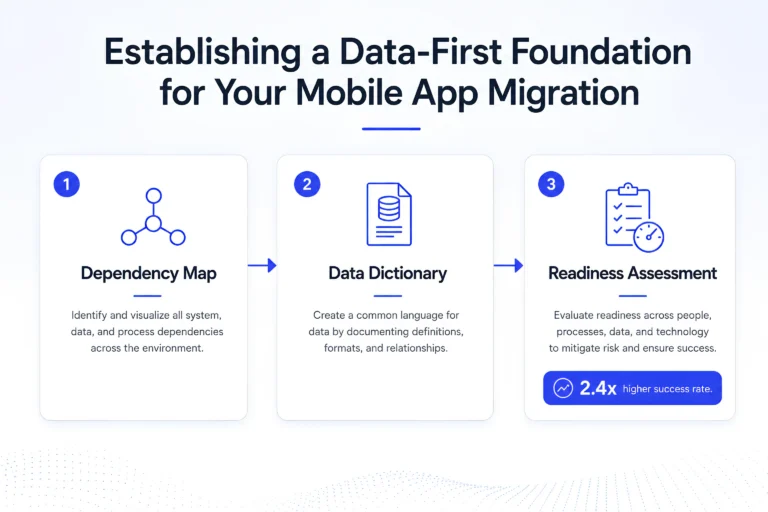
The organizations that consistently succeed share a common starting point. They begin with the data, not the technology. Before a single line of the new stack is written, they build a complete and documented understanding of the existing system.
Building a Dependency Map
The first component of this foundation is a comprehensive dependency map that captures every integration point, API contract, background job, and data flow between modules. Dependency mapping is where hidden couplings are surfaced while they are still cheap to address. Modern AI-assisted analysis tools can accelerate this work considerably, with large language models now capable of summarizing dependencies across large codebases and reducing discovery timelines meaningfully.
Creating a Data Dictionary
The second component is a data dictionary that describes the structure, quality, and relationships of the data that will move between systems. Because unresolved data quality issues become exponentially more expensive to fix after they are carried into a new platform, cataloging and cleansing data before migration is a core prerequisite rather than an optional step.
Running a Readiness Assessment
The third component is a readiness assessment that scores each component for migration complexity and business criticality. The return on this investment is measurable. Organizations that conduct a formal readiness assessment before migrating report success rates roughly 2.4 times higher than those that do not. This is the single most cost-effective decision available in the entire lifecycle of a mobile application migration, because it converts unknown risks into planned, estimable work.
Choosing the Right Tech Stack Migration Strategy
Not every application needs the same treatment. Mobile app modernization is commonly framed around a set of strategic pathways, often called the “R” framework, and selecting the right approach for each component is the most important decision in the entire program.
Rehost, Replatform, Refactor, or Rearchitect
Rehosting, or lift and shift, moves the application to new infrastructure with minimal code change and offers the fastest, lowest-risk route, though it carries legacy inefficiencies forward. Replatforming makes light optimizations during the move, such as switching to a managed database, to gain performance and scalability without touching the core architecture. Refactoring restructures the existing code to improve maintainability and performance. Rearchitecting redesigns the application structure entirely, often decomposing a monolith into microservices, which is more complex but unlocks the most long-term value. For a mobile app moving to a genuinely new tech stack, the work usually combines refactoring and rearchitecting, and the safest way to execute either at enterprise scale is incrementally.
Why Incremental Beats a Full Rewrite
A full rewrite followed by a single cutover forces every risk into one moment and pauses feature delivery for months. An incremental tech stack migration keeps the app live, keeps the team shipping, and limits the impact of any single defect. This is why 2026 best practices for business-critical systems emphasize a phased transition that keeps systems operational throughout rather than a big bang replacement.
Applying the Strangler Fig Pattern for Zero-Downtime Migration
The architectural pattern most closely associated with disruption-free mobile app migration is the Strangler Fig pattern, first described by Martin Fowler and now formalized in the reference architectures of both AWS and Microsoft Azure. The pattern takes its name from the strangler fig tree, which grows around a host tree and gradually replaces it until the original can be removed entirely.
How the Facade Routing Layer Works
Applied to a mobile application migration, the pattern works by placing a facade, typically a reverse proxy or API gateway, between the client and the backend. Initially the facade routes all traffic to the legacy stack. As each feature or domain is rebuilt on the new stack, the facade begins routing the corresponding requests to the new implementation. Because the routing happens behind a stable interface, users continue to interact with the same app and remain unaware that a migration is underway.
Documented Benefits and Trade-Offs
The advantages of this approach are well documented. It enables near-zero planned downtime because the legacy system remains a live fallback at every stage. It spreads investment across budget cycles rather than concentrating it in a single expensive event. It delivers value continuously, since each migrated slice becomes available to users immediately. One documented enterprise implementation, the platform consolidation at the Jochen Schweizer mydays Group, achieved 100 percent availability with zero downtime across the entire migration. The pattern does introduce two disciplines to plan for: running both systems in parallel roughly doubles infrastructure cost for the duration, and continuous data synchronization between old and new systems becomes the most technically demanding part of the work.
Slicing the Migration Vertically, Not Horizontally
A frequent and costly mistake is to migrate the application in horizontal layers, moving all controllers first, then all services, then all data access. This approach produces nothing deployable for months and offers no opportunity to validate the new stack under real traffic.
Migrating One Domain at a Time
The more reliable approach is vertical slicing. Rather than migrating a layer at a time, the team selects one complete business domain, for example authentication, product catalog, or billing, and migrates its entire stack: the endpoint, the application logic, the data access, and the tests. Each slice is independently valuable and independently deployable. Once a slice is validated in production, the team moves to the next. This is the same pattern global banks use when incrementally moving mainframe ledger functions to cloud-native microservices while keeping payments running 24/7.
Limiting the Blast Radius
Vertical slicing produces two important benefits for user continuity. It limits the blast radius of any single change to one domain, so a defect affects a narrow slice of functionality rather than the entire app. It also allows the team to write tests for each domain as it moves, which is particularly valuable when the legacy system lacks adequate test coverage.
Using Progressive Traffic Shifting to Protect Users
The safest cutover is not a switch but a dial. Once a domain has been rebuilt, traffic should be shifted from the legacy implementation to the new one gradually rather than all at once. This is where shadow mode and canary deployment become essential techniques.
Shadow Mode and Canary Releases
In shadow mode, the new implementation receives a mirrored copy of production traffic without serving responses to users, which validates correctness and performance against real-world load with zero user exposure. Once the new stack proves reliable, the team begins a canary rollout, directing a small percentage of live traffic to the new implementation and increasing it as confidence grows. Running a pilot migration of 5 to 10 percent of workloads first has been shown to reduce overall migration time by roughly 28 percent, largely because it surfaces issues early while they are still inexpensive to fix.
Making Rollback a Configuration Change
This progressive approach means that if the new stack behaves unexpectedly, the team reduces the traffic percentage and returns users to the stable legacy path immediately. Rollback becomes a configuration change rather than an emergency deployment, which is the single most important safeguard for a customer-facing mobile app.
Solving Data Synchronization and Consistency
Parallel operation is only safe if the data underneath it stays consistent. Because both systems may read and write during the transition, data synchronization is the technical core of a disruption-free legacy app migration.
Change Data Capture for Near-Zero Downtime
The preferred mechanism is Change Data Capture, which streams changes from the source system to the target in near real time and enables migrations with minimal downtime. During parallel operation, the team must decide which system owns each data domain at each phase and must be able to roll back cleanly. A practical safeguard is to preserve the ability to revert to the original data source during the early phases, before legacy tables and synchronization processes are removed.
Continuous Validation and Reconciliation
Continuous validation belongs alongside synchronization. Automated reconciliation checks that compare record counts, checksums, and key business metrics between the two systems allow the team to detect divergence before users ever notice it. Removing legacy data objects should be treated as a deliberate final step for each domain, taken only after the new system has been fully validated in production.
Testing and Communicating Throughout the Transition
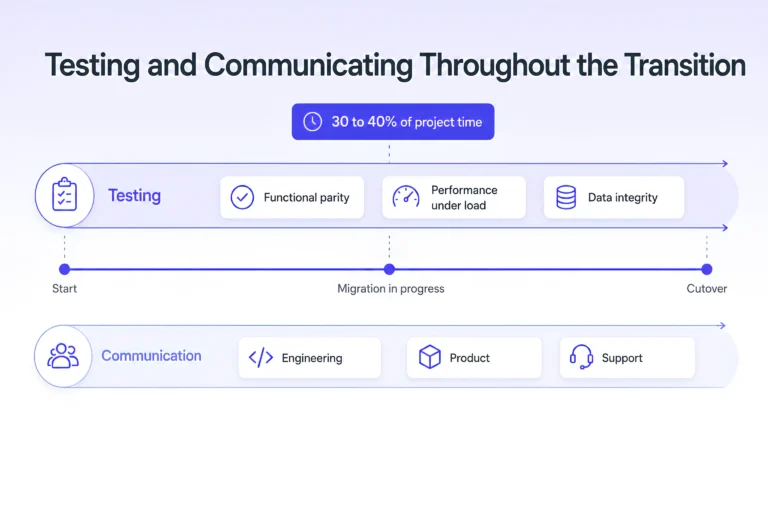
Testing discipline separates successful migrations from failed ones by a wide margin, and communication discipline determines how users experience the change.
Allocating Enough Time to Testing
The evidence is clear that underinvestment in testing is one of the strongest predictors of failure. Enterprise migrations should allocate 30 to 40 percent of project time to testing, covering functional parity, performance under load, data integrity, and rollback procedures. Automated regression suites are especially valuable because each migrated slice must continue to behave exactly as its predecessor did from the user’s perspective.
Coordinating App Store Releases and Backward Compatibility
Communication is equally important and often underweighted. A mobile app migration is a significant operational change, and stakeholders need to know when changes are happening and who to contact if issues arise. For customer-facing apps, this also means coordinating app store release timing, phased rollouts, and backward compatibility for users who have not yet updated to the latest version. A clear communication plan aligns engineering, product, and support teams and prevents the friction that arises when users encounter unexpected behavior with no explanation.
Decommissioning the Legacy Stack Deliberately
The final phase is one of the most commonly neglected. Because the incremental approach delivers most of its value before the migration is fully complete, teams are frequently tempted to stop once the important features are running on the new stack. This leaves the organization paying permanent double maintenance costs and carrying the security and compatibility risks of an aging system.
A disciplined mobile application migration ends by fully retiring the legacy stack. Once all traffic has been routed to the new system and validated over a sustained period, the team removes the legacy components, decommissions the redundant infrastructure, and either removes the facade or retains it as a stable adapter for older clients. Completing this step is what converts a migration from an ongoing cost into a realized return on investment.
Bringing It Together
A successful mobile app migration to a new tech stack without disrupting users is not a matter of luck or heroics. It is the product of a repeatable discipline: understand the data before touching the technology, select the right modernization strategy for each component, migrate incrementally rather than all at once, slice by domain, shift traffic progressively, keep data consistent throughout, test and communicate rigorously, and decommission the old stack deliberately. Each of these practices removes a specific, well-understood category of risk, and together they explain why the minority of organizations that follow them succeed while so many others struggle.
The organizations that get this right treat mobile app modernization as a strategic engineering program rather than a technical event. They accept that the transition period will cost more while two systems run in parallel, and they plan a clear path to retire that cost. Above all, they design the migration so that the user experience remains stable and predictable from the first slice to the final cutover.
Planning a Mobile App Migration for Your Enterprise?
Every legacy system carries its own dependencies, data complexities, and risk tolerances, and the right sequencing depends on your specific architecture and business priorities. If your team is evaluating a tech stack migration and wants to map the dependencies, define the vertical slices, and design a phased rollout that keeps your users unaffected, our engineering team can help you build a mobile app migration strategy tailored to your environment. Reach out to start a conversation about your modernization roadmap.