
 iOS App Development
 Android App Development
 React Native
 Flutter
 Web Development
 Custom Software
 Front End Development
 Blockchain Development
 Virtual Reality
 Cloud Computing
 IoT Development
 Augmented Reality
 Write us a message
It makes sense to move helpdesk and end-user support to a managed provider when ticket volume, coverage hours or staffing risk outgrow what your internal team can deliver at a stable cost. For most large organizations, deciding when to outsource IT helpdesk comes down to four tests: service levels, coverage, talent and the full cost of each resolved request.
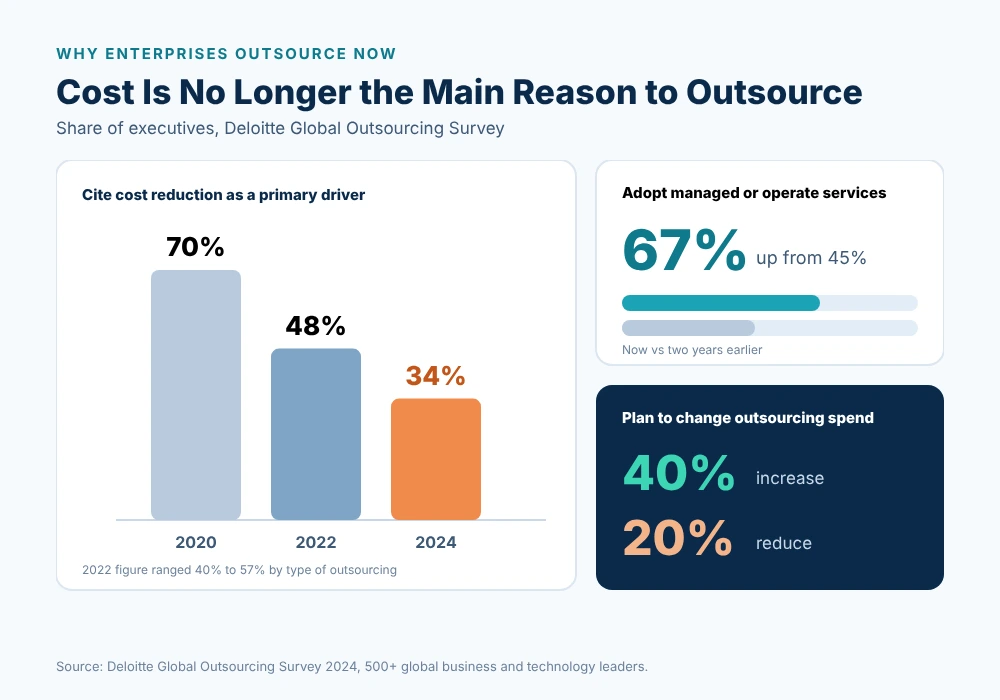
Outsourcing priorities have changed. In Deloitte’s 2024 Global Outsourcing Survey, 40% of respondents expected to increase third-party outsourcing investment, while only 20% planned a reduction. This guide sets out the signals, trade-offs and transition steps that executive teams should review before making the call.
What Changes When You Outsource Helpdesk and End-User Support?
Outsourcing end-user support moves the daily work of answering, logging and resolving employee requests to a provider, while your organization keeps ownership of IT strategy, priorities and risk. Where you draw that line decides how well escalations work once the provider is live, so it should be agreed in writing before any contract is signed.
What usually moves to the provider
- Tier 1 requests such as password resets, account access, software installs and how-to questions
- Tier 2 troubleshooting for laptops, mobile devices, email and collaboration tools
- Employee onboarding and offboarding for accounts and devices
- Ticket logging, triage, prioritization and monthly SLA reporting
What usually stays in-house
- IT strategy, budget ownership and vendor management
- Approval of access to sensitive systems and regulated data
- Support for proprietary applications until they’re documented well enough to hand over
How escalation works between both teams
- The provider resolves what it can at first contact and routes the rest by agreed priority
- Infrastructure, security and application issues go to the owning team, internal or external
- Escalation paths, contacts and response targets are written into runbooks before go-live
What Are the Signs You Need to Outsource Helpdesk?
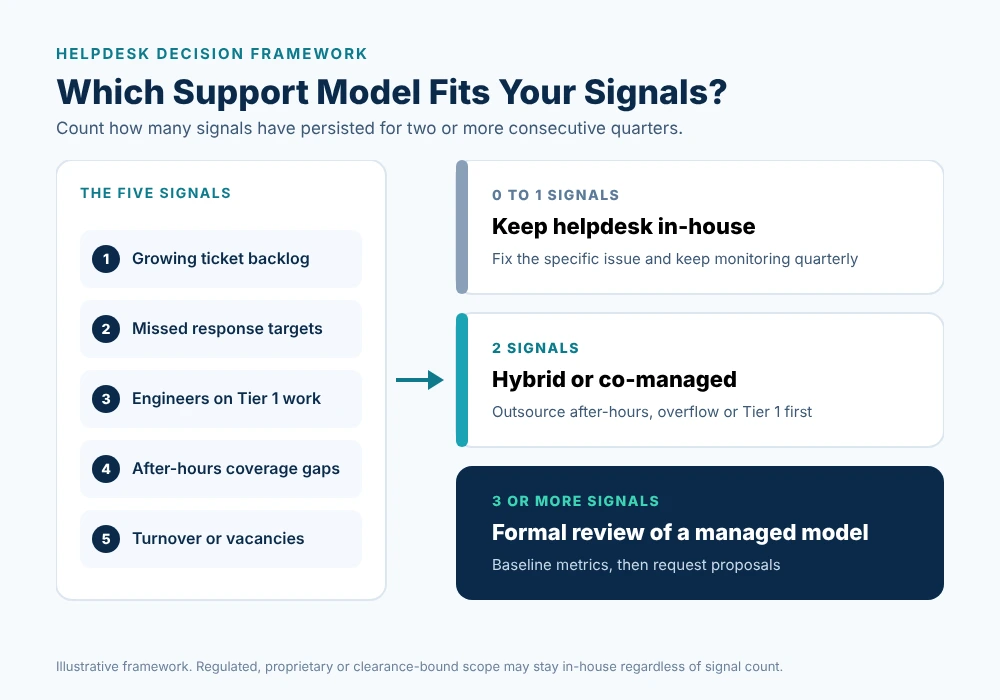
The signs you need to outsource helpdesk usually appear in service data well before they reach the boardroom: rising backlogs, missed response targets and senior engineers absorbed by routine requests. Any single signal can often be fixed internally. When three or more persist for two consecutive quarters, a formal review of your support model is justified.
Ticket backlogs and slipping response times
- Open tickets grow faster than closures, month over month
- Priority incidents miss their response targets, along with routine requests
- Employees bypass the desk and contact individual IT staff directly
Senior IT staff tied up with routine requests
- Gartner found that 40% of helpdesk calls relate to password expirations, changes and resets (Specops)
- Forrester estimates that each password reset costs about $70
- Engineers hired for infrastructure, cloud or security work lose hours each week to Tier 1 tickets
Growth, new locations or a hybrid workforce
- Acquisitions, new offices and regional expansion add users faster than hiring can follow
- In May 2025, 17.4% of employed Canadians mostly worked from home and 10.0% usually worked both at home and on site (Statistics Canada), which spreads support across home networks and more devices
Gaps in after-hours and weekend coverage
- Shift workers, staff in other time zones and travelling executives need help outside business hours
- One 24/7 seat needs 168 hours of cover each week, which takes more than four full-time employees before vacation, sick leave and training
Turnover and hiring difficulty on the helpdesk team
- Each departure takes undocumented knowledge with it
- Vacancies leave the remaining team covering more hours, which raises burnout and further attrition
Treat these signals as a pattern. A single difficult quarter rarely justifies a change of model, but a sustained trend across backlog, coverage and staffing usually does, especially when it coincides with growth or a major system change.
When Should You Keep Helpdesk In-House?
Outsourcing isn’t the right answer for every environment. Some organizations get better results from an internal desk, or from keeping certain user groups in-house while a provider handles the rest. Deloitte found that 70% of organizations had selectively insourced parts of previously outsourced scope within five years [Deloitte], so scope deserves careful thought.
Proprietary or highly specialized systems
- Line-of-business systems with little documentation and knowledge held by a few people
- Engineering, clinical or trading environments where support depends on deep domain context
On-site, clearance or regulatory constraints
- Roles that require security clearance, physical presence or data handling a provider can’t meet
- Contracts or regulators that restrict who may access certain systems
Low ticket volume and a stable environment
- A small, stable user base with predictable requests and an experienced team
- No business need for coverage outside core hours
In-House vs. Outsourced Helpdesk: Which Is Right for Your Organization?
The in-house vs outsourced helpdesk decision rarely turns on one factor. It weighs control and institutional knowledge against coverage, scalability and staffing risk. The table below compares both models on the factors executive teams usually examine when they review end-user support, and it can serve as a starting point for your own scoring.
Factor | In-house helpdesk | Outsourced helpdesk |
Coverage hours | Limited by headcount; 24/7 needs more than four FTEs per seat | Business hours, extended hours or 24/7/365 options |
Scalability | Constrained by hiring and training lead times | Capacity adjusted through the contract |
Skills depth | Depends on a small team | Access to a wider Tier 1 to Tier 3 pool |
Institutional knowledge | High from day one | Built through runbooks and shadowing |
Accountability | Internal targets | Contracted SLAs with monthly reporting |
Staffing risk | Turnover and vacancies sit with you | Sits with the provider |
Control | Direct day-to-day control | Exercised through governance and contract terms |
How Do You Build the Business Case for Outsourcing End-User Support?
A credible case for outsourcing end-user support compares the full cost of today’s desk with a provider’s fee, then adds the productivity cost of slow resolution. Price alone rarely decides it now. Cost reduction was a primary outsourcing driver for 70% of executives in 2020 but only 34% in 2024, and access to talent has become the top driver.
The true cost of an in-house desk
- Salaries, benefits and payroll costs for every seat, including premiums for evening and weekend shifts
- Licences for ticketing, remote support and endpoint management tools
- Recruiting, onboarding and training each time someone leaves
- Management time spent on scheduling, coverage gaps and quality reviews
The productivity cost of slow resolution
- Every hour an employee waits for a fix is lost output, multiplied across everyone affected
- Repeat issues compound quickly: at Forrester’s estimate, 1,000 password resets a year represent roughly $70,000 in support cost
Metrics to baseline before deciding
- Ticket volume by category, channel and time of day
- First contact resolution rate
- Average response and resolution time by priority
- Backlog age and ticket reopen rate
- User satisfaction (CSAT) after resolution
Collect at least three months of this data before requesting proposals. A clear baseline lets you set realistic SLAs, compare providers fairly and prove whether the new model is performing after go-live.
Fully Outsourced or Co-Managed: Which Helpdesk Model Fits?
Most enterprises don’t face an all-or-nothing choice. Deloitte reports that 67% of executives now adopt managed or operate services, up from 45% two years earlier. The right model depends on how much control you need, the skills you already have in-house, and the specific coverage gaps you’re trying to close.
Fully outsourced helpdesk
- The provider runs Tier 1 to Tier 3 end-user support under contracted SLAs
- Suits organizations with small internal IT teams, or a mandate to refocus staff on strategic programs
Co-managed model alongside an internal IT team
- Your team keeps VIP, specialist or on-site support, and the provider handles Tier 1, overflow and after-hours requests
- AppStudio’s managed helpdesk services support this co-sourcing approach, with pricing usually set per user or per ticket
Hybrid coverage
- The internal desk covers business hours, and the provider covers nights, weekends and holidays
- A practical first step that tests a provider before broader scope moves
What Risks Should You Plan For, and How Do You Reduce Them?
Helpdesk transitions that disappoint usually fail on change management, not technology. In Deloitte’s survey, 53% of respondents cited inadequate organizational change management as an outsourcing challenge. The risks below are predictable, which means each one can be addressed in the contract, the transition plan and the governance model from the start.
Loss of context and institutional knowledge
- Document known issues, workarounds, escalation contacts and VIP preferences before handover
- Run a shadowing period so provider agents learn your environment before taking ownership
User experience during the transition
- Communicate the change early, including new contact channels and what stays the same
- Track CSAT weekly during the first three months
Data access and security controls
- Require identity verification before any password reset or access change, since scams and fraud were a method of attack for 55% of Canadian businesses impacted by cyber incidents in 2025 (Statistics Canada)
- Insist on least-privilege access, session logging for remote support and audit rights in the contract
- Confirm certifications: AppStudio reports ISO 27001 and ISO 9001 [AppStudio]
How Do You Move Helpdesk to a Managed Provider Without Disruption?
A structured transition lets you move helpdesk to a managed provider without employees noticing a drop in service. AppStudio’s process runs in five phases, from assessment and baseline through optimization, and most desks are fully live within two to four weeks [AppStudio]. Larger, multi-site or heavily regulated environments may need a longer runway.
Step-by-step transition plan
- Baseline current metrics: volumes, response times, first contact resolution, CSAT and backlog.
- Capture knowledge: runbooks, known issues, escalation contacts and VIP lists.
- Set up tools and access: ticketing integration with platforms such as ServiceNow, Jira, Zendesk or Freshservice, plus remote support and identity checks.
- Soft launch and shadowing: provider agents work alongside your team before taking ownership.
- Go-live and stabilization: daily stand-ups in the early weeks to resolve issues quickly.
- 90-day review: compare results with the baseline and adjust scope or SLAs.
Illustrative scenario: a 2,500-employee organization with offices in three provinces runs a six-person desk during business hours. Backlogs rise at every quarter-end, and night-shift staff at two sites have no support. The CIO moves after-hours and overflow Tier 1 work to a provider first, keeps on-site and VIP support internal, and reviews full scope after 90 days.
What Should You Ask Before Choosing a Helpdesk Partner?
Provider proposals often look alike on paper, so ask every bidder the same questions in writing. Their answers show how each provider will perform when volumes spike, incidents escalate or targets are missed, and they give your procurement and IT leaders a fair, consistent basis for comparing bids.
- What first response and resolution targets will you commit to by priority, and do service credits apply?
- Which ticketing platforms do you integrate with, and who owns the ticket data?
- How do you verify identity before resetting passwords or changing access?
- Which coverage options do you offer: business hours, extended hours or 24/7/365?
- Which metrics will you report, and how often?
- What happens to our runbooks, ticket history and knowledge base if we exit?
Frequently Asked Questions
These are the questions executive teams ask most often when weighing when to outsource IT helpdesk and end-user support. The answers reflect common practice and AppStudio’s approach. Confirm specific commitments, such as timelines and service levels, in each provider’s proposal and in the final service agreement before you sign.
How do I know if my company is ready to outsource IT helpdesk?
Start with your ticket data. If backlogs, missed targets, coverage gaps and turnover appear together, the case is strong. An assessment can compare your current metrics with what a provider would commit to.
How long does a helpdesk transition take?
AppStudio says most desks are fully live within two to four weeks. Complex or multi-site environments can take longer, particularly when documentation needs to be created first.
Will employees notice the switch?
They’ll notice new contact channels and, ideally, faster responses. Shadowing, clear communication and weekly CSAT tracking keep disruption low during handover.
Can an outsourced helpdesk support remote and hybrid staff?
Yes. Remote desktop support, multi-channel access and device management cover employees wherever they work, including home offices.
Can we bring helpdesk back in-house later?
Yes, if exit terms are agreed up front. The contract should cover the return of ticket history, runbooks and knowledge base content, plus transition support.
Conclusion and Next Steps
Deciding when to outsource IT helpdesk is a question of evidence: service data, coverage needs, staffing risk and full cost. The signs you need to outsource helpdesk usually show up in your metrics long before they become a business problem. Weigh in-house vs outsourced helpdesk options against your control and compliance requirements, then choose the model that fits.
If the evidence points to change, a phased plan lets you move helpdesk to a managed provider with clear SLAs and a 90-day review. Organizations still unsure when to outsource IT helpdesk can begin with a baseline review of their current desk.
Book a helpdesk readiness assessment with AppStudio to benchmark your current desk and identify which scope to move first.