
 iOS App Development
 Android App Development
 React Native
 Flutter
 Web Development
 Custom Software
 Front End Development
 Blockchain Development
 Virtual Reality
 Cloud Computing
 IoT Development
 Augmented Reality
 Write us a message
A regional manager opens a new branch in Moncton on a Monday. By Wednesday, the firewall, switches and Wi-Fi are configured exactly like every other site, the new hires have laptops that set themselves up on first sign-in, and head office can see the branch’s health on the same dashboard as the other eleven. Nobody flew in from Toronto, and nothing was improvised.
That’s what good managed IT services for multi-site enterprises make possible. Many Canadian organizations run offices, plants, clinics, stores or warehouses across several provinces. For them, the services that work best are the ones that make every location run the same way:
- A standard site blueprint, so every location uses the same equipment, configuration and security settings
- Central identity and device management, so people and laptops can be added or removed from anywhere
- A field support model that combines remote fixes with on-site help where it’s needed
- Site-by-site visibility, so leaders can see how each location is doing
- Language and provincial coverage, including French-language needs in Quebec
- A repeatable playbook for new sites and acquisitions
Here’s how each one works in practice, with the questions to ask a provider.
Managed IT Services for Multi-Site Enterprises at a Glance
Service | What it solves across sites | Question to ask a provider |
Standard site blueprint | Every location set up differently, by different people | Can you show us your standard build for a new site? |
Central identity and device management | Slow onboarding and missed offboarding at remote sites | How does a laptop get from the box to a new hire in Saskatoon? |
Field support model | Small issues waiting days for someone to visit | Which issues are fixed remotely, and how is on-site help arranged? |
Site-by-site visibility | Head office can’t see which locations struggle | Can we see health and tickets for each site separately? |
Language and provincial coverage | Quebec teams, provincial rules and local carriers | How do you support our Quebec sites and staff? |
New-site and acquisition playbook | Each new location becomes a one-off project | What happens in the first 30 days after we add a site? |
1. A Standard Site Blueprint
The single biggest improvement for a multi-site organization is to decide what a “standard site” looks like and build every location to match. That means the same firewall model, switch configuration, Wi-Fi settings, network segments, printer setup and security policies everywhere.
Standardization pays off every time a site opens, moves or needs support. Here’s an illustrative example for a company bringing 12 locations onto a common standard:
Custom build: 12 sites × 5 engineer-days = 60 engineer-days
Standard blueprint: 12 sites × 2 engineer-days = 24 engineer-days
Saved: 36 engineer-days, or about seven working weeks
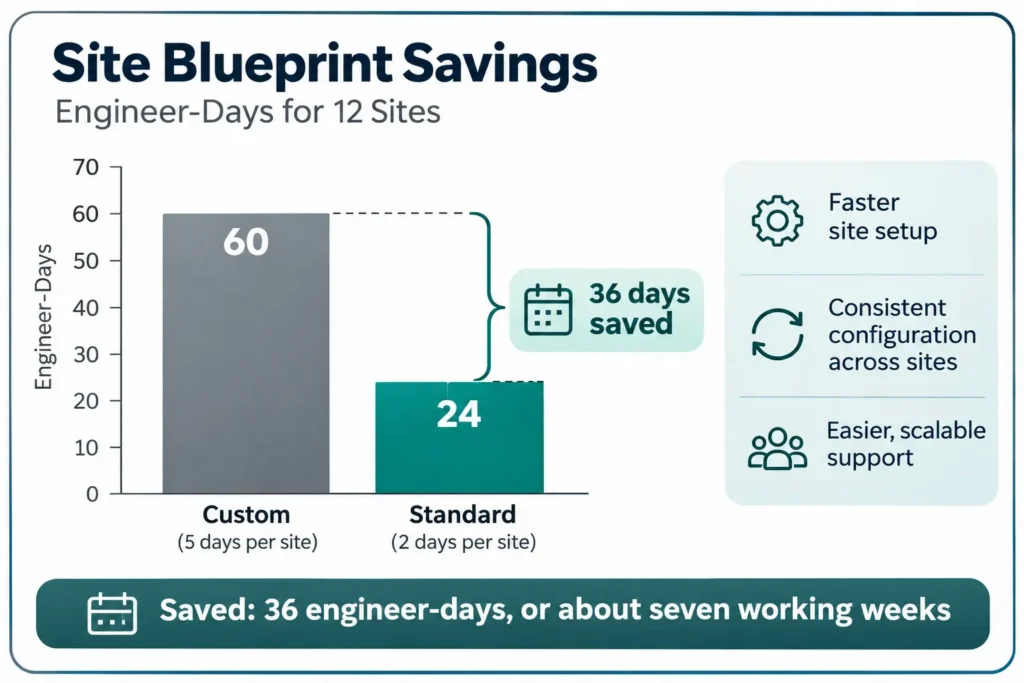
The day counts are illustrative, so use your provider’s estimates. The bigger benefit comes later: when every site is built the same way, a fix found at one location can be applied to all of them, and any engineer can support any site.
2. Central Identity and Device Management
People at remote sites need the same access, security and software as head office, on day one. Central identity and device management makes that possible without anyone travelling.
Microsoft describes Windows Autopilot as “a collection of technologies used to set up and pre-configure new devices, getting them ready for productive use.” From IT’s perspective, the user only has to connect to a network and sign in. “Everything beyond that is automated” (Microsoft Learn).
For a multi-site company, that removes a lot of setup work. Here’s an illustrative example of a company hiring 60 people a year across 10 sites:
Manual setup: 60 laptops × 2 hours of technician time = 120 hours a year
Automated setup: the employee connects and signs in, and the rest happens automatically
The same central approach handles leavers. On someone’s last day, access to email, files and business apps can be removed in one place, wherever they work.
3. A Field Support Model That Fits Canada
Canada covers a lot of ground, so on-site coverage needs a deliberate plan. The best multi-site support models combine three layers, matched to the type of issue.
Support layer | Typical issues | How it’s handled |
Remote first | Password resets, software problems, access changes, most network faults | Fixed by the help desk or NOC without anyone travelling |
Guided on-site | A device needs a reboot, cable check or swap | A trained local contact follows the provider’s instructions, often with a spare kept on site |
Dispatched on-site | Failed hardware, new installations, cabling | A technician is scheduled to visit the site |
Larger sites can keep a small kit of spare equipment, such as a pre-configured switch or access point, so a failed device can often be swapped the same day. Because every site follows the same blueprint, the spare is ready to go.
4. Site-by-Site Visibility
Head office needs to see each location clearly. Good reporting breaks results down by site:
- Tickets raised
- Time to resolve
- Device health
- Patch status
- Network availability
A company-wide view can make everything look fine while one location quietly struggles. Seeing each site separately helps leaders spot patterns, such as a branch that needs a network upgrade or extra training for staff.
5. Language and Provincial Coverage
Multi-site Canadian organizations often operate under more than one set of rules and languages.
Quebec sites. Under Quebec’s Charter of the French language, francization obligations apply to companies with 25 or more employees in Quebec. Companies with more than 25 employees for six months had to register with the Office québécois de la langue française by June 1, 2025 (DLA Piper). If your Quebec sites are part of a francization program, ask how your provider will support French-language interfaces, documentation and help desk conversations for those teams.
Provincial differences. Privacy, records and sector rules vary by province, and so do local carriers and on-site logistics. A provider that works across provinces should be able to explain how it handles each location you operate in.
6. A Playbook for New Sites and Acquisitions
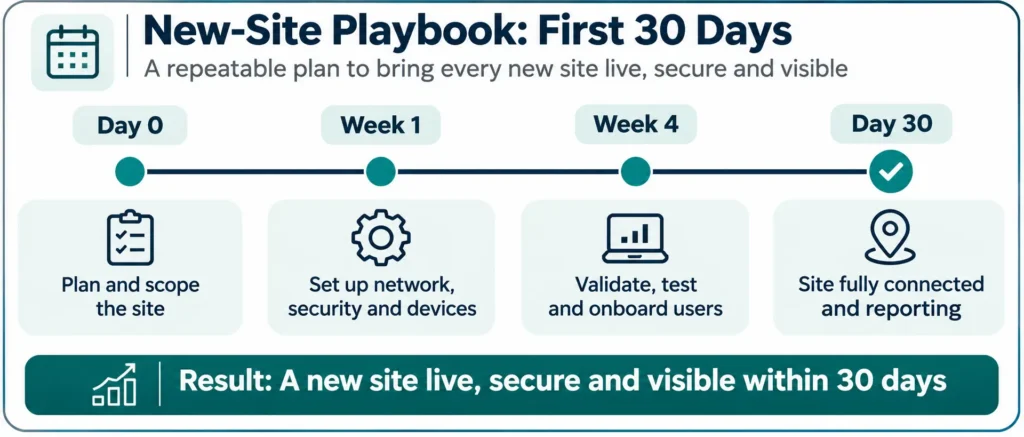
Growing organizations add locations through new openings and acquisitions. A repeatable playbook turns each one into routine work.
Timeframe | New site | Acquired site |
Before day 1 | Order equipment to the standard blueprint | Inventory the acquired company’s devices, accounts and systems |
Week 1 | Install network gear and connect to central monitoring | Connect key systems and secure admin access |
Weeks 2 to 4 | Issue laptops that set themselves up at first sign-in | Move users to central identity and device management |
Day 30 | Site appears in standard reporting | Site runs on the same blueprint as the rest of the company |
How AppStudio Supports Multi-Site Canadian Enterprises
AppStudio delivers managed IT services for multi-site enterprises that want every location run as one environment:
- A help desk and NOC staffed 24/7. Critical issues raised during business hours get a first response in under 10 minutes on average
- IT infrastructure management for the network gear at every location (firewalls, switches, routers and Wi-Fi), plus equipment in data centres and colocation
- Device management on platforms such as IBM MaaS360, Jamf Pro, Microsoft Intune and VMware Workspace ONE
- Structured onboarding and offboarding, so joiners, movers and leavers are handled the same way at every location
- Lifecycle tracking for every device, application and licence, from purchase to retirement
- Regular reporting on uptime, incidents, patch status and capacity, plus capacity forecasting for growing sites
Most environments start onboarding within 5 to 7 business days, and mid-sized organizations typically complete the move in 2 to 4 weeks.
Since 2015, AppStudio has completed more than 1,300 projects. Its quality and security programs are certified to ISO 9001 and ISO/IEC 27001, and it holds a SOC 2 Type II attestation.
Frequently asked questions
What managed IT services work best for multi-site Canadian enterprises?
The most effective managed IT services for multi-site enterprises are:
- A standard site blueprint
- Central identity and device management
- A field support model that combines remote and on-site help
- Site-by-site reporting
- Coverage for French-language and provincial needs
- A repeatable playbook for new sites and acquisitions
How do you standardize IT across multiple locations?
Define a standard site build covering network equipment, configuration, Wi-Fi, security settings and device policies, then apply it to every location. New sites are built to the standard, and existing sites are brought up to it over time.
How do new employees at remote sites get set up?
With tools such as Windows Autopilot and Microsoft Intune, the employee only needs to connect to a network and sign in. Setup is automated from there.
Do managed IT providers need staff in every province?
Not always. Most issues can be fixed remotely. What matters is a clear model for on-site help, such as trained local contacts, spare equipment at larger sites, and scheduled technician visits when hardware needs replacing.
What should multi-site enterprises with Quebec locations ask a provider?
Ask how the provider supports French-language interfaces, documentation and help desk conversations. This matters most if your Quebec sites are part of a francization program under the Charter of the French language.
How quickly can a new site be added?
With a standard blueprint and central management, a new location can typically be connected, monitored and included in reporting within about 30 days, depending on equipment lead times.
Run Every Location Like Your Best One
The right managed IT services for multi-site enterprises build every site the same way, manage it centrally and support it with a clear plan, which makes growth much simpler. New locations open faster, staff get the same experience everywhere, and leaders see the whole picture.
Schedule a free 30-minute session with AppStudio. We’ll map your current sites and show you how we’d bring them onto one standard, from your first location to your next acquisition.