
 iOS App Development
 Android App Development
 React Native
 Flutter
 Web Development
 Custom Software
 Front End Development
 Blockchain Development
 Virtual Reality
 Cloud Computing
 IoT Development
 Augmented Reality
 Write us a message
An enterprise SLA for managed IT services should guarantee measurable results for the business services your organization runs on. When a managed service provider takes over your infrastructure, service desk or security operations, it also takes on part of your operational risk. The SLA is the only document that says how much of that risk the provider carries and what happens when it falls short.
Many enterprises still sign agreements built for a much smaller customer. These SLAs list activities such as monitoring, ticket handling and patching. They say very little about whether the ERP comes back within four hours, whether a breach is reported in time for your disclosure obligations, or whether you can leave without losing your data and documentation. That gap is expensive. 41% of enterprises put the cost of one hour of downtime between $1 million and over $5 million [ITIC, 2024], and the average data breach in the US costs $10.22 million [IBM via Help Net Security, 2025].
For a large organization, a well-built managed services SLA should guarantee, at a minimum:
- Availability targets for each named business service, measured end to end
- Response and resolution times by priority, with a 24×7 path for critical incidents
- Time limits for detecting, containing and reporting security incidents
- Recovery point (RPO) and recovery time (RTO) objectives, proven by tested restores
- Service credits that grow with the impact of a failure and with repeat failures
- Termination rights, a funded transition period, and full return of data and documentation
The rest of the agreement exists so that you can check these six commitments are being met. Below, we cover what each guarantee should contain, the benchmarks to measure it against, the regulations that now set some of the terms, and the questions your leadership team should ask before renewing or signing.
Why the Managed Services SLA Is a Board-Level Document
In most cases, the provider’s legal team drafts the managed IT support SLA and procurement reviews it. For an enterprise, that’s backwards. The SLA defines how much operational risk you have handed to the provider and how much you have quietly kept.
These numbers show why the C-suite should own it:
- Downtime is now a seven-figure exposure for many large firms. ITIC’s 11th annual survey found that 41% of enterprises put the cost of an hour of downtime between $1 million and over $5 million [ITIC, 2024].
- Third parties cause most visible outages. Over nine years of tracking, third-party IT and data center providers (cloud, telecom, colocation) caused about two-thirds of publicly reported outages [Uptime Institute, 2026].
- Breaches stay open for months. On average, 241 days pass between a breach being identified and being contained [IBM via Help Net Security, 2025].
- Disclosure deadlines are short. US public companies generally have to file an Item 1.05 Form 8-K within four business days of deciding a cybersecurity incident is material [SEC, 2023]. Your provider’s notification window has to fit inside that.
When a managed service provider runs your infrastructure, service desk or security operations, its SLA becomes part of your risk register. The CFO, CIO, CISO and General Counsel should all sign off on it.
The 8 Guarantees Every Enterprise IT SLA Should Contain
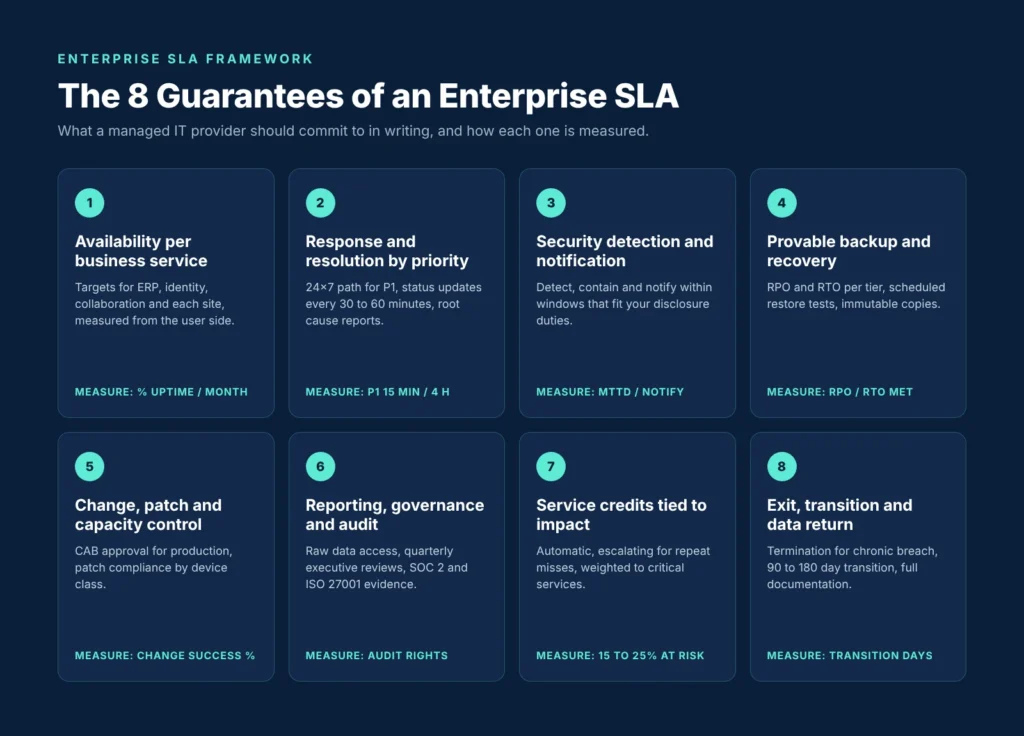
1. Availability Measured Per Business Service
A single “network uptime” figure tells you very little. An enterprise SLA should name each business service in scope (ERP, email and collaboration, identity, customer-facing applications, WAN links per site) and set an availability target for each one.
The clause should specify:
- Exactly where availability is measured, ideally with synthetic transactions run from the user’s side
- The measurement period (monthly is standard) and how partial outages and slow performance are counted
- Which maintenance windows are excluded, how long they can last, and how much notice is required
- Whether availability is reported per site for multi-location estates
2. Response and Resolution Times by Priority
Response time measures how quickly a qualified engineer starts work on an incident. Resolution (or restoration) time measures how quickly the business is working again. You need both, and resolution time matters more.
Commonly published benchmarks for a managed IT support SLA [Datapath, 2026]:
Priority | Example | Response | Resolution / Restoration |
P1 Critical | Core system down, many users affected | 15 minutes | 4 hours |
P2 High | Major function degraded, workaround limited | 1 hour | 8 business hours |
P3 Medium | Single user or non-critical service | 4 business hours | 1 to 2 business days |
P4 Low | Requests, minor issues | 1 business day | 3 to 5 business days |
Enterprises should negotiate stronger P1 and P2 terms:
- 24x7x365 coverage for P1 incidents, whatever business hours the contract otherwise covers
- Status updates to named executives every 30 to 60 minutes during a P1
- A defined escalation path, with timeframes, up to the provider’s service delivery lead and executive sponsor
- A root cause analysis within an agreed number of business days after every P1
3. Security Incident Detection, Containment, and Notification
If the provider manages your endpoints, identity, firewalls or a SOC, the managed services SLA must cover security outcomes separately from IT support.
Clauses to require:
- Targets for mean time to detect (MTTD) and mean time to contain confirmed incidents
- Notice to your security lead within a fixed window (hours, not days) of a confirmed or suspected compromise
- Duties to preserve evidence and cooperate with forensic investigations
- Patch deadlines by severity, for example a set number of days for critical vulnerabilities on internet-facing systems
- Help with incidents at no extra cost or at a pre-agreed rate. DORA now requires this for in-scope EU financial firms
4. Backup and Recovery You Can Prove
The SLA should commit to an RPO and RTO for each service tier, and to the testing that proves the provider can meet them.
- RPO and RTO set for each application tier, in line with your business impact analysis
- Restore tests on a fixed schedule, with written results. Quarterly is a reasonable minimum for critical systems
- Immutable or offline copies so you can recover from ransomware
- An active role for the provider in your annual disaster recovery exercise
5. Change, Patch, and Capacity Management
Many outages start with a change to the environment. Uptime Institute reports that staff not following established procedures is still the main cause of outages from human error [Uptime Institute, 2026].
- Approval from your change advisory board (CAB) for any change that touches production
- A target change success rate, reported monthly
- Patch compliance percentage by device class
- Capacity thresholds that trigger action before users notice a problem
6. Reporting, Governance, and Audit Rights
Audit rights are what make every other clause enforceable. Specify:
- Monthly service reports with access to the underlying raw data
- Quarterly business reviews attended by an accountable executive from the provider
- An annual SLA review, with the right to tighten targets as your estate changes
- Audit and inspection rights for you and, where relevant, your regulators
- Current third-party attestations (SOC 2 Type II, ISO/IEC 27001), with the reports shared with you
7. Service Credits That Reflect Business Impact
The section on service credits below covers this in detail. Credits should be tiered, applied automatically, and backed by the right to terminate after repeated failures.
8. Exit, Transition, and Data Return
This clause is the one most often left vague, and it costs the most when a relationship ends.
- The right to terminate for cause after repeated SLA breaches (for example, three missed P1 targets in a rolling six months)
- A transition assistance period, usually 90 to 180 days, at rates agreed in advance
- Return of all data, configurations, credentials, runbooks and network documentation in usable formats
- Duties to hand over knowledge to your incoming provider or internal team
- No offboarding fees beyond those priced at signing
What “Three Nines” Actually Allows
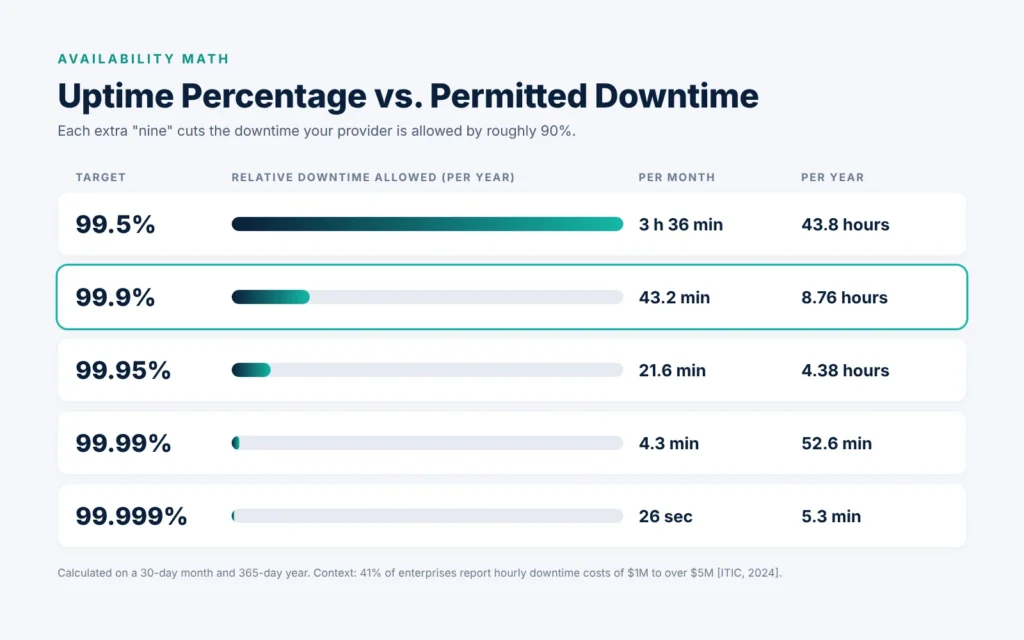
Small differences in the decimal places of an availability target mean large differences in allowed downtime. This table shows how much downtime each common target permits, based on a 30-day month and a 365-day year:
Availability target | Permitted downtime per month | Permitted downtime per year |
99.5% | 3 hours 36 minutes | 43.8 hours |
99.9% | 43.2 minutes | 8.76 hours |
99.95% | 21.6 minutes | 4.38 hours |
99.99% | 4.3 minutes | 52.6 minutes |
99.999% | 26 seconds | 5.3 minutes |
How to use this in negotiation:
- Set each target based on what an hour of downtime costs for that service
- Ask what architecture supports the number. A 99.99% commitment on a single-site, single-carrier design won’t hold
- Check whether planned maintenance counts toward the target. A 99.9% target that excludes eight hours of monthly maintenance gives you much less protection than it appears to
Service Credits: Why the Standard Model Falls Short
Credits are calculated as a percentage of the monthly fee and have nothing to do with your actual loss. AWS’s terms are typical. Its EC2 region-level SLA pays a 10% credit when monthly uptime is below 99.99% but at least 99.0%, 30% when it is below 99.0%, and 100% when it is below 95.0%. Credits can only be used against future bills, and you must claim them by the end of the second billing cycle [AWS, 2022].
Illustrative scenario (hypothetical figures): A global manufacturer pays $120,000 a month for managed IT infrastructure. A storage failure takes its ERP offline for 3 hours 36 minutes, which brings monthly availability down to 99.5%. At a 10% credit tier, the provider owes $12,000. If the firm is among the 41% of enterprises whose downtime costs $1 million or more per hour [ITIC, 2024], it has lost more than $3.6 million. The credit covers about 0.3% of that.
Credits will never cover your full loss. What you can negotiate:
- Automatic credits. The provider calculates and applies them from its own reports, with no claim process.
- Escalating tiers. Credits increase for consecutive or repeated misses within a rolling period.
- Weighted services. Missing a target on a critical service earns a larger credit than missing one on a minor service.
- A meaningful cap. Many MSP contracts limit total monthly credits. Push for 15% to 25% of the monthly fee to be at risk.
- Termination triggers. Repeated failure gives you the right to exit without penalty. This clause matters more than any credit percentage.
- No double counting. Accepting credits does not stop you from claiming damages for gross negligence or data protection breaches.
Regulation Is Now Writing Part of Your SLA
For many enterprises, the SLA is now partly a regulatory document as well as a commercial one.
- DORA (EU financial sector). In force since 17 January 2025. Under Article 30, contracts supporting critical or important functions must include “precise quantitative and qualitative performance targets,” notice and reporting duties, business continuity testing, unrestricted access and audit rights, and exit strategies with a “mandatory adequate transition period” .
- SEC cybersecurity disclosure (US public companies). A material incident generally requires an Item 1.05 Form 8-K within four business days of the company deciding it is material [SEC, 2023]. Your provider’s notification and evidence duties need to support that deadline.
- Sector frameworks. HIPAA, PCI DSS, SOC 2 and CMMC each set expectations for evidence, logging and access control. Your managed services SLA should name the ones that apply to you.
Even if DORA doesn’t apply to your firm, its Article 30 list is a sound benchmark for any enterprise IT SLA.
Red Flags in an SLA for a Managed Service Provider
Watch for these during review:
- Targets measured only with the provider’s own monitoring tools, with no way for you to verify them
- “Best efforts” or “commercially reasonable” language on availability or resolution
- Response times with no resolution or restoration times
- Maintenance windows with no limit on length or frequency
- Credits that require a written claim within 30 days, or that are capped below 5% of fees
- No right to terminate for repeated breaches
- Nothing on returning data, credentials and documentation at exit
- Security responsibilities described as “shared” without a RACI matrix that says who does what
- Freedom for the provider to subcontract without notice or approval
Questions Your Leadership Team Should Ask Before Signing
For the CEO and COO
- Which business processes stop if each in-scope service fails, and does the SLA prioritize services in that order?
- What does an hour of downtime really cost for each of our top five services?
For the CFO
- How much of the monthly fee is genuinely at risk?
- Do credits increase when failures repeat?
- What will exit and transition cost, and is that price fixed now?
For the CIO and CISO
- How is availability measured, and can we check it ourselves?
- What are the detection, containment and notification commitments, and do they fit our disclosure obligations?
- When was the last restore test, and can we see the results?
For General Counsel
- Can we actually use the termination rights in practice, or do they only exist on paper?
- Are data protection and confidentiality breaches excluded from the liability caps?
- Does the contract meet DORA, HIPAA, PCI DSS or the other rules that apply to us?
How Zazz Approaches Enterprise SLAs
We write SLAs around the business services our clients run, and we hold ourselves accountable for restoring service as well as for responding to incidents. That’s why we set availability targets per service, report from raw data our clients can inspect, and include termination rights for repeated failure.
We’ll be upfront about the trade-offs. Five-nines availability is only possible when the underlying architecture supports it, and that often means investing in redundancy before we can commit to the number. We would rather agree to a credible 99.95% and meet it than promise 99.999% on infrastructure that can’t deliver it.
Frequently Asked Questions
What is an enterprise SLA in managed IT services?
An enterprise SLA for managed IT services is the part of the contract that sets the measurable service levels a managed service provider must deliver, how those levels are measured and reported, and what remedies apply when they are missed. For large organizations, it covers availability, incident response and resolution, security, recovery, governance and exit.
What uptime should an enterprise managed services SLA guarantee?
Most enterprises target 99.9% to 99.99% for critical business services. 99.9% allows 8.76 hours of downtime a year, while 99.99% allows 52.6 minutes. The right target depends on what downtime costs for each service and on the architecture behind it.
What is the difference between response time and resolution time in an SLA?
Response time is how quickly a qualified engineer starts work on an incident. Resolution or restoration time is how quickly the service is working again. Enterprise SLAs should guarantee both. P1 incidents are commonly set at 15 minutes for response and 4 hours for restoration.
Are SLA service credits enough to cover downtime losses?
No. Credits are a percentage of the monthly fee, so they rarely come close to the business cost of an outage. They work best as an accountability tool, combined with credits that increase for repeat failures and the right to terminate after repeated breaches.
What should an SLA say about exiting a managed service provider?
It should set out termination rights, a transition assistance period (usually 90 to 180 days), transition rates agreed in advance, and full return of data, configurations, credentials and documentation. DORA makes exit strategies mandatory in EU financial entities’ contracts for critical ICT services [EU Regulation 2022/2554, Art. 30].
Closing: Make the SLA Match the Risk You Carry
An enterprise SLA with a managed IT provider should guarantee that business services are restored, that recovery is proven, that security incidents are reported on time and that you can exit cleanly. Its remedies should be strong enough to change how the provider behaves. If your current agreement reads like a list of tasks the provider will perform, review it before your next renewal or audit cycle.
Zazz works with enterprise leadership teams to define, benchmark and run managed IT services under SLAs built around business outcomes. Get a free SLA review from our managed services team, and we’ll show you where your current agreement falls short of the eight guarantees in this guide.