
 iOS App Development
 Android App Development
 React Native
 Flutter
 Web Development
 Custom Software
 Front End Development
 Blockchain Development
 Virtual Reality
 Cloud Computing
 IoT Development
 Augmented Reality
 Write us a message
Almost every managed IT provider advertises 24×7 helpdesk support. Far fewer can show what happens when a regional manager in Vancouver locks herself out at 11 p.m., or when a payroll system fails in Halifax before the morning shift arrives. The difference between those providers rarely shows up in a sales deck. It shows up in coverage models, SLA definitions, escalation paths, and security procedures that most buyers never think to test.
This guide gives enterprise IT, operations, and procurement leaders a practical way to narrow a long list of providers to a credible few. It includes a 24×7 helpdesk provider checklist you can use as helpdesk evaluation criteria in an enterprise service desk RFP and in vendor interviews, along with the questions, evidence, and red flags that separate real round-the-clock support from a voicemail box with a ticket number.
How Can Enterprises Shortlist a 24×7 Helpdesk Provider?
Enterprises can shortlist a 24×7 helpdesk provider by verifying six things in order: how after-hours coverage is staffed, how the SLA defines response and resolution, whether performance data is measurable and recent, how the helpdesk verifies callers before resetting credentials, whether language and time zone needs are covered, and how the provider performs in a live test or pilot. Providers that cannot evidence each point should be removed before pricing discussions begin.
The checklist below turns those six steps into specific checkpoints.
The 24×7 Helpdesk Provider Checklist
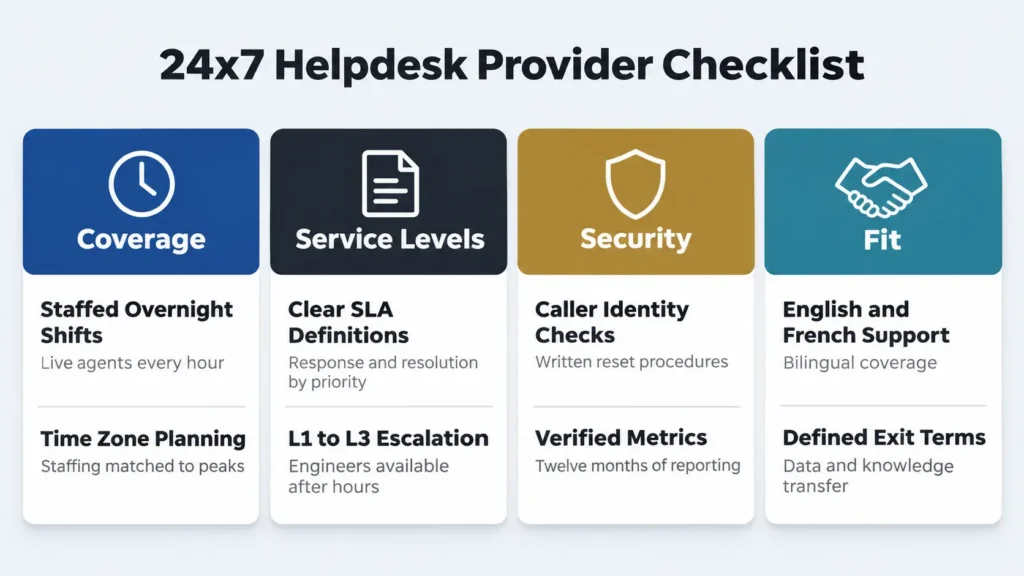
Use this 24×7 helpdesk provider checklist to score each candidate. Ask for evidence, not just answers.
Checkpoint | What to ask | Evidence to request |
Coverage model | Who answers at 3 a.m. on Sunday? | Staffing schedule by shift and location |
Channel availability | Are phone, chat, email, and portal all live 24×7? | Channel hours in the SLA |
Response vs resolution | How are both measured, and in business or calendar hours? | Sample SLA with priority definitions |
Escalation path | How do L1, L2, and L3 hand off after hours? | Escalation matrix and on-call roster |
Performance metrics | What are your first contact resolution, resolution time, and CSAT results? | 12-month reports split by business hours and after hours |
Caller verification | How do you confirm your identity before a password or MFA reset? | Written identity verification procedure |
Language support | Can you support users in English and French? | Bilingual staffing levels and hours |
Time zone coverage | How do you staff peaks across Canadian and US time zones? | Volume and staffing forecasts |
Tooling | Can you work in our ITSM platform? | Platform experience and integration references |
Onboarding and exit | How long to go live, and how do we leave? | Transition plan and exit terms |
Step 1: Confirm What “24×7” Actually Means
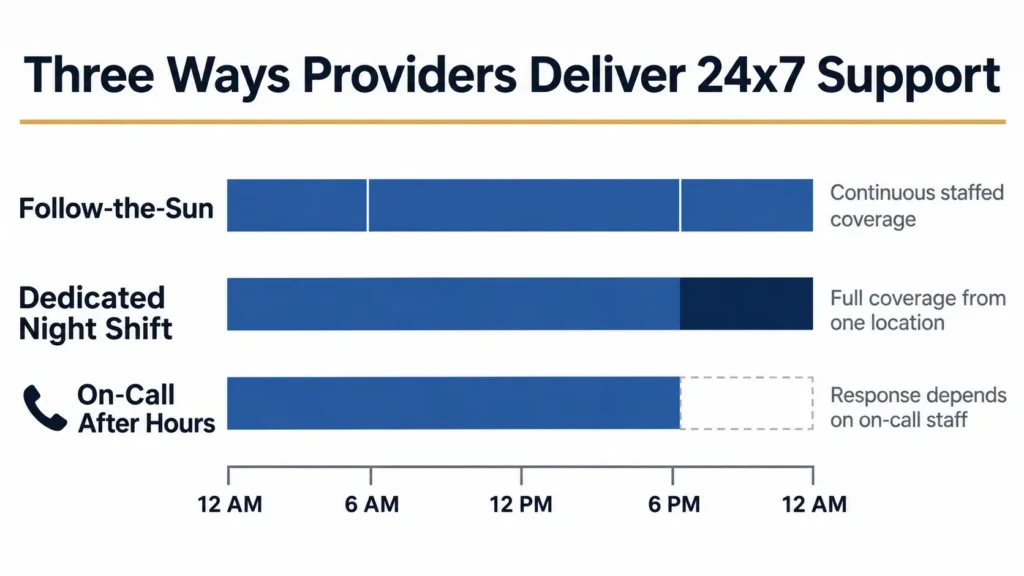
“24×7” can describe very different operating models, and each carries a different level of risk.
- Follow-the-sun. Teams in multiple regions hand off during their working day, so every shift is staffed by alert, fully trained agents. This model offers the most consistent quality but depends on clean handoffs and shared documentation.
- Dedicated overnight shift. A single location staffs a night team. This works well when the night team has the same access, training, and escalation authority as the day team.
- On call after hours. Calls go to an answering service or a rotating on-call engineer. This is the least expensive model, but response times often stretch, and complex issues wait until morning.
The first item on any 24×7 helpdesk provider checklist should be a simple question: which of these models will serve your users, and for which channels and priorities? Many providers run live phone support overnight but leave chat and email unattended until business hours.
Step 2: Read the SLA, Not the Brochure
The SLA is where 24×7 claims become enforceable or quietly disappear. Review every 24×7 helpdesk SLA for four details.
Response time versus resolution time. Response time measures how quickly a ticket is acknowledged by a person. Resolution time measures how quickly the issue is fixed. A fast response with no resolution commitment gives users little practical benefit.
Business hours versus calendar hours. Some providers measure SLAs only in business hours, which means a ticket logged on Friday night may not start the clock until Monday morning. Benchmark data often uses the same convention: the Freshservice Benchmark Report 2025, drawn from more than 157 million IT tickets across over 10,000 organizations, reports a median first response time of 9.36 business hours and a median resolution time of 21.96 business hours. Confirm which clock your SLA uses for every priority level.
Priority definitions. A critical incident for your organization, such as a branch network outage or an executive locked out before a board meeting, must be defined as critical in the contract. Vague definitions let providers downgrade urgent tickets.
Remedies and exclusions. Look for service credits tied to missed targets, and check for exclusions that could cover after-hours of work, third-party systems, or specific channels.
Step 3: Request Performance Data You Can Verify
Every provider claims high satisfaction. Ask for twelve months of reporting on these metrics, split between business hours and after hours:
- First contact resolution (FCR): the share of issues resolved in the first interaction. The Freshservice benchmark puts the median for IT tickets at 74.14%, which offers a useful reference point for comparison.
- Mean time to resolve (MTTR): average time from ticket creation to resolution, by priority.
- Customer satisfaction (CSAT): user ratings collected after ticket closure.
- Abandonment rate: the share of callers who hang up before reaching an agent, which often rises overnight.
- Reopen rate: tickets closed and then reopened, a signal of rushed or incomplete fixes.
- Backlog age: how long open tickets have been waiting.
A strong provider will share this data readily and explain the trends. Providers that only offer annual averages, or cannot separate after-hours performance, deserve closer scrutiny.
Step 4: Test the Helpdesk’s Security Discipline
The helpdesk holds the keys to user accounts, which makes it a prime target for attackers. A joint CISA and FBI advisory on Scattered Spider describes how the group convinces IT helpdesk staff to reset passwords and MFA tokens, enabling account takeover, and how it has abused trusted relationships with contracted IT helpdesks to reach target organizations.
The broader data points the same way. The Verizon 2025 Data Breach Investigations Report found that the human element was involved in roughly 60% of breaches, while third-party involvement doubled from 15% to 30%.
For that reason, security belongs on every 24×7 helpdesk provider checklist. Ask each candidate:
- How do agents verify a caller’s identity before resetting a password or MFA device?
- Do overnight agents follow the same verification process as day agents?
- Are high-risk requests, such as executive account resets, escalated or call-back verified?
- Are calls recorded and reviewed for social engineering attempts?
- Does the provider support phishing-resistant MFA and self-service reset workflows?
After-hours shifts are often where verification shortcuts happen, so ask specifically how overnight procedures are audited.
Step 5: Account for Canadian Language and Time Zone Needs
National enterprises in Canada face support requirements that generic shortlists miss.
Language. According to Statistics Canada’s 2021 Census analysis of English-French bilingualism, 18% of Canadians can hold a conversation in both official languages, rising to 46.4% in Quebec. For organizations with Quebec employees, language also carries compliance weight. As summarized by McCarthy Tétrault, francization obligations under Quebec’s Charter of the French Language extended to employers with 25 or more employees on June 1, 2025, and the required linguistic analysis covers work tools such as software, databases, and IT systems. A bilingual IT helpdesk in Canada that can support users in French, at the hours they work, reduces friction and supports those obligations.
Time zones. Canada spans six time zones, and many enterprises also support US offices. A provider’s staffing plan should reflect when your ticket volume actually peaks, including early mornings in Atlantic Canada and late evenings on the West Coast.
Step 6: Validate Before You Commit
Interviews and documents only go so far. Before final selection, validate performance directly:
- Submit an after-hours test ticket. With the provider’s agreement, log a realistic request outside business hours and measure response, quality, and escalation.
- Call references in your time zone and industry. Ask specifically about overnight and weekend experiences, not just general satisfaction.
- Run a 30 to 60 day helpdesk pilot program. Start with one region or user group, define success criteria in advance, and review the same metrics you requested in Step 3.
- Confirm exit terms. Agree on how knowledge bases, ticket history, and documentation transfer if the relationship ends.
Red Flags That Should Remove a Provider From Your Shortlist
- After-hours support delivered only through voicemail or an answering service for critical issues
- SLAs measured exclusively in business hours with no calendar-hour commitments for critical tickets
- No written caller identity verification procedure
- Performance data that cannot be split by time of day
- Reluctance to allow a test ticket, reference calls, or a pilot
- No clear escalation path to L2 and L3 engineers overnight
- Exit terms left undefined until after signing
How AppStudio Approaches 24×7 Helpdesk Support
AppStudio designed its IT helpdesk services to meet the criteria in this checklist. Support is available 24×7 across phone, email, chat, and portal, with follow-the-sun engineers covering nights and weekends and a tiered L1 to L3 model for escalation and root-cause analysis. Typical baseline targets are a first response in under 10 minutes for critical issues and under 30 minutes for standard requests, defined per agreement alongside resolution targets for each priority.
AppStudio’s teams work within established ITSM platforms, including ServiceNow, Jira Service Management, Freshservice, and Zendesk, so enterprises can keep their existing tooling. Onboarding typically begins within a few business days, with full coverage in place within one to three weeks.
Build a Shortlist You Can Defend
The right 24×7 helpdesk provider is the one that can prove its coverage, not just promise it. A structured 24×7 helpdesk provider checklist keeps the evaluation focused on evidence, protects users from after-hours gaps, and gives leadership a decision they can stand behind.
If your organization is evaluating helpdesk partners, speak with the AppStudio team to walk through your coverage requirements and see how our service desk measures against each checkpoint.
Frequently Asked Questions
How can enterprises shortlist managed IT services for 24x7 helpdesk support?
Enterprises should verify how after-hours support is staffed, how the SLA defines response and resolution, whether performance data is recent and split by time of day, how callers are verified before credential resets, whether language and time zone needs are covered, and how the provider performs in a test ticket or pilot.
What should a 24x7 helpdesk provider checklist include?
A 24×7 helpdesk provider checklist should cover coverage model, channel availability, SLA definitions, escalation paths, performance metrics, caller verification, language support, time zone coverage, ITSM tooling, and onboarding and exit terms.
What is the difference between response time and resolution time?
Response time measures how quickly a person acknowledges a ticket. Resolution time measures how quickly the issue is fixed. Enterprise SLAs should define both for every priority level and state whether they are measured in business or calendar hours.
What is a follow-the-sun helpdesk model?
A follow-the-sun model uses teams in different regions that hand off work across time zones, so every shift is staffed during that team’s normal working day. It typically delivers more consistent after-hours quality than on-call coverage.
How can a helpdesk be protected against social engineering?
Helpdesks should follow a written identity verification procedure for password and MFA resets, apply it equally on every shift, use call-back verification for high-risk accounts, record and review calls, and support phishing-resistant MFA and self-service reset options.
Do Canadian enterprises need bilingual helpdesk support?
Enterprises with employees in Quebec or French-speaking users elsewhere benefit from English and French support. Quebec’s francization requirements also extend to employers with 25 or more employees and cover IT systems used at work.
How long should a helpdesk pilot last?
A pilot of 30 to 60 days is usually enough to observe after-hours performance, escalation quality, and user satisfaction, provided success criteria are agreed in advance.